PromptOT for claude.ai.
Anthropic's claude.ai now works with PromptOT via the Model Context Protocol. Manage prompts, blocks, versions, and test cases without leaving claude.ai.
Sign in from claude.ai.
claude.ai connects via OAuth — no config file needed. Open your workspace settings, add the PromptOT MCP server URL, then sign in with PromptOT when prompted.
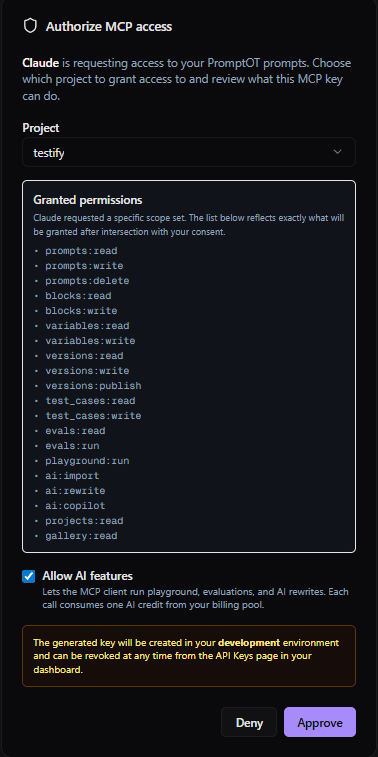
OAuth keeps PromptOT credentials out of your config files entirely.
A few of the 23 tools at your assistant's disposal.
These are some of the most useful day-to-day. See the full catalog on the MCP overview page.
list_promptsSee every prompt in a project, with version + status.
create_promptSpin up a new prompt with starter blocks in one shot.
save_draft_versionPersist the current block layout as a new draft version.
publish_versionPromote a draft to production for the live API to serve.
diff_versionsCompare two versions block-by-block before publishing.
list_test_casesPull the test cases attached to a prompt for evaluation.
Three steps to PromptOT in claude.ai.
Generate a key
Create an MCP-scoped API key from your project's API keys page.
Sign in from claude.ai
Open claude.ai settings, add the MCP server URL, and approve the OAuth flow.
Ask your AI
Try “Show me my PromptOT prompts” in claude.ai. The tools take it from there.
Ready to wire up claude.ai?
Generate a scoped key, paste the snippet, and ask away. Or browse the other supported assistants.