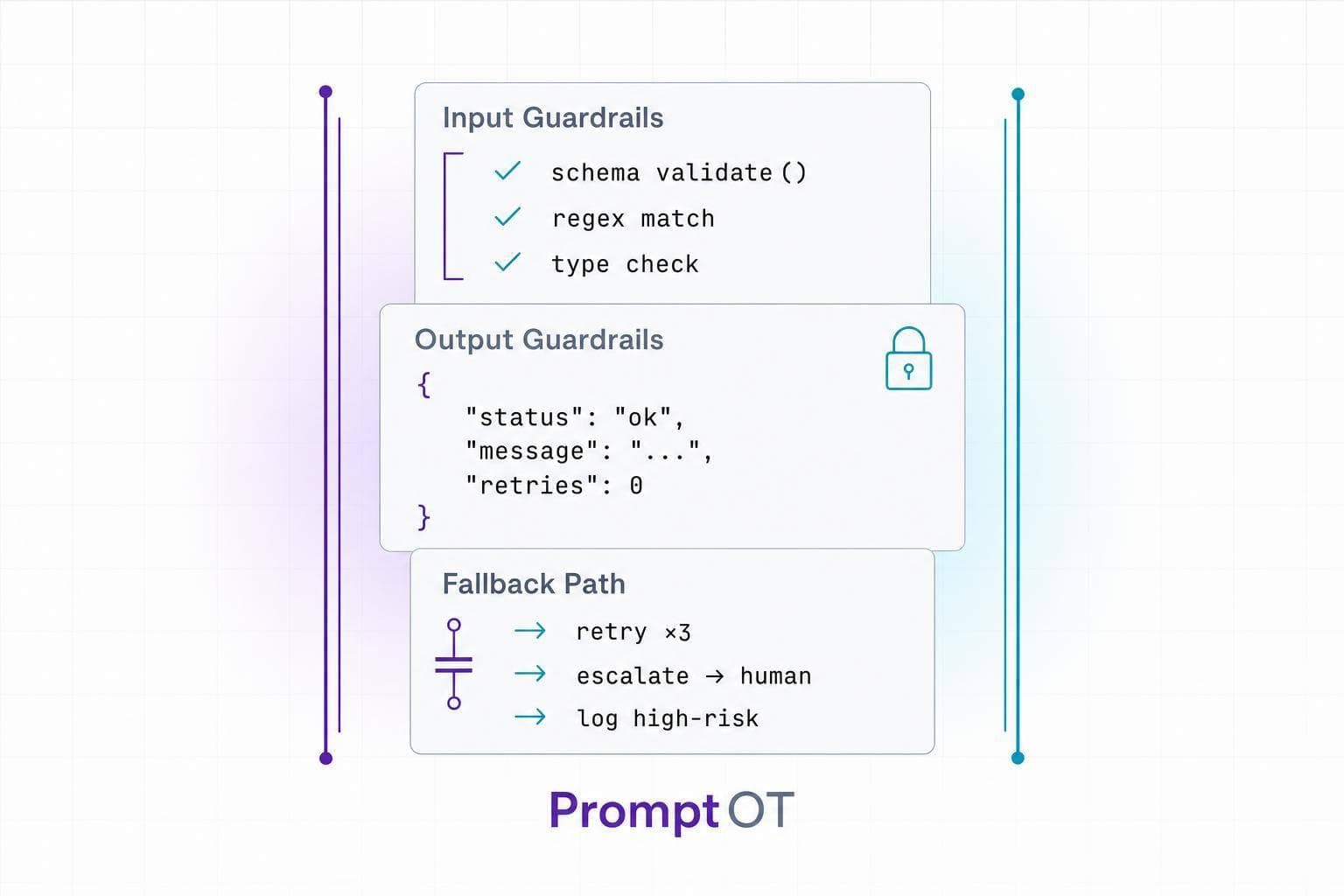
If an LLM fails, it should fail in one fixed way: check the input, force the output format, and stop with a parseable error when the task can’t be done. That’s the core idea.
I’d sum the article up like this:
- List failure cases first before writing the prompt
- Split rules into input, output, and fallback guardrails
- Use plain IF–THEN rules, not soft wording
- Ask one clarifying question, allow one more try, then stop
- Return JSON only for errors and block extra text
- Escalate legal, medical, financial, and out-of-scope requests
- Test guardrails with valid, edge, and failure cases
- Keep a regression set so new prompt edits don’t break old flows
The article also makes one point that matters a lot in production: LLMs still hallucinate, even in tight workflows. So the goal is not perfect output. The goal is predictable failure.
A short way to think about it:
- Bad input? Ask once or return an error
- Bad output? Reject it unless it matches the schema
- High-risk task? Stop and route it to a person
- Tool or API failure? Return a safe fallback or escalation signal
I like the article’s focus on structure over tone. “Handle errors gracefully” sounds nice, but it doesn’t help a parser. Exact rules do. <u>That’s what makes the system testable.</u>
If I were taking one lesson from it, it would be this: write prompts like API contracts, not like polite suggestions.
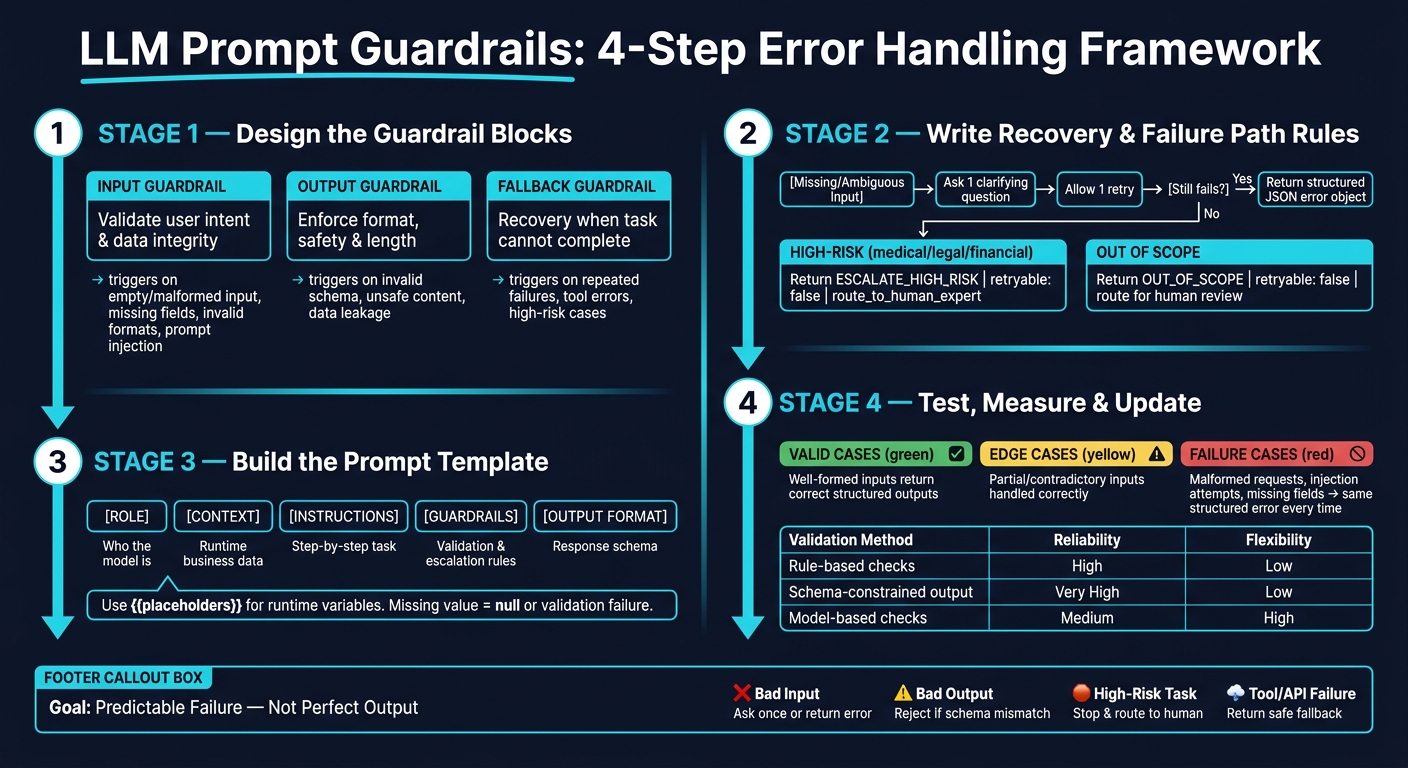
LLM Prompt Guardrails: 4-Step Error Handling Framework
LLM Resilience - Error Handling & Retry Mechanisms in Production AI | Uplatz
sbb-itb-b6d32c9
Step 1: Design the Guardrail Blocks
Split failure modes into three prompt blocks: input, output, and fallback. Each block handles a different part of the interaction. First you validate, then you process, then you recover if something goes wrong. That setup makes each layer easier to test and audit on its own.
Use this as the implementation map:
| Guardrail Type | Purpose | Trigger Condition | Expected Response |
|---|---|---|---|
| Input | Validate user intent and data integrity | Empty or malformed input, missing fields, invalid formats, unsupported or ambiguous intents, prompt injection, personal data, or policy violations | Clarifying question, rejection, or structured error object |
| Output | Enforce format, safety, and length | Invalid schema, unsafe content, personal data leakage, or length limits | Validated JSON or filtered content |
| Fallback | Provide recovery when the task cannot be completed | Repeated validation failures, unsupported requests, tool/network errors, or high-risk cases | Safe default, structured error object, or escalation signal |
Input Guardrails: Validation and Missing Data
Input guardrails run before the model tries the main task. The goal is simple: catch bad, incomplete, or unclear requests early, before the model does anything with them.
Write clear IF–THEN rules for each check. For example:
"If
source_textis null or an empty string, do not proceed. Return a structured error object withstatus: 'error',code: 'MISSING_FIELD', andmissing_fields: ['source_text']."
At a minimum, cover:
- Empty or very short requests
- Missing required fields
- Invalid formats, such as a date that doesn't match
YYYY-MM-DD - Unsupported intents
- Ambiguous user goals
Be blunt about one point: do not guess. State it plainly in the prompt: "Do not infer missing required fields."
Even when input passes, don't stop there. The output block still needs to check the model's answer before anything is returned.
Output Guardrails: Format and Safety
Output guardrails run after the model generates a response and before that response reaches your app or user. Every LLM response should be validated before use.
Treat the response like a typed API contract. Require JSON-only output. List every required key. Ban extra top-level keys.
Then add field-level rules. For example:
confidencemust be a decimal between0.0and1.0summarymust be fewer than 1,000 characters
Add safety limits too. For instance:
"Do not include personal data beyond what the user provided. If the task requires a medical or legal diagnosis, return
code: 'SAFETY_BLOCKED'instead."
If the content is for a U.S. audience, require currency values in the format $14.99 with two decimal places.
Why does this matter? Because downstream systems - chatbots, document pipelines, and agent workflows - need responses they can parse in a fixed way. They should be able to check code values and act on them, instead of trying to interpret free-form text.
Fallback Guardrails: Recovery Rules
Fallback guardrails define what happens when both input and output checks fail. The core rule is simple: never allow a partial or misleading answer.
Instead, build one of three recovery paths straight into the block:
- A safe default that returns a conservative response
- A structured error object that marks the task as not achievable
- An escalation signal that sends the case to a human agent
This matters even more in high-risk areas like healthcare or finance, where automatic handling needs tight limits.
Keep each block separate so validation rules, schema rules, and escalation logic can be updated on their own.
Next, turn these blocks into a production prompt template with separate role, context, instruction, guardrail, and output sections.
Step 2: Write Prompt Rules for Recovery and Failure Paths
Now it’s time to turn those guardrail blocks into plain, hard rules the model can follow.
The big idea is simple: recovery should follow one fixed path. No wandering. No extra retries. No guessing. If something is missing, the model asks once, tries once more, and then stops or escalates.
Ask for Clarification, Retry Once, Then Stop
Your recovery flow should be deterministic. If required fields are missing, or the user’s intent is unclear, ask one clarifying question. After that, allow one more attempt. If the reply still fails validation, stop and return a structured error object.
That matters because it keeps validation and recovery tied together. You don’t want one part of the prompt checking inputs while another part improvises how to recover. That’s where messy behavior starts.
Write the rule directly into the guardrail block in firm language:
If required fields are missing or ambiguous, ask the user a single clarifying question. You may make at most one additional attempt after receiving clarification. If the second attempt still fails validation, stop and output a structured error object. Do not retry again. Do not invent missing data.
That retry limit does two jobs at once:
- It stops the model from drifting into extra loops
- It makes the flow much easier to test
Return Safe Defaults and Structured Error Objects
When something fails, return only a valid JSON error object that downstream systems can parse.
This is where many prompts go off the rails. The model gives you JSON, then adds a sentence like “Sorry, I couldn’t process that.” That tiny extra line can break a parser. So the rule needs to be blunt: JSON only. Nothing else.
Define the schema in the output block, then enforce it in the guardrail block.
At minimum, include these fields:
| Field | Type | Purpose |
|---|---|---|
error_code |
String | Stable identifier for programmatic branching, such as MISSING_FIELD, INVALID_FORMAT, or OUT_OF_SCOPE |
reason |
String | Human-readable explanation for logging or user display |
missing_inputs |
Array | Specific fields or values the user still needs to provide |
retryable |
Boolean | Whether the client should offer another attempt |
next_action |
String | Routing signal such as ask_user_for_missing_fields, route_to_human, or abort_request |
safe_default |
Object or null | Conservative fallback value when appropriate; use null when no safe fallback exists |
Your prompt rule should say this plainly: output only the error object in valid JSON, with double-quoted keys and no trailing commas. Do not include apologies, notes, or extra text outside the JSON structure.
Pricing is a good example. If inputs needed for an estimate are missing, do not estimate anyway. Return the error object and set safe_default to null. Don’t make up a number just to keep the flow moving.
Escalate High-Risk or Out-of-Scope Cases
Some cases should not go through recovery at all.
If the request is medical, legal, financial, or compliance-sensitive, and there is no approved response template, stop and escalate. Return ESCALATE_HIGH_RISK with retryable: false and next_action: "route_to_human_expert".
If the request falls outside the assistant’s scope, return OUT_OF_SCOPE with retryable: false, then route it for human review.
This gives the model a clean line: try recovery only when it’s safe to do so. When it isn’t, stop and hand it off.
In the next step, you’ll place these recovery rules directly into the prompt template’s guardrail and output blocks.
Step 3: Build a Production-Ready Prompt Template
Put the recovery rules into a block-based template. The goal is simple: keep recovery behavior visible, instead of hiding it inside the task itself.
Use Separate Blocks for Role, Context, Instructions, Guardrails, and Output Format
Each block should do one job.
The role block says who the model is. The context block stores runtime business data, like product details, account metadata, and locale. The instructions block lays out the task step by step. The guardrails block covers validation, fallback, and escalation rules. The output format block defines the response schema.
"When these live as separate blocks, a product manager can update the tone without touching the guardrails." - PromptOT
This setup makes prompt changes a lot less messy. A team can adjust workflow wording without changing guardrails. That split also helps validation, task execution, and output parsing stay out of each other’s way.
Pass Runtime Variables Safely
Use {{placeholders}} for runtime values. If a value is missing, pass it as null or {"status": "missing"}. Check types and length limits before compilation. If {{locale}} is missing, default it to en-US.
If a variable is missing, treat that as a validation failure, not a prompt defect.
Version and Roll Back Guardrail Changes
"PromptOT supports dedicated guardrails blocks in every system prompt, keeping safety constraints organized, versioned, and independently testable alongside the rest of the prompt structure." - PromptOT
Handle guardrail edits the same way you’d handle code. Test them in draft, publish only after validation, and tag releases so rollback is fast if something goes wrong. That way, you can undo guardrail changes without touching application code.
Step 4: Test, Measure, and Update Guardrails
Once your prompt template is built and versioned, the next step is straightforward: does it still work when inputs are invalid, incomplete, or in conflict?
That’s the part you can’t guess your way through. You have to test it.
Test Valid Cases, Edge Cases, and Failure Cases
Test each guardrail block against the exact failure mode it’s supposed to catch.
Before shipping any guardrail change to production, run three test groups.
- Valid cases check that normal, well-formed inputs still return correct structured outputs and don’t get blocked by rules that are too strict.
- Edge cases cover unclear or incomplete inputs, like partially filled forms or instructions that contradict each other.
- Failure cases matter most: malformed requests, prompt injection attempts, missing required fields, and downstream dependency failures such as a timed-out API call or a missing database record.
For every failure case, make sure the system returns the same structured error every time. Check that required JSON keys are always present, values match the expected types, and invalid inputs still return that schema, with no partial objects and no plain-text fallback.
It also helps to keep a small golden regression set: a labeled collection of inputs and expected outputs. Update it in the same commit as any guardrail change so regressions show up right away.
Compare Validation Methods Before Shipping
Each validation method fits a different part of guardrail design.
Rule-based checks belong in input guardrails. Schema-constrained output fits output guardrails. Model-based checks should sit on top as a second review layer, not as the main line of defense.
| Validation Method | Reliability | Flexibility |
|---|---|---|
| Rule-based checks | High for exact conditions (regex, required fields, prohibited strings) | Low - struggles with nuance |
| Model-based checks | Medium - can fail inconsistently | High - understands intent and tone |
| Schema-constrained output | Very high for structure (JSON Schema, required keys) | Low - limited to formatting |
Use the simplest method that can enforce the rule.
Rule-based validation is the right fit when the requirement is binary and precise. Schema-constrained output is often the best option for production error handling because it gives you strong structure and steady behavior. Model-based checks are best used as a second pass - for example, checking whether a support response is actually helpful, not just structurally valid.
Conclusion: Build Guardrails That Fail Predictably
Prompt guardrails should aim for predictable failure, not perfect behavior.
A system that always returns a clear error, safe default, or escalation path is more dependable than one that fails silently.
In practice, that means defining failure modes before writing the prompt, separating input, output, and fallback guardrail blocks, capping retries at two attempts, and returning structured error objects instead of improvised responses. When logs show a new failure pattern, add it to the regression set, update the matching block, and rerun the tests. Version every change so rollback is fast if something breaks.
FAQs
How do I choose which failure cases to guard first?
Start with failures that can break prompts before the LLM runs. That usually means:
- missing required variables
- variable type or shape mismatches
- formatting or escaping issues from user input
Fixing those first is simple common sense. If the prompt can’t be built cleanly, nothing after that matters.
Next, put high-severity risks at the top of the queue. In practice, that means prompt injection and sensitive-data leakage. These deserve Exception handling and tighter checks, not casual best-effort cleanup. If something looks unsafe, fail fast, log it, and route it through the right guardrails.
For lower-risk issues, use looser handling. You don’t need the same hard stop for every small formatting problem or minor content oddity. A softer path often works better there, as long as the result stays predictable.
Then test those choices with an eval set of 50 to 200 cases. Don’t make it overly neat. Include the messy stuff:
- empty inputs
- oversized inputs
- adversarial inputs
- known edge cases
That kind of eval gives you a much clearer picture of where your checks hold up and where they fall apart.
When should I return a safe default instead of an error?
Return a safe default when the guardrail violation isn't critical and the system can still proceed.
Use Default/Canned for topical violations or out-of-bounds queries. Use Fix for minor issues like PII redaction or formatting errors. Use Exception for critical issues such as prompt injection or severe toxicity.
What’s the best way to test guardrails before production?
Treat prompts as versioned artifacts, not static text. That shift matters. Once a prompt is part of a live system, it shouldn’t live as a loose snippet in a doc or chat thread. It needs the same care you’d give code.
Build a golden dataset of 50 to 200 real-world examples. Make sure it includes the messy stuff too:
- edge cases
- adversarial inputs
- past production failures
Then use that dataset for automated regression testing in your CI/CD pipeline. If scores drop below your defined thresholds, block the deployment. Simple rule, big payoff.
For high-stakes environments, add red teaming to simulate threats like jailbreaking or injection. This gives you a safer way to pressure-test behavior before users do it for you.
In PromptOT, guardrail blocks are independently testable, version-controlled, and audit-ready.