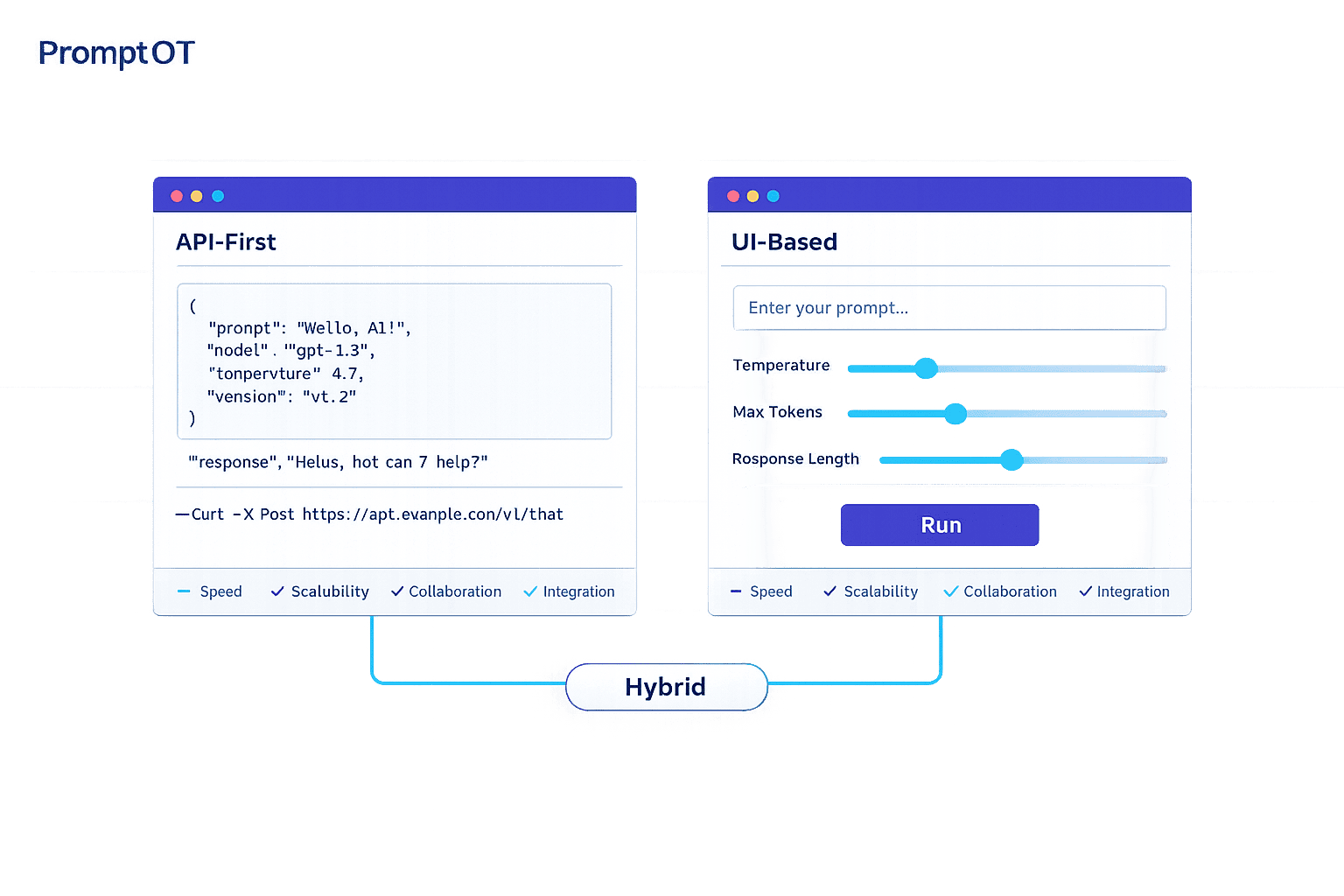
When it comes to managing AI prompts in production, two main approaches stand out: API-first delivery and UI-based delivery. Each has its strengths and trade-offs, depending on your team's needs and project goals:
- API-First Delivery: Ideal for automation, scalability, and integration into developer workflows. Prompts are fetched via APIs, enabling faster updates and better control in production environments. Key features include version control, dynamic templating, and webhook notifications.
- UI-Based Delivery: Focuses on ease of use and collaboration. Non-technical users can create, test, and update prompts through a visual dashboard. It simplifies workflows for domain experts but may lack the automation and speed of API-first systems.
Quick Comparison:
| Factor | API-First Delivery | UI-Based Delivery |
|---|---|---|
| Execution Speed | High (automated, bulk operations) | Moderate (manual, visual interaction) |
| Scalability | High (supports large systems) | Limited (manual processes) |
| Collaboration | Developer-focused | Non-technical user-friendly |
| Integration | Strong (CI/CD pipelines, APIs) | Moderate (manual or custom bridges) |
| Best Use Case | Production-grade systems | Prototyping, quick iterations |
Key Takeaway: Choose API-first for automation and stability in large-scale systems. Opt for UI-based delivery if your team prioritizes accessibility for non-technical users or rapid prototyping. Both approaches can be combined for hybrid workflows, balancing collaboration with programmatic control.
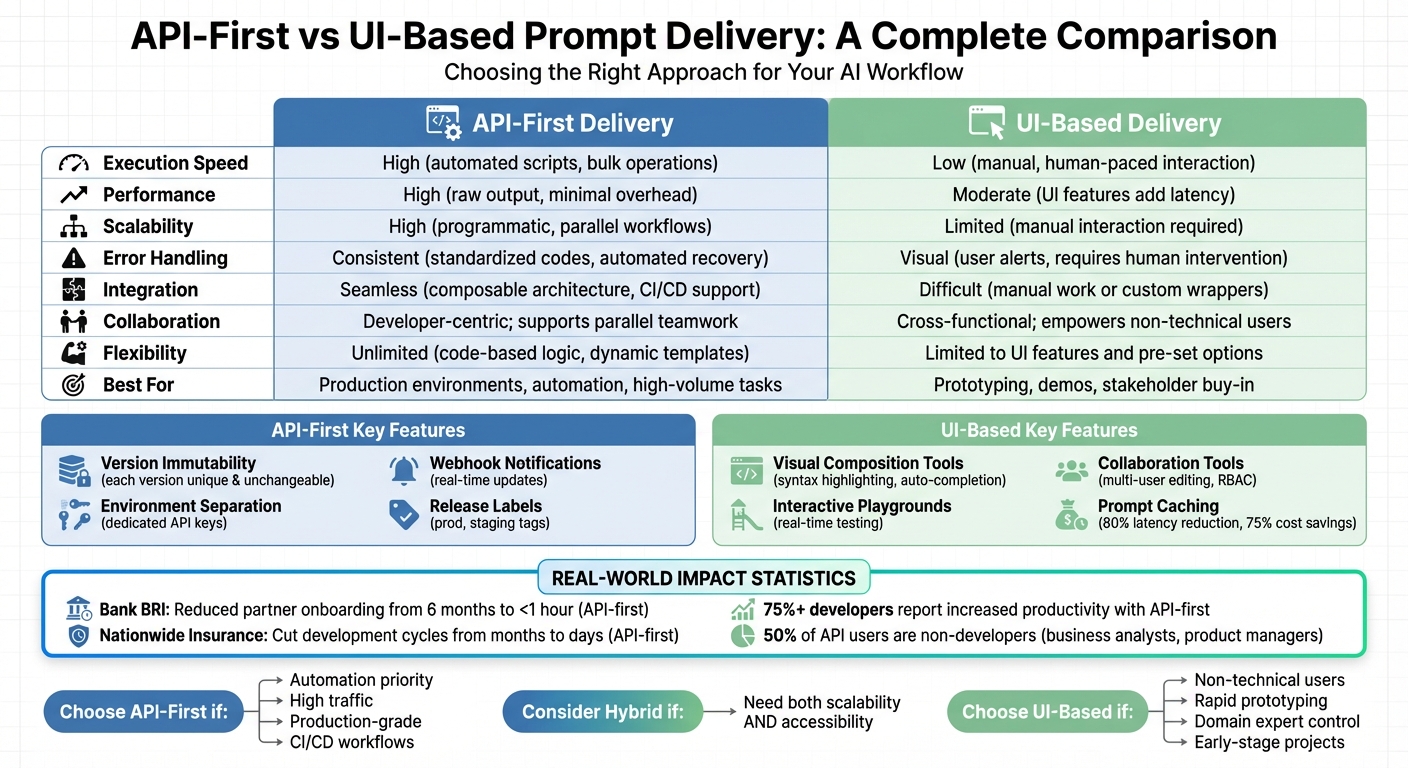
API-First vs UI-Based Prompt Delivery: Complete Feature Comparison
What is API-First Prompt Delivery?
API-first prompt delivery is a method that uses APIs to dynamically fetch prompts from a centralized registry instead of embedding them directly into your codebase. When your application interacts with a language model, it makes an API call to retrieve the latest version of the prompt. This approach ensures that prompts can be updated quickly and efficiently, a crucial aspect of modern AI system design.
In this setup, prompts are treated as structured JSON objects. These objects include essential details such as model parameters (like temperature and max tokens), message arrays (for roles like system, user, and assistant), metadata, and unique version identifiers. Essentially, prompts are managed as production assets with their own lifecycle.
The standout feature of API-first delivery is its separation of prompts from application code. This allows teams to update prompts through a management interface, enabling faster iteration and easier collaboration. Applications automatically retrieve the latest version of a prompt, ensuring consistency and reducing the risk of errors. As the Braintrust team puts it:
"Prompt management brings structure to this process by treating prompts as production assets that can be versioned, reviewed, tested, and deployed independently of application code."
Dynamic templating is another key feature, allowing variables like {{variable}} to be injected at runtime. This makes it possible for a single prompt template to adapt to various user inputs. Additionally, environment-specific API keys ensure that development, staging, and production environments each use the appropriate prompt versions. These capabilities streamline integration and create a solid foundation for comparing API-first delivery with UI-based approaches.
Key Features of API-First Delivery
API-first delivery offers several technical features designed to support efficient development and deployment:
- Version Immutability: Each prompt version is unique and unchangeable. Any updates result in a new version, making it easy to track changes and roll back if needed.
- Environment Separation: With dedicated API keys for different environments, untested prompts are kept away from end-users.
- Webhook Notifications: Real-time updates can be pushed through webhooks, keeping teams informed of any changes.
- Release Labels: Tags like
prodorstagingallow teams to deploy new prompt versions without altering the application code.
Benefits of API-First Delivery
The programmatic approach of API-first delivery provides several advantages, especially for scaling AI systems:
- Faster Iteration Cycles: Teams can modify prompt behavior or adjust model settings without redeploying the application.
- Enhanced Automation: Integration with CI/CD pipelines allows for automated testing, ensuring only validated prompts are deployed.
- Improved Reliability: Every change is logged, enabling easier debugging and incident reviews. SDKs with time-to-live (TTL) caching ensure functionality even if the prompt management backend experiences downtime.
- Scalability: An enriched API with metadata makes it easier to manage and filter a growing library of prompts.
Drawbacks of API-First Delivery
Despite its advantages, API-first delivery comes with challenges that require technical expertise:
- Technical Complexity: Developers need to be familiar with REST APIs, SDKs, and handling environment variables. Robust error handling is also essential to manage issues like JSON decoding errors or failed requests.
- Initial Setup Effort: Setting up the prompt registry, integrating SDKs, configuring environment-specific API keys, and establishing webhook listeners can be time-consuming. However, this upfront effort typically pays off in the long run.
Next, we’ll explore UI-based prompt delivery, an alternative approach with its own unique strengths and features.
sbb-itb-b6d32c9
What is UI-Based Prompt Delivery?
UI-based prompt delivery simplifies the process of creating, managing, and testing prompts by using graphical interfaces instead of relying on code or API calls. Users interact with visual editors that include features like syntax highlighting, auto-completion for variables, and real-time previews. This approach makes prompt management accessible to non-technical users - such as marketers, product managers, or domain experts - who understand the AI's goals but might not be comfortable with programming. It allows these professionals to shape AI behavior without diving into code, creating a more inclusive way to manage prompts.
This system separates prompt management from the traditional software development workflow, giving domain experts like lawyers, content creators, or medical professionals the freedom to refine prompts directly. As noted in Humanloop's documentation:
"The UI enables non-technical team members to contribute effectively".
Many systems use a hybrid approach, combining a user-friendly interface for editing with API delivery for production integration. A common feature is "mad-libs" style templating (e.g., {{variable_name}}), which generates input fields for testing different scenarios. This allows users to experiment without altering the core template.
Key Features of UI-Based Delivery
UI-based systems are designed to make prompt creation and management intuitive, offering several useful tools:
- Visual Composition Tools: Editors like the Monaco Editor provide features such as syntax highlighting, error detection, and auto-completion. These tools help users create prompts more efficiently and distinguish between simple tasks and more complex interactions involving roles like System, User, and Assistant.
-
Interactive Playgrounds: These allow users to test prompts in real time across different models and settings. For example, if a placeholder like
{{customer_name}}is added, the UI generates an input field to test values and instantly preview the output. This immediate feedback reduces the mental effort often tied to text-only prompt design. - Version Control: Robust tracking features let users view changes, compare versions side-by-side, and roll back to earlier iterations with one click. Labels such as "production", "staging", or "development" help teams deploy the right version to the correct environment.
- Collaboration Tools: Multi-user editing is supported through features like edit locks to avoid conflicts, comment threads for discussions, and role-based access controls (RBAC) for permissions (e.g., Owner, Editor, Viewer, Tester). Advanced systems may also include approval workflows to ensure human oversight before changes go live.
Benefits of UI-Based Delivery
The visual and collaborative nature of UI-based delivery offers several advantages. Non-technical users can update prompts and deploy them without waiting for developers, enabling quicker adjustments and better alignment with domain expertise.
A study involving 18 participants found that a widget-based UI, PromptCanvas, outperformed traditional interfaces in reducing mental strain, as measured by the Creativity Support Index. The clear, visual structure helps users better organize prompts and understand how different components interact. As Jordan Ellis from Trickle explains:
"Prompt-driven UI generation lowers the barrier to creation. It opens the door for non-designers, marketers, founders, and hobbyists to prototype and build interfaces without needing deep technical knowledge".
Real-time visual verification ensures users can catch formatting and logic errors before deployment. Many systems also include A/B testing tools to compare prompt performance, monitor conversion rates, and measure statistical significance. Additionally, prompt caching, configurable through UI settings, has been shown to cut latency by up to 80% and reduce costs by as much as 75%.
Drawbacks of UI-Based Delivery
Despite its strengths, UI-based delivery has some limitations, particularly when scaling. Managing hundreds of prompts across multiple projects can become unwieldy, and while these systems excel at individual prompt management, they may struggle with more complex workflows involving dynamic logic or conditional branching.
Integration can also be a challenge. UI-based systems often require a bridge to connect with applications, which can add slight latency compared to direct API calls. On mobile devices, the visual interface can sometimes lead to errors like "apple-picking" (manually copying text) or accidental submissions.
Scalability becomes a concern when integrating prompt management into CI/CD pipelines or automating large-scale testing. While UI systems often include version control, they may lack the programmatic tools needed for automated validation or deployment as part of a continuous integration process. As a result, UI-based delivery is best suited for teams focused on collaborative, domain-driven prompt management rather than engineering-heavy environments that require deeper integration into development workflows. This makes it an ideal choice for agile teams prioritizing non-technical collaboration in AI projects.
API-First vs. UI-Based Delivery: Direct Comparison
Choosing between API-first and UI-based prompt delivery boils down to two main factors: prompt ownership and workflow integration. API-first delivery is ideal for environments that demand automation, scalability, and programmatic control. It’s particularly suited for production scenarios where prompts need to evolve independently from the application code. On the other hand, UI-based delivery focuses on accessibility and collaboration, enabling non-technical teams to make quick adjustments without waiting for developer input.
The performance gap between these approaches becomes especially apparent in high-volume tasks. With API-first delivery, bulk operations can be executed in seconds using scripts, whereas similar tasks would take hours if done manually through a UI. For example, Bank BRI in Indonesia leveraged an API-first management platform in 2025 to slash partner onboarding time from six months to under an hour. Nationwide Insurance experienced a similar transformation, reducing development cycles from several months to just a few days by adopting an API-first strategy. These efficiencies stem from API-first delivery's ability to automate repetitive tasks and support parallel development through mock servers, allowing frontend and backend teams to work simultaneously.
Reliability and error handling also differ significantly. API-first systems use standardized status codes and automated recovery processes, making them more suitable for high-volume scenarios. In contrast, UI-based systems rely on visual alerts and manual intervention, which can slow down workflows. This distinction is crucial for production environments, as API-first delivery allows teams to decouple prompts from application code, enabling instant rollbacks without disrupting the system.
Collaboration is where the two approaches diverge further. UI-based delivery empowers product managers, marketers, and other non-technical stakeholders to directly shape AI behavior, minimizing reliance on engineers for minor updates. However, API-first delivery supports collaboration at scale by shifting it to a layer where changes can be version-controlled, tested, and deployed programmatically. In fact, over 75% of developers at API-first companies report increased productivity and faster partner integrations. While API-first may seem developer-centric, it doesn't exclude collaboration - it simply enables it in a more structured and scalable way.
Comparison Table: API-First vs. UI-Based Delivery
| Factor | API-First Delivery | UI-Based Delivery |
|---|---|---|
| Execution Speed | High (automated scripts, bulk operations) | Low (manual, human-paced interaction) |
| Performance | High (raw output, minimal overhead) | Moderate (UI features like search add latency) |
| Scalability | High (programmatic, parallel workflows) | Limited (manual interaction required) |
| Error Handling | Consistent (standardized codes, automated recovery) | Visual (user alerts, requires human intervention) |
| Integration | Seamless (composable architecture, CI/CD support) | Difficult (manual work or custom wrappers) |
| Collaboration | Developer-centric; supports parallel teamwork | Cross-functional; empowers non-technical users |
| Flexibility | Unlimited (code-based logic, dynamic templates) | Limited to UI features and pre-set options |
| Best For | Production environments, automation, high-volume tasks | Prototyping, demos, stakeholder buy-in |
These differences highlight how each approach fits into distinct workflows, making it easier to integrate prompt delivery into production environments effectively.
Integrating Prompt Delivery into Production Workflows
When it comes to moving prompts from development to production, the key is to treat them as versioned, deployable assets rather than static strings buried in your code. How you integrate these prompts depends on your team’s priorities. If automation and speed are your goals, an API-first approach might be the way to go. On the other hand, if you value hands-on control and accessibility, a UI-based system could be a better fit. This decision affects how agile and reliable your overall system will be.
Both approaches benefit from a three-pillar architecture: a management interface for prompt experts, a backend API as the central source of truth, and an SDK for integrating prompts into applications. The main difference lies in how changes are implemented. API-first workflows rely on automated CI/CD pipelines, while UI-based workflows involve manual promotion and review steps. To ensure production stability, it’s critical to maintain environment isolation - with separate API keys for Development, Staging, and Production environments - so updates can be tested without risking live systems.
API-First Integration Strategies
An API-first approach shines in automated deployment pipelines, where updates to prompts can happen seamlessly. By integrating prompt management with CI/CD workflows (using tools like GitHub Actions), teams can automate evaluations for every prompt change. For example, if a new prompt version results in lower quality scores, the pipeline can block the merge. This method also supports progressive rollouts, like canary releases, where new prompts are gradually exposed to a subset of traffic.
The Braintrust Team highlights this advantage:
"Decoupling prompts from application releases allows teams to update behavior safely without redeploying code".
For systems handling high traffic, webhook-driven caching becomes crucial. Instead of fetching prompts via API for every request, webhooks can push updates - such as prompt.deployed events - directly to local caches or databases. This ensures fast response times, even if the management service experiences downtime.
UI-Based Integration Strategies
On the flip side, UI-based systems empower domain experts to manage prompts without needing engineering support. This could include product managers, legal teams, or marketing copywriters, who often have the deep domain knowledge required for crafting effective prompts. As Alex Ostrovskyy puts it:
"The best prompt engineers are often not the ones with 'ML Engineer' in their title. They are the product managers, the marketing copywriters, the legal experts... who possess deep domain knowledge".
Here, applications fetch prompts using environment labels like "prod" or "staging", rather than hardcoding version IDs. When a stakeholder promotes a prompt version in the UI, production updates happen instantly - no code changes required. This approach is particularly useful for early-stage projects or prototypes, where human review can spot issues like tone or empathy that automated systems might miss. UI-based workflows also offer instant rollback options, letting non-technical team members quickly revert to a previous version during incidents, without waiting for engineering intervention.
Choosing the Right Approach for Your Use Case
When it comes to prompt delivery, deciding between API-first and UI-based methods isn’t about one being inherently better - it’s about what fits your team and project needs. For instance, if you’re building scalable, production-level applications, API-first delivery offers the automation and reliability required to handle heavy traffic. On the other hand, if your team includes domain experts who need to make quick iterations without waiting on developers, a UI-based approach removes that bottleneck.
Think about your team’s makeup. Recent stats show that about 50% of people working with APIs aren’t developers - they’re business analysts, product managers, and others in similar roles. If your prompt editors fall into this category, asking them to submit pull requests can slow things down. Interestingly, some of the best prompt engineers come from non-developer roles, as they bring deep domain expertise to the table. This makes UI-based delivery a natural fit for empowering non-technical users. The choice between API-first and UI-based methods often depends on this team dynamic, as well as the maturity of your project.
Project maturity is another key factor. Early-stage projects often benefit from UI-based delivery because it allows stakeholders to experiment with different LLM providers and parameters in a visual environment - no coding required. On the flip side, mature projects need the stability and reliability of APIs to scale effectively. Hardcoding prompts can lead to technical debt, making it harder to iterate as the project grows. These considerations help clarify when each method works best.
When to Choose API-First Delivery
API-first delivery shines when automation and reliability are top priorities. If your workflows involve A/B testing, canary releases, or CI/CD pipelines, programmatic control is essential. This method is also ideal for high-traffic systems where speed is critical - API-first delivery bypasses UI load times, enabling faster response rates.
This approach is particularly useful for complex workflows where prompts need to be dynamically generated based on real-time data. For example, if your AI agent pulls information from multiple microservices or databases to construct prompts, hardcoding won’t cut it. API-first delivery also offers robust security features like endpoint authentication and rate limiting, which are crucial for enterprise applications handling sensitive data.
Another advantage is stability. APIs rely on versioned endpoints, which are less prone to unexpected changes than graphical interfaces. For organizations already invested in API infrastructure - especially since 58% of APIs are built for internal use - extending that setup to include prompt delivery makes perfect sense.
When to Choose UI-Based Delivery
UI-based delivery is a better option when speed of iteration takes precedence over full automation. If you’re in the early stages of development and need to test multiple prompt variations quickly, a visual interface lets you compare outputs side-by-side and gather feedback in real time. This is particularly helpful for smaller teams or projects where setting up CI/CD pipelines would be overkill.
The real advantage of UI-based delivery is its ease of use for non-technical users. Domain experts can directly update prompts through a dashboard, avoiding the delays of pull requests and deployment cycles. This flexibility allows teams to adapt to changing business needs instantly. Another benefit is the transparency it provides - users can visually trace and validate the AI’s actions step-by-step, which is critical during prototyping when understanding a prompt’s behavior is more important than speed. Additionally, if you’re dealing with legacy systems that lack modern API endpoints, UI-based delivery might be your only practical option.
Hybrid Approaches: Combining Both Methods
Hybrid prompt management brings together the scalability of API-first approaches and the ease of use offered by UI-based systems. A typical setup includes a UI admin panel, a backend API, and an SDK. This combination allows product managers to make visual updates while engineers handle scalability and automation seamlessly. It ensures both groups can contribute effectively across different stages of development.
In this setup, prompts are treated as managed content. Domain experts can use the UI to experiment with variations, test them side-by-side, and push a specific version to production using REST API calls. The application, in turn, fetches the active prompt at runtime by referencing environment labels like "development" or "production". This workflow empowers domain experts to iterate quickly while engineers maintain control over deployment.
Tools such as MLflow highlight how this hybrid approach works in practice. For example, users can visually tweak LLM outputs and parameters within a "Prompt Engineering UI." These configurations are then saved as versioned models, ready for batch or real-time deployment via API. To ensure reliability, implementing TTL caching in the SDK keeps the application running with the last working prompt, even if the backend temporarily goes offline. Some teams also sync UI-managed prompts with versioned .prompt files in Git, ensuring the codebase remains the single source of truth.
However, hybrid systems come with added coordination challenges. To prevent errors, it's essential to separate "Versioning" from "Deployment" workflows. This distinction minimizes the risk of accidental disruptions while enabling agile updates. By maintaining this balance, hybrid systems achieve a blend of technical precision and user-friendly management, aligning with the broader goal of combining automation with accessibility.
Conclusion
When deciding between API-first and UI-based delivery, the right choice depends entirely on your project's unique needs and your team's skill set.
API-first delivery shines when speed, stability, and scalability are top priorities, especially for engineering-driven, production-grade applications. On the other hand, UI-based delivery empowers non-technical users to iterate quickly, though it may come with slight compromises in reliability.
As Chris Kosmopoulos from Blueprint aptly states:
"It's not a question of which is better, but which use case is better suited for each type of automation."
In many cases, a hybrid approach can be highly effective. This allows teams to use UI tools for rapid prototyping and collaboration with domain experts while leveraging APIs and SDKs for robust runtime delivery. Employing versioned, deployable prompts ensures systems remain maintainable and efficient in production. Whether you lean towards API-first or UI-based methods, this flexible approach encourages adaptability in production workflows.
FAQs
How do I choose between API-first and UI-based prompt delivery?
Choosing between API-first and UI-based prompt delivery comes down to what your project demands and how your team operates.
- API-first works best for technical teams that focus on scalability, automation, and managing tasks programmatically.
- UI-based delivery is better suited for non-technical users or teams that value user-friendly interfaces, quick changes, and visual tools.
Think about factors like your need for scalability, your team's technical skills, and the complexity of your workflows to decide which approach fits your objectives best.
How can we keep prompts safe across dev, staging, and production?
To manage prompts effectively across development, staging, and production, it's crucial to use a strong prompt management system. Think of prompts as versioned, deployable assets - this approach allows for controlled updates, thorough testing, and easy rollbacks when needed.
A solid setup involves a three-layer architecture:
- A user interface (UI) for managing prompts.
- A backend API that acts as the single source of truth.
- An SDK to streamline integration across systems.
On top of that, prioritize security by implementing safeguards like protections against prompt injection attacks and data leakage. This helps ensure your prompts remain consistent and secure throughout their lifecycle.
What does a hybrid prompt workflow look like in production?
A hybrid prompt workflow in production merges various strategies with human oversight to improve AI's performance and reliability. This approach typically involves structured prompt design, layered methods like chain-of-thought reasoning, and review phases for testing and fine-tuning. By combining automated tools with human quality checks, teams can create prompts that are scalable and dependable while reducing the chances of inconsistencies during production.