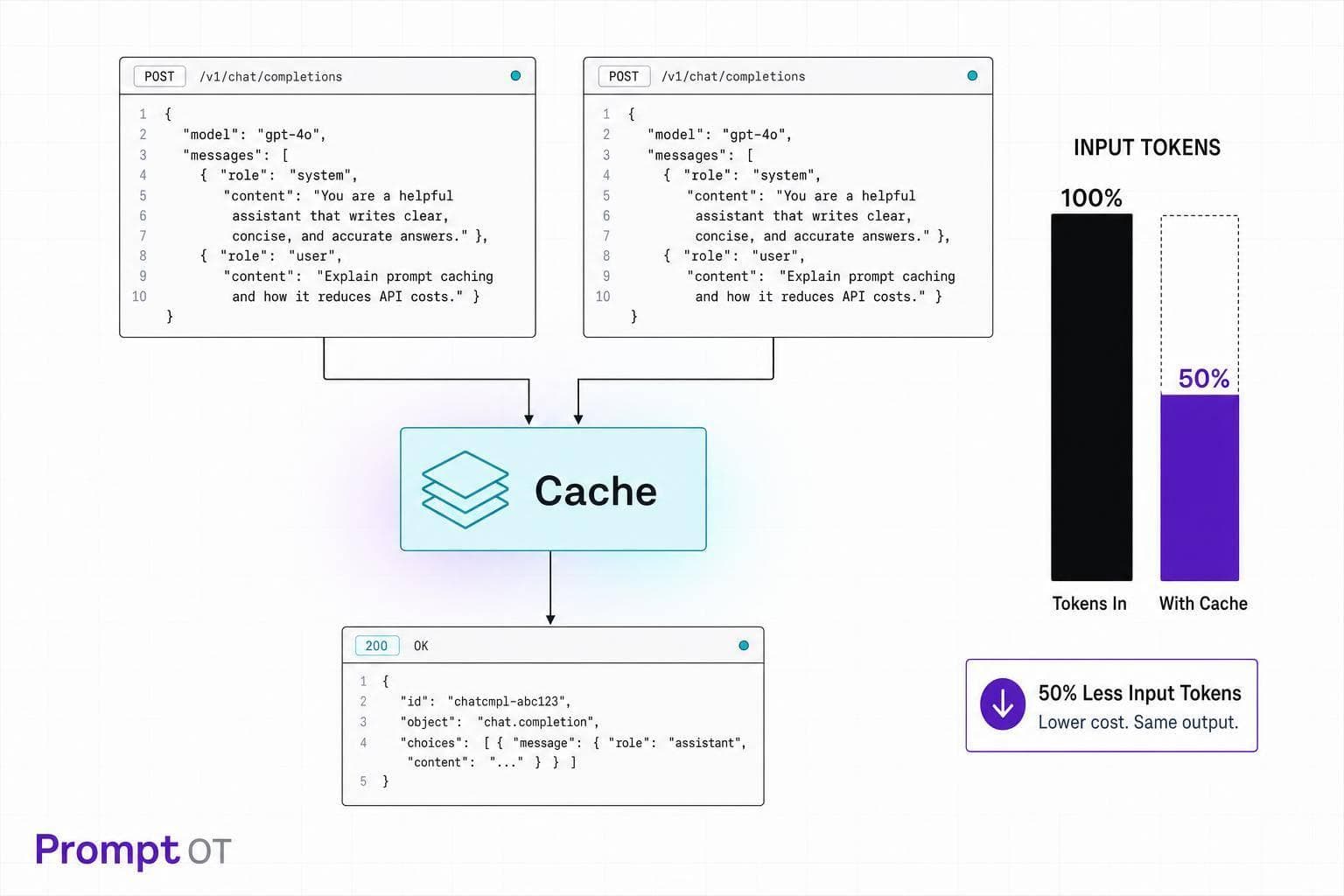
You can cut LLM API spend fast by caching the part of the prompt that stays the same. In many setups, that means 50% off cached input tokens with OpenAI and up to 90% off cache reads with Anthropic. If I put static prompt blocks first, move changing data to the end, and add an app-side cache for repeat questions, I can lower both cost and response delay without changing answer quality.
Here’s the short version:
- Prompt caching only cuts input cost. It does not change output quality.
- Provider caching discounts repeated prompt prefixes.
- App-side caching can skip the API call and cut the cost to $0.00 on cache hits.
- Stable prompt order matters: instructions, tools, and fixed context first; user input and runtime data last.
- OpenAI uses automatic prefix matching and needs at least 1,024 tokens.
- Anthropic uses explicit cache markers, also with a 1,024-token minimum for most models.
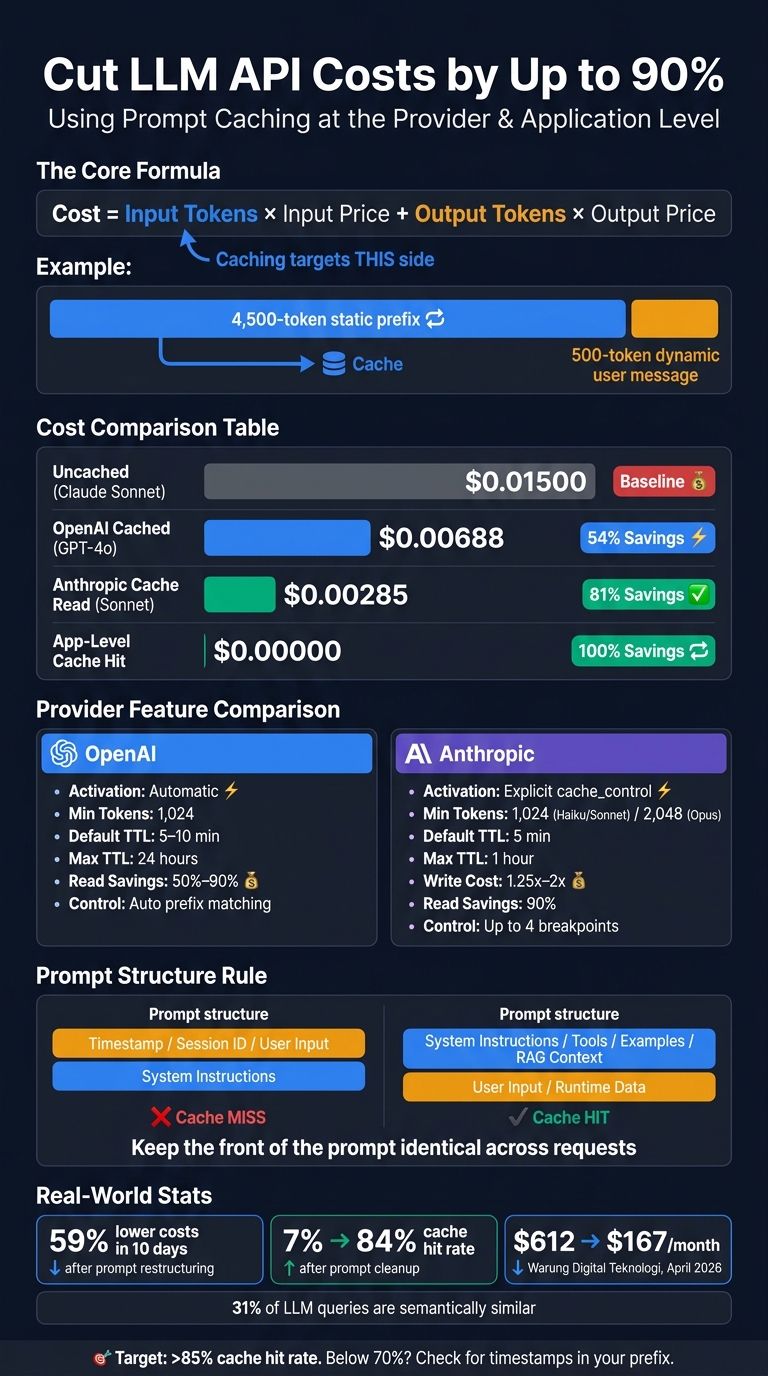
- Teams have reported gains like 59% lower costs in 10 days and cache hit rates moving from 7% to 84% after prompt cleanup.
If I had to boil the whole article down to one rule, it would be this: keep the front of the prompt identical across requests. That is where most of the savings come from.
Quick comparison:
| Method | What it does | Cost impact | Main catch |
|---|---|---|---|
| OpenAI prompt caching | Reuses matching prompt prefixes | Often 50% off cached input | Exact prefix match required |
| Anthropic prompt caching | Reuses marked prompt blocks | Up to 90% off cache reads | First write costs more |
| App-side exact-match cache | Returns saved answer for the same request | $0.00 on hits | Only works for repeats |
| App-side semantic cache | Returns saved answer for near-match requests | $0.00 on hits | Needs threshold tuning |
So if you want lower LLM spend, I’d focus on three things first: prompt order, cache hit rate, and TTL settings.
LLM Prompt Caching: OpenAI vs Anthropic vs App-Level Cost Savings
Prompt Caching Reduced My Agent Costs by 90%
sbb-itb-b6d32c9
How LLM API costs work and where caching fits in
LLM pricing comes down to two things: input tokens and output tokens. The basic formula is straightforward:
Cost = input tokens × input price + output tokens × output price
Caching helps on the input side. More specifically, it helps when the same prompt prefix shows up again and again. That’s why prompt structure matters so much. If you can keep a large part of the prompt unchanged, you can cut spend in a very direct way.
Input, output, and cached token pricing explained
Providers bill input tokens in one of two ways: uncached or cached. Cached tokens get a discount.
To make that less abstract, imagine a 5,000-token prompt made up of:
- a 4,500-token static prefix
- a 500-token dynamic user message
Here’s what that single request costs on the input side only under a few billing models:
| Scenario | How It's Billed | Input Cost (USD) |
|---|---|---|
| Uncached (Claude Sonnet 4.6) | 5,000 tokens × $3.00/1M | $0.01500 |
| OpenAI Cached (GPT-4o) | 500 × $2.50/1M + 4,500 × $1.25/1M | $0.00688 |
| Anthropic Cache Read (Sonnet 4.6) | 500 × $3.00/1M + 4,500 × $0.30/1M | $0.00285 |
| Application-level cache hit | 0 tokens sent to API | $0.00000 |
That table makes the pattern pretty clear: the more of your prompt that counts as cached input, the less you pay.
Anthropic adds one wrinkle. The first cache write costs more, so a prefix needs at least two hits to break even.
How OpenAI and Anthropic handle prompt caching
OpenAI handles prefix caching automatically. If a prompt prefix exactly matches one from an earlier request, OpenAI gives those cached tokens a flat 50% discount. There are two catches:
- the prefix has to be an exact match
- it also needs to be at least 1,024 tokens long
Even a small change in that prefix can kill the cache hit.
Anthropic takes a different route. It uses explicit cache markers. You choose which parts of the request are cacheable, and Claude stores the processed state for those segments. Anthropic also says cache hits can cut Time-to-First-Token latency by 50% to 85%. For chat apps and other user-facing tools, that speed gain can matter just as much as the lower bill. Like OpenAI, Anthropic also needs a minimum 1,024-token prefix for caching to kick in.
Provider-side caching isn’t the only option. You can also add application-level semantic caching. This works differently: instead of discounting prompt processing, it avoids the API call altogether. If a new query is close enough in meaning to an earlier one, your app can return a stored answer from a cache layer such as Redis or DynamoDB.
That can go a long way because research shows 31% of LLM queries in production are semantically similar to prior ones. In plain English, almost a third of requests may be repeat-like traffic. The catch is that you have to tune similarity thresholds and decide how long cached responses stay valid.
These pricing rules matter most when your prompt prefix stays stable. The next section shows how to rewrite prompts so more tokens count as cacheable prefixes.
Restructure prompts so more tokens become cacheable
Caching works best when the start of your prompt stays the same. That makes prompt structure your biggest lever. If a prompt begins with a timestamp, session ID, or any other per-request value, you lose the stable prefix the cache needs. Put stable content first and dynamic content last.
Move stable prompt blocks to the front
The simplest way to get more cache hits is to make the beginning of each prompt identical. Put the reusable prefix first and the dynamic tail last.
The prefix should include system instructions, tools, guardrails, and fixed examples. The tail should hold the user's question, retrieved chunks, and runtime variables.
Build prompts with one deterministic function so the prefix stays the same across requests. Even a single extra space or a different JSON key order can break the match. When blocks come from data, normalize them: sort JSON keys, strip trailing whitespace, and keep retrieved context in a stable order.
Static-first prompts keep the reusable prefix intact. Dynamic-first prompts don't.
After the prefix is stable, cut any repeated context that doesn't help the answer.
Cut repeated context and tighten output formats
Once your static content is locked at the front, trim anything that doesn't need to appear again. Shorter instructions reduce the prefix size and help you clear the caching threshold without adding filler. If you need dynamic values like dates or user IDs, use stable placeholders in the system prompt and pass the actual values in a dynamic block at the end of the prompt.
Keep few-shot examples in the same order.
Lock this structure into your prompt workflow so it stays stable across requests.
How to implement caching at the provider and application level
Once your prompt is set up so the stable parts come first, you can turn on the two layers that drive the biggest savings: provider-level caching and application-level caching.
Here’s the simple way to think about it:
- Provider caching cuts the cost of repeated prompt prefixes
- Application caching skips repeat API calls altogether for exact or near-exact repeats
The best setup uses both. Start with provider caching, then add application caching on top.
Use provider-level prompt caching for repeated prefixes
At the provider layer, cache the longest prompt prefix that stays the same across requests. That usually means your shared system prompt, tool definitions, few-shot examples, and RAG documents placed at the start of the prompt. Keep changing values like timestamps, request IDs, or session-specific metadata out of that cached prefix.
OpenAI does this automatically for prompts with 1,024+ tokens, and cached input gets a 50% to 90% discount depending on the model. If you use service_tier="flex", you can access extended 24-hour caching.
Anthropic takes a more hands-on approach. It uses explicit cache_control breakpoints in the system or messages array. You can place up to four breakpoints per request so the system prompt, tools, and RAG context can be cached as separate chunks. The default TTL is 5 minutes. A 1-hour TTL is available at a higher write cost, while cache reads get a 90% discount.
| Feature | OpenAI | Anthropic |
|---|---|---|
| Activation | Automatic (opt-out) | Explicit (cache_control) |
| Min tokens | 1,024 | 1,024 (Haiku/Sonnet) / 2,048 (Opus) |
| Default TTL | 5–10 minutes | 5 minutes |
| Max TTL | 24 hours (extended) | 1 hour |
| Write cost | No premium | 1.25x (5-minute) to 2x (1-hour) |
| Read savings | 50%–90% | 90% |
| Breakpoint control | Automatic prefix matching | Up to 4 explicit breakpoints |
Watch hit rates early. If prompt drift sneaks in, your savings can disappear fast. Log cached_tokens on OpenAI responses and cache_read_input_tokens on Anthropic responses. A good target for mature deployments is above 85%. If you’re below 70%, that usually means something is wrong in the prompt structure, like a timestamp or other changing value slipping into the cached prefix.
Add application-level exact-match or semantic caching
Provider caching lowers the cost of repeated prefixes. Application caching goes a step further and removes repeat calls completely.
With application-level caching, you store the full response and return it right away for exact or near-exact repeats. That means no API call and almost instant retrieval.
There are two common paths:
- Exact-match caching returns a saved response when the new query matches a past query byte for byte
- Semantic caching uses embeddings to catch queries that ask for the same thing with different wording
That second case matters more than a lot of teams expect. Research shows about 31% of LLM queries have semantic similarity, so there’s a clear opening here. For semantic caching, use a similarity threshold of at least 0.95 so you don’t return an answer that’s close, but not close enough.
For TTLs, use 5 to 10 minutes for fast-changing data and 1 to 24 hours for more stable content. If the source changes, invalidate the cache entry right away.
This tends to pay off most in a few places: RAG apps, customer-facing chatbots with long system prompts, and agentic loops that keep firing the same tool calls.
| Strategy | Pros | Cons |
|---|---|---|
| Provider-level only | Zero infra overhead; handles dynamic suffixes; reduces TTFT by up to 80% | Limited TTL; requires large prefixes (>1,000 tokens) |
| Application-level only | 100% cost savings on hits; full TTL control; avoids API rate limits | Risk of stale responses; misses pay full price; requires embedding infra |
| Layered approach | Maximum cost and latency reduction; handles both repeat and partial matches | Higher complexity; requires managing two separate TTL and invalidation policies |
A good example came in April 2026, when Warung Digital Teknologi used layered caching across six AI products and cut monthly API spend from $612 to $167 by caching stable system instructions and tool definitions.
Manage cache-friendly prompts with PromptOT and put the plan into action
Caching only pays off when the cached prefix stays the same. If that prefix keeps shifting, your savings disappear fast. Once caching is set up, prompt management is what helps you keep those savings instead of losing them during prompt edits.
Use PromptOT to keep cacheable prompt blocks stable
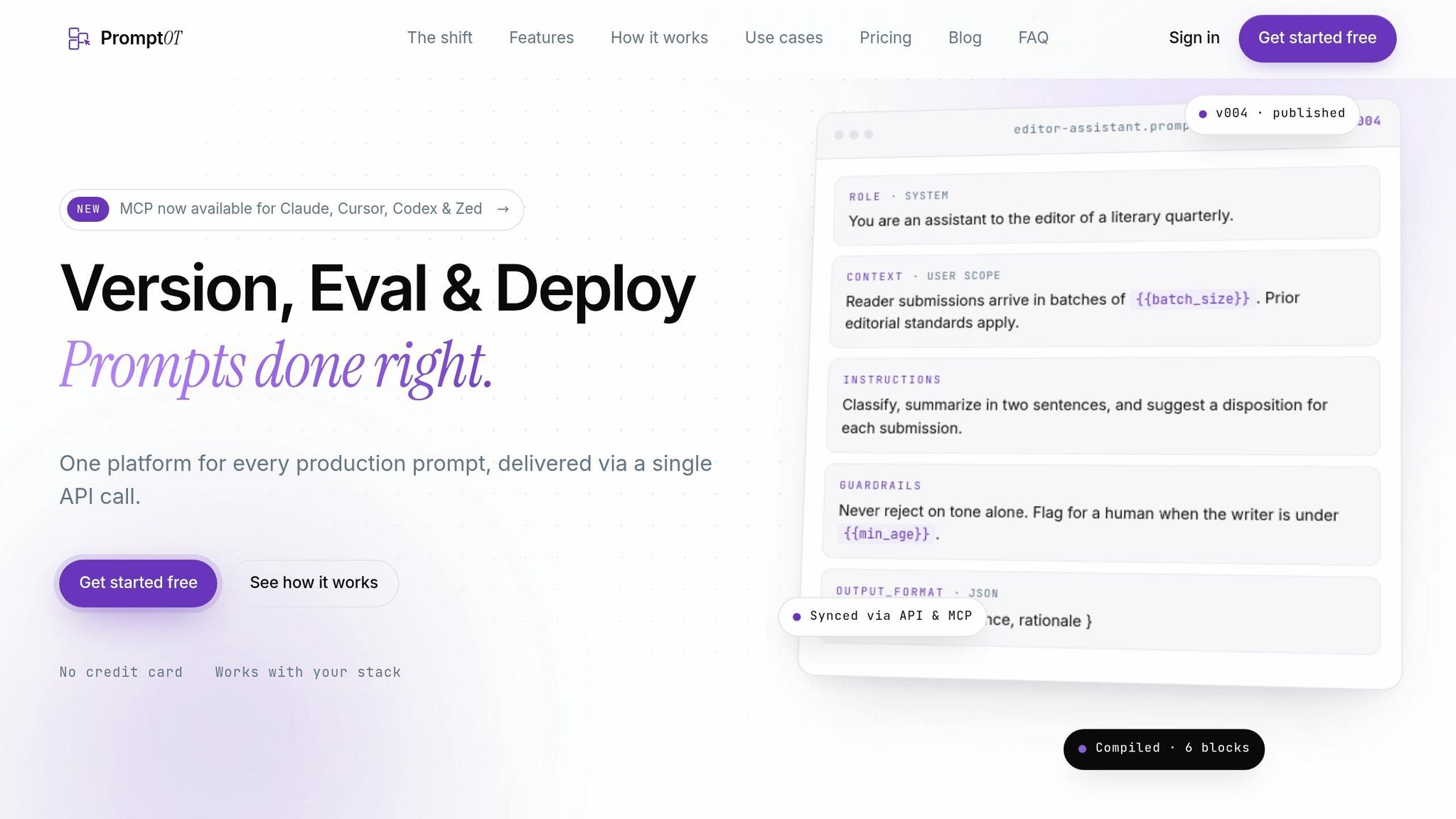
PromptOT helps you keep cacheable prompt blocks in a fixed order by splitting role, context, instructions, guardrails, and output format into typed blocks. Then dynamic, per-request data goes at the end as {{placeholders}}, resolved at runtime.
That setup matters for a simple reason: it keeps the stable prefix identical across users and sessions. And that’s exactly what provider-level caching needs to count a hit.
PromptOT also gives you draft and published versions, so you can test prompt changes without disrupting the live cache. Environment-scoped API keys keep dev and prod separate, which means draft edits won’t invalidate the live cache. When the new version is ready, publish it. If something goes sideways, instant rollback takes you back to the last stable state.
With the prompt structure locked down, the last piece is keeping it steady in production.
Conclusion: the fastest path to 50% lower LLM spend
The fastest path to lower spend is simple: put the longest stable content at the front of the prompt, version prompt changes safely, and track cached_tokens so you can see whether caching is working. OpenAI cached input costs 50% less, and Anthropic cache hits cost 90% less.
FAQs
When does prompt caching save money?
Prompt caching cuts costs when you reuse the same prompt parts across requests and place them at the start. That usually means things like system prompts, fixed instructions, or shared context.
The biggest savings show up when those shared prompt prefixes are sent often within the cache TTL, which is usually 5–10 minutes, and cache hit rates stay high. In plain English: the more often you resend the same beginning of a prompt in that time window, the more money you can save.
This works best when you have long, stable prompts and a high volume of requests. If your prompts change a lot from one request to the next, the cache usually won’t help much - and in some cases, it won’t help at all.
What usually causes cache misses?
Cache misses usually happen when a prompt’s prefix changes from earlier requests.
The usual culprits are dynamic fields like timestamps, request IDs, user-specific data, or even the same prompt parts showing up in a different order.
Small formatting shifts can also break the cache. Extra whitespace, layout changes, or tweaks to the prompt structure may be enough to cause a miss.
To cut down on misses, put static content first and move dynamic content after cache breakpoints.
Should I use provider caching, app caching, or both?
Use both when you can.
Provider caching cuts input token costs and trims latency when the same prompt prefix shows up again at the API level. App caching helps you handle repeated queries or static content inside your own application.
Put them together, and you get savings from the provider side plus caching logic shaped around your prompt structure and workload. That can lead to bigger cost savings and faster response times.