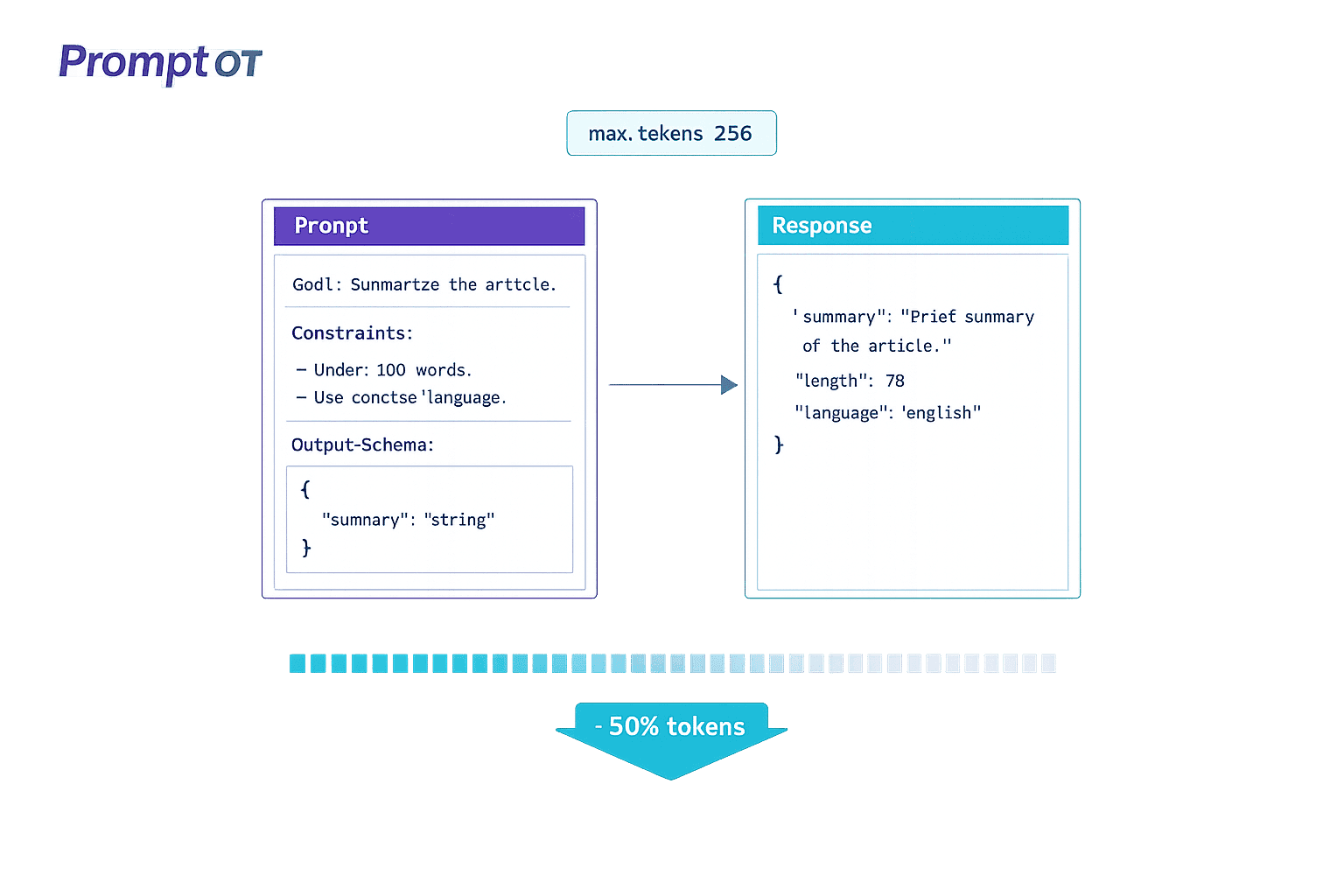
LLM costs can add up fast, but prompt optimization can cut expenses by 40–60% without losing quality. Here's what you need to know:
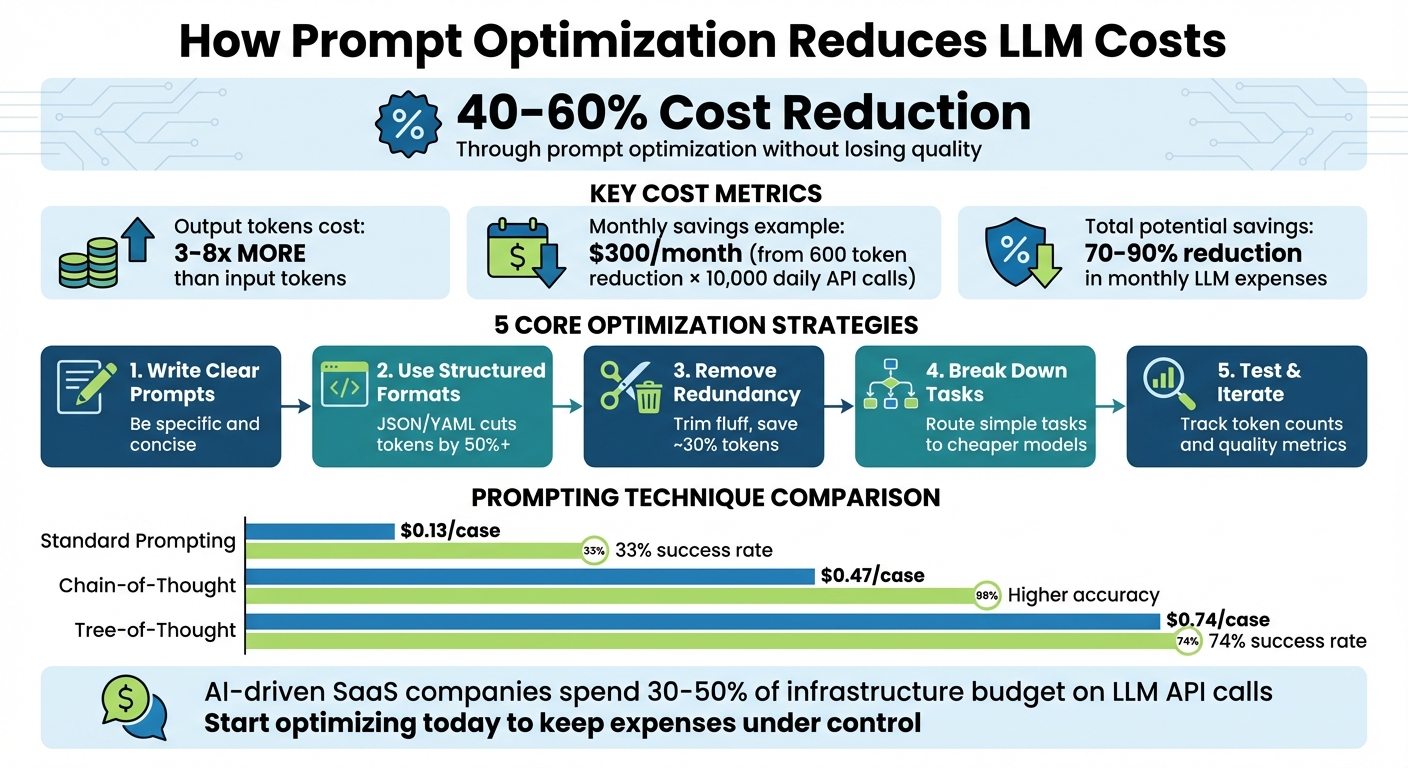
- Token Costs: LLMs charge per token, with output tokens costing 3–5 times more than input tokens.
- Key Strategies to Save:
- Write concise, specific prompts to avoid unnecessary token use.
- Use delimiters (like
""") and structured formats (e.g., JSON) to improve clarity and reduce confusion. - Remove redundant instructions and focus on positive phrasing.
- Break complex tasks into smaller steps to use cheaper models where possible.
- Test and iterate prompts to refine efficiency and reduce retries.
- Savings Example: A 600-token reduction per API call across 10,000 daily requests can save around $300/month.
- Tools to Help: Platforms like PromptOT streamline prompt management with version control and collaboration features.
Bottom Line: Efficient prompts don’t just cut costs - they improve performance and scalability. Start optimizing today to keep LLM expenses under control.
LLM Prompt Optimization Cost Savings and Token Reduction Strategies
3 LLM Cost Optimization Tricks Every Engineer Needs
sbb-itb-b6d32c9
Write Clear and Specific Prompts
Ambiguous prompts can lead to unnecessarily long and repetitive responses, which directly increase costs. The solution? Be precise. Provide clear, concise instructions to the model.
When instructions are straightforward, both input and output token usage drops. This is important because output tokens are significantly more expensive than input tokens - costing 3–8 times more across major providers. For instance, a lengthy prompt can often be condensed into a brief, focused command, reducing token consumption. This not only saves money but ensures the model delivers relevant and accurate results.
Being specific also helps prevent errors and irrelevant outputs. Setting clear constraints - such as word limits, required formats, or defined scopes - keeps the model on track and avoids wasting tokens on unnecessary content. For example, instead of requesting "a summary", ask for "5 key points in simple language."
"If a human can't quickly understand what the prompt is asking, you'll likely end up 'paying tokens' to compensate for unclear instructions." - Andrew Mayne, former OpenAI Developer
Next, let’s look at how using delimiters and structured formats can further improve clarity.
Use Delimiters and Structured Formats
Delimiters are a simple way to make instructions clearer for the model. Using triple quotes ("""), triple hashes (###), or XML tags can separate instructions from context, reducing confusion. For more complex prompts, XML tags are especially effective. Wrapping reference material in tags like <documentation> or <examples> signals to the model that this content is informational, not part of the task.
"XML markup produces more reliable, predictable outputs than Markdown-structured prompts." - Limited Edition Jonathan, Technical Editor
Structured formats like JSON and YAML also improve efficiency. JSON is ideal for automation, while YAML balances readability and token efficiency. These formats can cut token usage by over 50% compared to verbose, paragraph-style instructions. For example, instead of saying, "Summarize this article in a way that covers all the main points but is not too long", use a JSON structure like this:
{"goal": "Summarize", "format": "5_bullets", "style": "simple"}.
This approach minimizes ambiguity while saving tokens.
Once your prompt is well-structured, focus on removing unnecessary words.
Remove Redundant or Vague Instructions
Get rid of fluff. Polite phrases like "Please help me by providing a very comprehensive..." waste tokens without adding value. Skip unnecessary adjectives, transitions, and labels. For instance, replace "Question: [text] Answer: [text]" with "[text] -> [text]" to save roughly 30% of tokens.
Focus on what the model should do, not what it shouldn’t. Negative instructions like "don’t use jargon" are harder for models to process and often require more tokens to explain. Instead, use positive phrasing like "Use simple language." Research shows that larger language models struggle more with negative constraints, making positive instructions a more effective strategy.
Finally, streamline your examples. One or two diverse examples are usually enough - more than that only inflates the token count. Audit your few-shot examples for inconsistencies, and aim for variety rather than repetition to teach the model patterns effectively.
"The biggest wins can come from changing the interaction pattern, not just trimming text - batch multiple classifications into a single API call." - Andrew Mayne
Structure Your Prompts for Efficiency
Organizing prompts into distinct sections helps models process them more effectively. This approach takes advantage of how language models prioritize the first and last ~200 tokens, a concept called the primacy and recency effects. By separating background details from the task itself, you can avoid confusion and save tokens.
Separate Context, Instructions, and Output Format
A good prompt has three main components: setting the stage, defining the task, and specifying the desired result.
One effective strategy is the C.T.G.C. framework, which breaks prompts into four parts: Context (background information), Task (what needs to be done), Guidelines (style or tools to use), and Constraints (hard rules). To maximize efficiency:
- Place identity and background info at the start to leverage the primacy effect.
- Put core instructions near the end to benefit from the recency effect.
- Use tags like
<context>or<documentation>to mark reference material as informational rather than actionable.
For example, GPT models work well with simple delimiters like ### or """, while models like Claude respond better to structural elements.
| Component | Purpose |
|---|---|
| Identity/Role | Defines the persona or perspective (Start - Primacy) |
| Context/Data | Supplies factual references (Middle) |
| Instructions | Outlines the specific task (Near End) |
| Safety/Recap | Lists critical rules or limits (Very End - Recency) |
Placing static content like identity and reference data at the start can also save costs. For example, if you make 10,000 API calls daily and save 600 tokens per call through better structuring, you could save about $300 per month.
Adjusting the order of elements can also resolve errors. In one case, moving a rule from the middle to the beginning eliminated recurring issues.
Additionally, explain why rules exist, not just what they are. Principle-based instructions make models more adaptable, reducing the need for long, detailed rule lists. One team saw accuracy jump from 84% to 96% by switching to this approach.
"Rules without reasons create robots. Reasons without rules create chaos. You need both." - BuildYourFish
Tools like PromptOT make this process easier by allowing you to organize prompts into blocks - role, context, instructions, guardrails, and output format. These blocks can be rearranged as needed, keeping prompts clear and manageable across teams.
Balance Brevity with Completeness
Once your prompts are structured, the next step is to keep them concise while still providing enough detail. Too little context leads to errors and costly re-prompting, while too much creates unnecessary noise.
Here are a few tips:
- Replace vague terms with specific constraints. For instance, instead of saying "write a short summary", specify "3–5 sentences".
- Use keywords like
importorSELECTto trigger specific patterns. - Reference previous context in a conversation rather than re-sending large chunks of text. For lengthy documents, summarizing or using embeddings can cut token usage by up to 80%.
- Limit examples to one or two diverse cases. Adding more examples often increases token counts without improving results.
Different prompting techniques also vary in cost. Standard prompting costs about $0.13 per case, chain-of-thought costs $0.47, and tree-of-thought costs $0.74 - but the latter achieves a 74% success rate compared to 33% for standard prompting. Choose the simplest method that fits your task.
Start with zero-shot prompting (no examples) for straightforward tasks. Move to few-shot prompting (providing examples) only if the model struggles with the desired style or format. This step-by-step approach avoids over-complicating simple tasks.
"Prompt compression isn't just about saving money - it's about writing smarter, not longer." - DevToolHub
Apply Advanced Prompting Techniques
Refining your prompting strategy can help save tokens and improve the accuracy of model outputs. Let’s explore some advanced techniques to achieve this.
Break Down Complex Tasks into Smaller Steps
Instead of tackling a large task all at once, divide it into smaller, manageable steps. This approach allows you to use less expensive models for simpler subtasks and reserve more advanced models for the final, complex stages. For example, models like GPT-4o mini or Claude 3 Haiku can handle straightforward tasks, while cutting-edge models take care of the final assembly.
This method also simplifies debugging. If one step fails, you only need to retry that part instead of running the entire prompt again, saving both time and tokens. For instance, instead of asking a model to "translate and summarize this document", you could break it into three steps: extract key points, simplify the language, and then translate.
Another effective strategy is Least-to-Most (LtM) prompting, where the model starts with simple problems and builds on those solutions for more complex ones. This method has shown impressive results. In a 12-word letter concatenation task, LtM achieved 74% accuracy, compared to 34% for standard Chain-of-Thought prompting. Similarly, in the SCAN benchmark (converting language into action sequences), LtM reached a 76% success rate, far outperforming the 6% achieved with basic prompting.
Additionally, conditional context helps streamline instructions. By classifying the user's intent with a simpler model or rule-based system, you can provide only the specific instructions needed for each subtask, avoiding an overly verbose "all-in-one" prompt. This approach trims unnecessary tokens and keeps the process efficient.
Use Few-Shot Prompting with Examples
Providing a few carefully chosen examples can significantly improve the model's output without overloading it with tokens. The trick is to focus on quality over quantity - two strong examples often outperform five weaker ones. For most tasks, 4–6 examples are sufficient.
"Quality matters more than quantity. Two excellent examples beat five mediocre ones." - Keyur Patel, AI Prompts Specialist
Select examples that cover a range of scenarios, including edge cases, rather than just the most common situations. Place the most relevant example at the end of the prompt, as models tend to prioritize recent context. Automating this process with semantic similarity search can help identify the best examples for each query.
To save tokens, trim unnecessary words from your examples. Tools like LLMLingua can compress examples by 60–80% while maintaining performance. Using structured formats like JSON or Markdown in examples can also encourage concise, well-organized outputs, further reducing token costs.
Keep in mind that output tokens are 3–8 times more expensive than input tokens across major AI providers. Placing few-shot examples at the beginning of the prompt takes advantage of caching, meaning you only pay for those tokens once across multiple requests.
For even better results, consider asking the model to reason through its responses step by step.
Request Step-by-Step Reasoning
Encouraging the model to "show its work" can improve accuracy by breaking down complex logic into smaller, more manageable pieces. This technique, known as Chain-of-Thought (CoT), helps identify and correct errors before arriving at a final answer.
In 2022, researchers from the University of Tokyo and Google Research found that adding a simple phrase like "Let's think step by step" to prompts increased accuracy on the MultiArith math dataset from 18% to 79%. While this approach does increase output tokens, it often saves money in the long run by reducing retries, corrections, and follow-up prompts.
"By making the reasoning process explicit, we help models avoid logical shortcuts and errors that occur when they attempt to compress multi-step reasoning into a single forward pass." - Tetrate.io
To manage costs, apply step-by-step reasoning only to complex queries, as identified by a less expensive classifier model. You can also ask the model to summarize its reasoning before passing it to the next stage, keeping the context concise. Setting a max_tokens limit ensures the reasoning chain doesn’t become unnecessarily long.
For large-scale production, you can even use outputs from a larger model's reasoning steps as training data to teach a smaller, more affordable model to replicate the same process in the future. This can help balance precision and cost efficiency.
Test and Iterate Your Prompts
Once you've crafted concise, well-structured prompts, the next step is to test and refine them thoroughly. Why? Because even the most polished prompts need real-world validation to ensure they’re not just functional but also cost-effective. The difference between a prompt that "works" and one that truly saves money lies in systematic testing and ongoing refinement.
Track Token Counts and Output Quality
To measure how efficient your prompts are, establish clear metrics like:
- Manual Correction Rate (MCR): The percentage of outputs that need human edits.
- Token Usage per Accepted Output (TAO): The total tokens divided by outputs accepted without corrections.
These metrics help uncover hidden costs in your prompts.
"A single unoptimized prompt can consume excessive tokens per request. Multiply that by thousands of users and you've got a cost problem that's invisible unless you're measuring it." - Nawaz Dhandala, Author, OneUptime
Use tools like OpenAI’s tiktoken, Anthropic’s heuristic (roughly 1 token per 3.5 characters), or Google’s count_tokens API to estimate token usage before making API calls. To control costs, set hard limits with the max_tokens parameter - such as 10 tokens for classification tasks or 100 tokens for data extraction. Keeping output length in check often delivers the biggest savings.
Create a golden dataset of 500–2,000 labeled examples that cover both common use cases and edge cases. This will serve as your benchmark for comparing prompt iterations. Track Parse Error Rates (PER) using automated tools like JSON parsers or regex validators to catch issues early, before escalating to costly human reviews. For production systems, use real-time dashboards to monitor performance metrics across thousands of requests. These measurements fuel a systematic process of continuous prompt optimization.
Refine Prompts Based on Data
Once you’ve gathered performance data, refine your prompts using a structured "Define → Test → Diagnose → Fix" approach. Make one change at a time - whether it’s removing a few-shot example, shortening instructions, or tweaking output constraints - to clearly identify what drives improvement.
For example, a test comparing a verbose prompt (443 tokens) to a concise one (225 tokens) for email routing with the gpt-oss-20b model showed 100% accuracy for both. However, the concise prompt cut token costs by 23%, saving $6.18 per million requests, and improved response speed by 8% (167ms faster). This highlights how shorter prompts can often achieve the same results while reducing costs.
Since large language models (LLMs) are non-deterministic, repeat your tests multiple times to understand the range of possible outcomes rather than relying on a single result. To confidently detect a 10% reduction in MCR, aim for at least 400 samples per test arm. Prioritize optimizations based on their potential impact, effort required, and risk level to focus on the most meaningful changes.
If you’re managing multiple prompt versions across environments, tools like PromptOT (https://promptot.com) can help. These platforms offer features like version control, instant rollbacks, and environment-specific API keys. They also enable eval-as-code workflows, where regression tests automatically run in CI/CD pipelines, flagging any pull requests that exceed predefined efficiency thresholds like MCR or TAO. This infrastructure simplifies the testing process and ensures consistent results.
Manage Prompts Centrally Across Teams
Once you've optimized individual prompts, the next step is scaling those efficiencies across your entire organization. When prompts are scattered across different repositories, it creates a mess of "version chaos" that wastes both time and resources. This disorganization forces teams to duplicate efforts and makes it tough to maintain consistency. By managing prompts centrally, you create a system that not only streamlines teamwork but also preserves the cost and time savings achieved through optimization.
"If you build AI features, you have prompts. If you have a team, you have a versioning problem." - Mahmoud Mabrouk, Co-Founder Agenta & LLM Engineering Expert
Centralizing prompt management can cut down the 30–40% of AI development time that teams currently spend on prompt engineering. By consolidating prompts into a single platform, you remove the inefficiency of engineers pulling instructions from multiple sources. This also allows domain experts to contribute directly without needing advanced technical skills.
Create Standard Prompt Templates
Reusable templates can save your team from rewriting prompts repeatedly. Incorporate variables like {{topic}}, {{audience}}, or {{tone}} to make templates adaptable for different scenarios. With this setup, a single template can cover many use cases without requiring manual tweaks.
"The biggest productivity unlock in 2026 isn't 'better prompts.' It's reusable prompts - saved as templates, inserted by keyword, and customized with variables in seconds." - FlashPrompt
Break larger, complex prompts into smaller reusable components. These fragments - like tone guidelines, formatting rules, or safety measures - can be shared across multiple templates. For example, if your team often needs JSON output with specific schema validation, create a dedicated block for that output format. This ensures consistency and avoids "prompt drift", where instructions become inconsistent over time.
When designing templates, separate dynamic inputs from fixed rules. For instance, placeholders like {{topic}} should remain distinct from constants like "Maximum 300 words" or "Return valid JSON." Use clear, human-readable variable names - {{examples}} is much easier to understand than {{param1}}. Always include explicit formatting instructions in templates to ensure consistent results.
Version and Collaborate on Prompts
Once you've established standard templates, version control becomes essential for smooth collaboration. Managing prompt versions is particularly challenging because LLM outputs are non-deterministic. To reproduce past results, you'll need to capture the entire execution context, including prompt text, model version, and parameters like temperature. Assigning a unique ID to each change ensures you can track the exact configuration used in production.
Tools like PromptOT make this process easier by offering structured version control with features like draft and published states, as well as instant rollback options. This allows teams to test new prompt variations in development environments before rolling them out, minimizing the risk of quality issues. Environment-specific API keys ensure that prompts are validated with production-like data before they go live.
For teams managing more than 10 prompts in production, versioning is one of the top operational challenges. Centralized platforms solve this by decoupling prompts from code, enabling instant updates to AI behavior through APIs or user interfaces. This change reduces iteration cycles from days to just minutes.
To enhance collaboration, implement role-based access controls and use side-by-side comparison tools to quickly identify improvements or regressions. An audit trail with commit messages can also help maintain accountability.
In April 2024, Microsoft researchers Tobias Schnabel and Jennifer Neville introduced SAMMO, a framework for symbolic prompt program search. Their experiments demonstrated that SAMMO consistently outperformed other instruction-tuning methods across models like GPT-3.5, Llama-2 70B, and Mixtral 7x8B. Notably, Llama-2 70B achieved a 200% (2x) relative performance boost when using SAMMO's structured optimization compared to baseline prompts. This underscores how effective centralized and systematic prompt management can be when paired with the right tools to track, test, and deploy changes efficiently.
Conclusion
Efficient prompt design isn't just a nice-to-have; it’s a game-changer for cost management in LLM operations. By applying the strategies discussed, you can cut token usage by 40–60% while keeping - or even improving - the quality of your outputs. The savings add up fast: reducing 600 tokens per API call across 10,000 daily requests can save $300 per month. And when you implement a full optimization stack, monthly LLM expenses can drop by as much as 70–90%.
Prompt optimization should be treated as a core engineering practice. Focus on using clear, structured prompts with delimiters, eliminating redundant language, caching static content by placing it early in prompts, breaking down complex tasks into manageable steps routed to cost-effective models, and setting max_tokens to control verbosity.
"LLM API costs are not fixed physics - they're engineering problems with engineering solutions." - Pockit Tools
These methods don’t just reduce token usage - they significantly improve overall efficiency. For example, semantic caching can hit success rates above 80% for repetitive queries, cutting costs by more than 70%. Similarly, routing simpler tasks to lower-cost models while reserving premium models for complex queries can reduce query costs by nearly half.
For teams managing prompts at scale, tools like PromptOT can take things further. They offer centralized platforms with version control, collaboration features, and environment-specific deployment to ensure consistency across hundreds of prompts. Considering that AI-driven SaaS companies now spend 30–50% of their infrastructure budget on LLM API calls, mastering prompt efficiency isn’t just about cutting costs - it’s about staying competitive in 2026 and beyond.
FAQs
What’s the fastest way to cut output tokens?
The fastest way to cut down on output tokens is by applying prompt compression techniques. This means trimming unnecessary text, simplifying labels, and sticking to only the most important details. Another effective method is combining multiple tasks into one API call. These approaches not only save tokens but also speed up responses and reduce costs - all without sacrificing clarity or performance.
When should I use JSON vs. XML delimiters?
JSON delimiters are the go-to choice for APIs and structured data. They’re widely recognized for their simplicity and efficiency, making them a reliable standard for AI-related tasks.
On the other hand, XML delimiters shine when dealing with hierarchical data or situations involving multiple documents. Their format provides clarity and structure, which is especially helpful in more complex organizational needs.
To put it simply: JSON excels with APIs and straightforward data, while XML is better suited for hierarchical or multi-document setups.
How do I test prompt changes without breaking quality?
To ensure prompt changes maintain high quality, follow a structured evaluation process. Start by setting clear success criteria - what does a successful outcome look like? Then, build a diverse test set that includes typical cases, edge cases, and error cases. Evaluate the outputs using specific metrics such as correctness, format, completeness, and tone.
Leverage tools like version control and A/B testing to compare different prompt variations. This helps you spot failure points and make targeted improvements. By refining prompts iteratively, you can keep quality standards high while minimizing the risk of regressions.