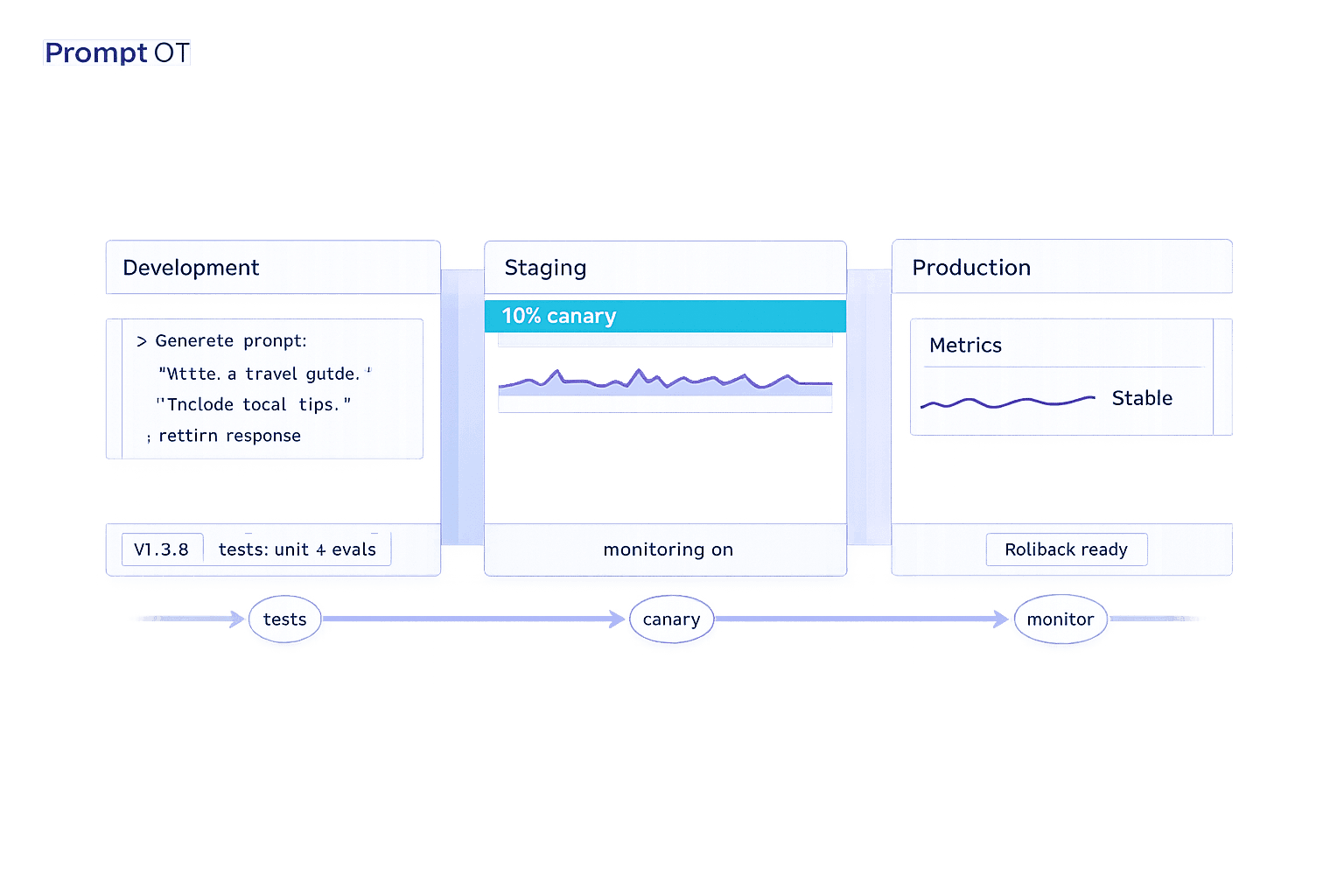
Prompt versioning is how teams avoid chaos when managing AI prompts. Without it, even minor changes can break systems, increase costs, or confuse users. Here's the takeaway: prompts need to be treated like code - tracked, tested, and versioned.
Key points you need to know:
- What is prompt versioning? It's a system to manage, track, and update AI prompts. Each version includes text, settings (like temperature), and metadata (author, reasoning, etc.).
- Why does it matter? Untracked prompt changes can cause production failures. Example: A small tweak in January 2026 led to a 40% cost spike for a B2B analytics company.
- Development vs. Production:
- Development = fast experimentation, no user impact.
- Production = stability, strict controls, and instant rollback.
- Best practices:
- Use semantic versioning (e.g., major updates = X.0.0, minor = 0.X.0, patches = 0.0.X).
- Test prompts with automated gates before deployment.
- Use environment-specific strategies (draft → staging → production).
Tools like PromptOT simplify this process by separating prompts from code, enabling instant updates, rollbacks, and detailed tracking. Whether you're handling 10 prompts or 10,000 queries daily, versioning ensures reliability and faster fixes.
Bottom line: Treat prompts like production assets, not disposable text. Versioning prevents costly mistakes and keeps your AI systems stable.
Prompt Versioning & Testing Strategies - Reliable LLM Development | Uplatz
Best Practices for Managing Prompt Versions
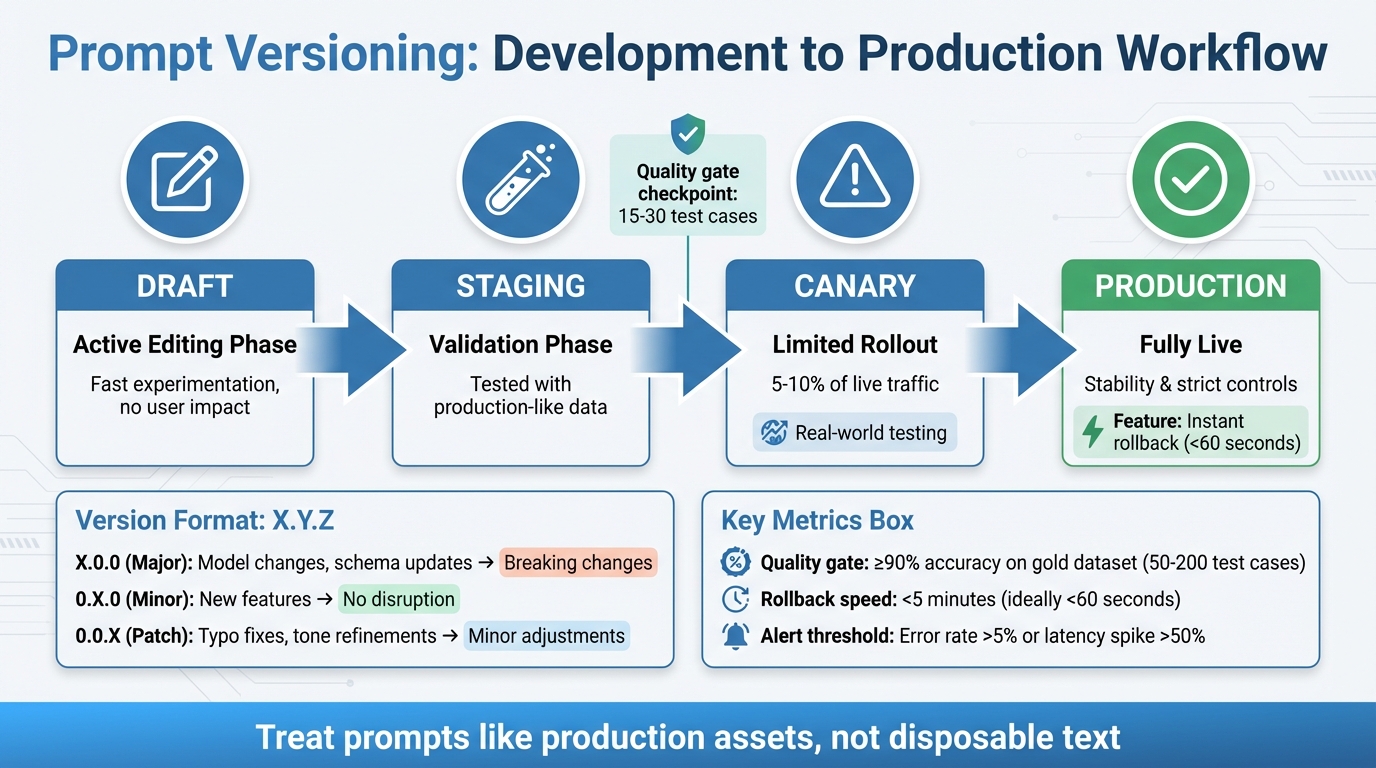
Prompt Versioning Workflow: Development to Production Deployment
When it comes to managing prompt versions in production, following structured practices can make the process far more efficient and reliable.
Treat prompts as fixed production assets. In other words, a production prompt should be a fully self-contained package. This package includes everything: the model selection, sampling parameters (like temperature and top_p), tool schemas, and retrieval settings. By bundling all these elements together, you ensure that every piece needed to reproduce a specific output is locked into a single versioned artifact.
Using Semantic Versioning for Prompts
Semantic versioning (SemVer) is a straightforward way to label and track changes using the X.Y.Z format. Here's how it works:
- Major versions (X.0.0) indicate big changes, like switching to a new model or altering the output schema. These kinds of updates can break existing functionality downstream.
- Minor versions (0.X.0) introduce new features or capabilities without disrupting current operations.
- Patch versions (0.0.X) cover smaller adjustments, such as fixing typos or refining tone, without changing the core logic.
For example, if a prompt changes its output format, that shift would require a major version update because it could affect other systems relying on that format. The golden rule here is immutability: once a version is created, it stays locked. Any changes result in a new version, ensuring consistent reproduction of outputs.
Once clear versioning is in place, the next step is managing how prompts are deployed across various environments.
Environment-Specific Deployment Strategies
Environment bindings allow the same prompt ID to point to different versions depending on the environment. For instance, in development, "latest" might be used, while production relies on a fixed version like "v1.2.0". To avoid accidental updates in production, environment-specific API keys should be used.
Prompts should move through defined stages, such as:
- Draft: Active editing phase
- Staging: Validated with production-like data
- Canary: Limited rollout to 5–10% of live traffic
- Production: Fully live
Canary rollouts are particularly helpful for identifying edge cases that synthetic testing might miss. Every live LLM call should log the specific prompt and version ID, making it easier to trace and resolve issues. Additionally, include the prompt version in your cache key to prevent serving outdated or incorrect responses after rollbacks.
Automated Testing and Evaluation
Automated testing plays a critical role in catching untracked changes before they go live. Before deploying a new prompt version, test it against 15–30 examples that cover common scenarios, edge cases, and adversarial inputs. This ensures quality standards are met through automated CI/CD evaluation gates. These gates can issue:
- Hard fails: For schema violations or safety issues, blocking deployment.
- Soft fails: For minor quality dips, triggering alerts without stopping the release.
Shadow testing is another useful strategy. In this approach, new prompts are tested on live traffic in parallel, but the results are not shown to users. This method helps identify failures in real-world conditions without affecting the user experience.
Promoting and Rolling Back Prompt Versions
Promotion Workflows with Quality Gates
Promoting a new prompt version should only happen after meeting strict quality standards. Every prompt must pass specific requirements, such as achieving at least 90% accuracy on a gold dataset. This dataset typically includes 50 to 200 carefully chosen test cases that cover core scenarios, edge cases, and even adversarial inputs.
Tools like side-by-side diffs are invaluable for spotting exact wording changes, allowing reviewers to predict how the model’s behavior might shift. Neglecting these steps can have serious consequences. For instance, one major e-commerce company suffered a $2M revenue loss when an untested prompt change caused their recommendation system to suggest out-of-stock items.
"Prompts are logic - they deserve the same deployment rigor as code." – Adaline
To mitigate risks, canary rollouts are a smart safety measure. They route 5–10% of live traffic to the new prompt version, helping identify real-world issues that might not surface during synthetic testing. A/B testing further strengthens this process by comparing the performance of the new version against the current baseline. Key metrics like accuracy, latency, and user satisfaction guide these comparisons.
Once promotion processes are secured with quality gates, the next priority is having reliable rollback strategies in place.
Immutability and Rollback Strategies
Strict promotion standards set the stage for effective rollback strategies, which are crucial for maintaining production stability. Prompt versions are immutable, meaning any modification creates a new, unique version. This immutability ensures that previously stable versions remain accessible, allowing for quick rollbacks when necessary.
Rollbacks must be swift - ideally completed in under 5 minutes. Techniques like environment pointers, aliases, or feature flags can reduce rollback times to under 60 seconds. These rapid measures are essential for keeping production environments stable.
"If rollback takes more than 15 minutes, the system isn't production-ready." – Supergood
When prompts are stored in a centralized registry and accessed via an API at runtime, updates bypass the lengthy CI/CD process typically required for code deployments. Additionally, execution logs should always include key details like the active prompt version ID, model parameters, and input hashes. This eliminates the need for time-consuming investigations after an issue arises.
sbb-itb-b6d32c9
Monitoring and Documentation for Prompt Changes
Tracking Performance Metrics
Keeping tabs on various quality metrics is crucial - things like win rates, failure rates, and format compliance (e.g., ensuring outputs follow valid JSON) all play a role in assessing performance. Many teams now lean on "LLM-as-a-judge" scoring to evaluate more subjective qualities such as correctness, faithfulness, and tone.
But it’s not just about quality. Performance and cost metrics are equally important. Monitor average latency (in milliseconds), total token usage, and the cost per request to detect efficiency issues early. Automated alerts can help flag problems, like error rates exceeding 5% or latency spiking by more than 50%. A latency threshold of 5,000ms is often used as a baseline for system health checks.
In February 2026, Dropbox's engineering team introduced Braintrust, a tool designed to evaluate and version-control prompt changes before deployment. This system allowed them to measure prompt quality ahead of user exposure, successfully reducing LLM regressions.
However, monitoring alone isn’t enough. Pairing it with comprehensive documentation ensures that every prompt change is traceable and accountable.
Documenting Prompt Versions and Changes
Thorough documentation is the backbone of maintaining reliable production prompts. Each prompt version should include metadata like the author, timestamp, rationale for changes, model parameters, and evaluation results. Immutability is key - once a version is deployed, it stays unchanged. Any edits create a new version, ensuring logs and traces remain accurate and dependable.
For every execution, log critical details such as the active prompt version ID, model parameters, input hash, and output decision. This makes post-incident investigations faster and more effective. If dynamic prompts are used - those built at runtime with placeholders for user input or retrieved context - document how they’re constructed. Structural changes in these prompts can impact behavior as much as text changes do.
Human Review for High-Impact Changes
While metrics and logs provide valuable data, they can’t capture everything - especially in high-stakes situations. Automated tools often miss subtleties, which makes human review essential for scenarios where the risks are higher. In fields like healthcare or legal, domain experts should review outputs to prevent harmful or inappropriate responses that automated systems might overlook. Annotation queues can route a portion of production or test outputs to these experts for detailed feedback.
For effective oversight, implement a tiered review process. Minor changes, like tweaking wording, might only need one reviewer. But for more complex updates, such as logic changes in high-traffic prompts, a full team review and QA testing are necessary. Use side-by-side comparisons in a playground or IDE to test new versions against the current production baseline with identical inputs. This layer of human oversight acts as your final safeguard before rolling out high-impact changes to users.
Using PromptOT for Prompt Versioning
PromptOT is a structured platform designed for managing prompts with a focus on versioning and deployment. It treats prompts as assets that can be independently versioned, tested, and deployed, separate from your application code. Using a block-based composition, developers and domain experts can build prompts from key components - like role, context, instructions, guardrails, and output format - and manage them through draft and published states.
One of its key strengths is how it separates prompt updates from traditional code releases. With a single API call, applications can access the active prompt version, allowing for instant updates to AI behavior without redeploying the entire codebase. This API-first approach removes deployment bottlenecks and supports the fast iteration cycles needed for modern AI products. It also enables strong environment segregation and detailed change tracking.
Environment-Specific Features in PromptOT
PromptOT streamlines version control while enabling live deployment. It supports distinct environments - commonly development, staging, and production - so testing can remain isolated from live systems. Scoped API keys ensure that experiments in development don't accidentally impact end users. Stable, validated versions can be pinned to production, while experimental changes remain in the development environment.
Version immutability is a cornerstone of PromptOT's design. Each prompt change is assigned a unique, immutable ID, ensuring that production behavior remains reproducible and debugging becomes straightforward. Logs always reference the exact prompt version in use, making tracing and rollbacks reliable.
"Immutability is what makes tracing and rollback dependable over time." - Braintrust Team
If issues arise, you can instantly roll back to a previously validated version by reassigning the environment to an older version ID - no need to redeploy code. Prompts follow a structured workflow (development → staging → production), advancing only after meeting quality gates and evaluation thresholds.
Collaboration and Guardrails
PromptOT supports collaboration while protecting production stability through role-based access control (RBAC). This feature restricts permissions for viewing, editing, and deploying prompts, allowing product managers, engineers, and domain experts to contribute safely within their roles. The platform also maintains detailed audit trails, logging every change along with the author and timestamp.
Guardrail blocks act as reusable templates for safety instructions and formatting guidelines, ensuring consistency across AI features. Teams can compare side-by-side diffs to see exact wording changes between versions, helping them assess how even small edits might affect model behavior. Notifications via webhooks or Slack keep everyone informed when a prompt version is assigned or removed from an environment, maintaining a clear deployment history.
API-First Delivery and Monitoring
PromptOT's API-first design ensures dynamic and efficient prompt delivery. By using runtime variable interpolation, prompts can include {{placeholders}} that are resolved dynamically with user inputs or contextual data, avoiding hardcoded values. The platform is compatible with various LLM providers - like OpenAI, Anthropic, and Google - offering flexibility as AI tools evolve.
The free tier provides 1 million trace spans and 10,000 evaluation scores per month, which is enough for most teams to establish a solid prompt management workflow. For organizations with stricter needs, enterprise features include SOC 2 Type II certification, SSO/SAML support, and self-hosted deployment options. Webhook notifications also include HMAC-signed payloads, ensuring secure integration with CI/CD pipelines and blocking promotions if quality scores fall below defined thresholds.
In February 2026, Dropbox's engineering team used PromptOT (Braintrust) to evaluate and manage prompt changes before deployment. This structured approach allowed them to measure prompt quality before updates went live, significantly reducing regressions in production AI features.
Conclusion
Prompt versioning has transitioned from being a nice-to-have to an absolute necessity for production systems. Without proper management, untracked modifications - often referred to as "prompt debt" - can wreak havoc, where fixing one edge case unexpectedly disrupts 20% of other queries. This shift toward treating prompts as critical engineering components, rather than disposable text, has fundamentally reshaped how AI teams deliver dependable features.
"Teams shipping reliable AI automation in 2026 prioritize robust prompt management over sophisticated tooling." - Systems Sunday
The practices outlined in this guide - semantic versioning, environment-specific deployment, immutability, and evaluation-focused workflows - form a solid framework to prevent regressions while enabling faster iterations. By decoupling prompts from application code and managing them through a centralized registry, teams can modify AI behavior or apply hotfixes in seconds instead of hours, all without requiring full code redeploys. For organizations processing over 10,000 queries daily, this approach becomes crucial, as even a minor 2% regression impacts 200 users each day.
PromptOT streamlines this process with features like block-based composition, instant rollback, and automated evaluation gates. Its free tier, designed for individuals and small projects, provides an accessible starting point to establish robust workflows before scaling. With its API-first approach, teams can update prompts in real time, cutting deployment times from hours to mere seconds.
"Teams that adopt prompt management ship changes faster because they can iterate without fear of breaking production, and they catch regressions before users notice them." - Braintrust Team
To truly harness the benefits of prompt versioning, log every execution with its corresponding prompt version ID, implement a draft-to-production workflow, and enforce quality gates. These steps integrate key principles - semantic versioning, immutability, environment-based deployment, and rigorous evaluation - into a unified process that transforms prompt management from a source of stress into a competitive edge.
FAQs
What should a single prompt version include?
A well-crafted single prompt should bring together all essential components to ensure clarity and functionality. These components include:
- Instructions: Clearly outline the task or objective.
- Context: Provide background information to frame the task.
- Role: Specify the perspective or role the AI should adopt.
- Guardrails: Define boundaries or limitations to guide the output.
- Output Format: Detail the structure or format the response should follow.
- Placeholders or Variables: Include dynamic elements that can be replaced with specific inputs.
Additionally, employing version control is crucial. It helps track changes, ensures reproducibility, and maintains consistency throughout both development and production stages.
How do I safely deploy prompt changes to production?
To ensure the safe deployment of prompt changes, it's important to treat prompts as production assets. This means implementing proper version control, thorough testing, and having rollback procedures in place. Always test updates in a staging environment before going live, and use version identifiers to track changes effectively. Controlled deployment methods, such as feature flags or environment-specific API keys, can help manage updates without disrupting operations.
Additionally, document all modifications clearly and keep a close eye on performance after deployment. Tools like PromptOT can simplify the process by handling versioning, testing, and rollbacks, making it easier to manage prompt changes securely.
What metrics should I monitor after a prompt update?
Monitoring critical metrics such as output quality, consistency, and accuracy is essential. Pair these with regression evaluations, user feedback, and system performance reviews. Together, they help pinpoint any issues or setbacks caused by updates. Keeping a close eye on these metrics ensures updates align with expectations and don’t inadvertently disrupt the system’s functionality.