When teams edit AI prompts without a proper system, chaos follows. Small changes can overwrite each other, breaking production systems, wasting hours troubleshooting, and even impacting customer satisfaction. For example, in March 2026, a minor wording tweak caused 300 leads to be misrouted, and another untracked change dropped customer satisfaction from 87% to 61% in just 11 days.
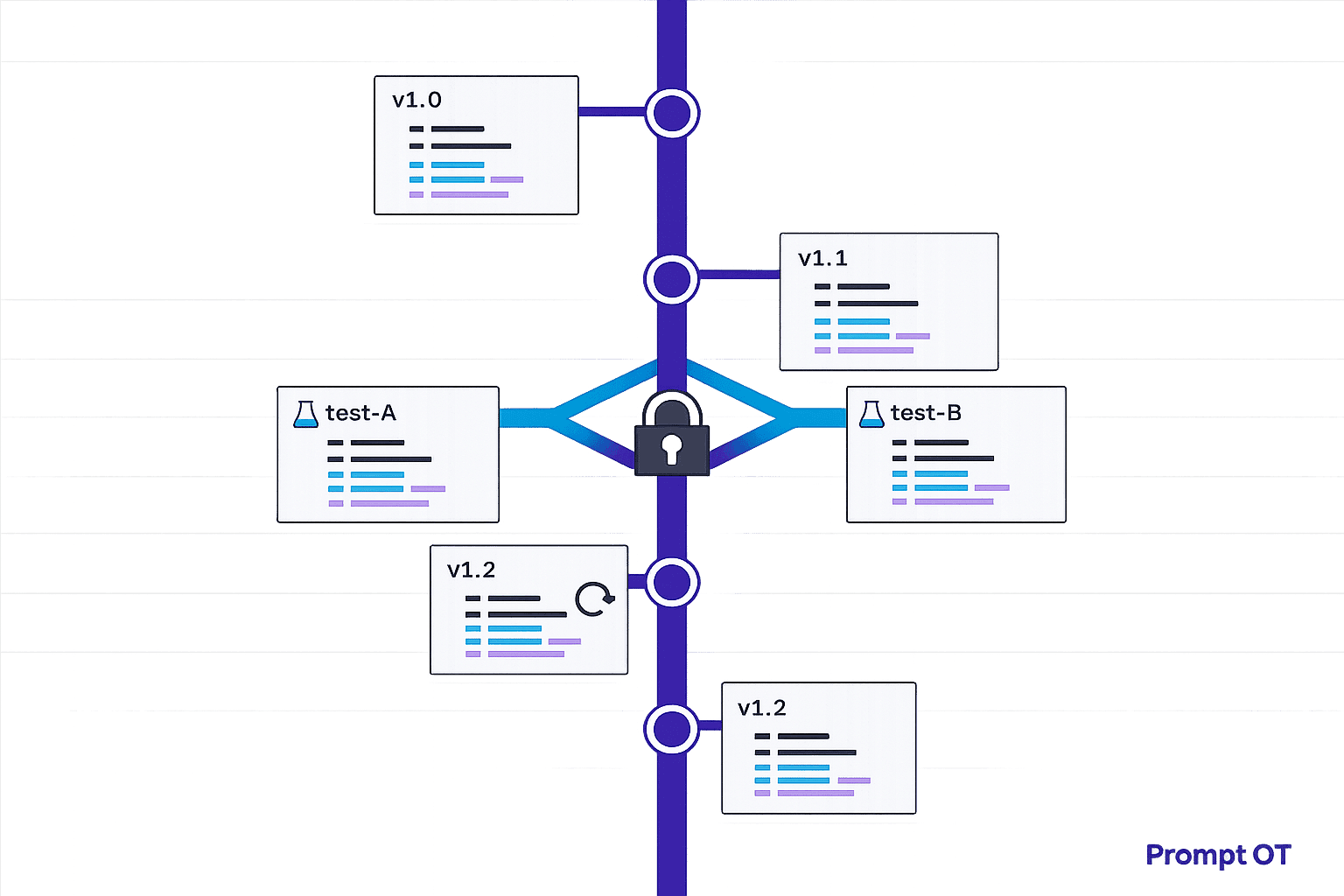
The solution? Prompt versioning. This approach tracks every change, prevents silent overwrites, and allows instant rollbacks. Teams can safely collaborate, test updates, and avoid production failures. By centralizing prompt management, companies reduce conflicts, improve efficiency, and keep systems stable.
Here’s how it works:
- Immutable versions: Every change creates a new record, keeping past versions intact.
- Clear histories: Track what changed, who made the change, and why.
- Draft vs. published states: Test updates safely before going live.
- Rollback options: Instantly revert to a working version if issues arise.
With tools like PromptOT, teams can manage prompts like production code - organized, reliable, and easy to update.
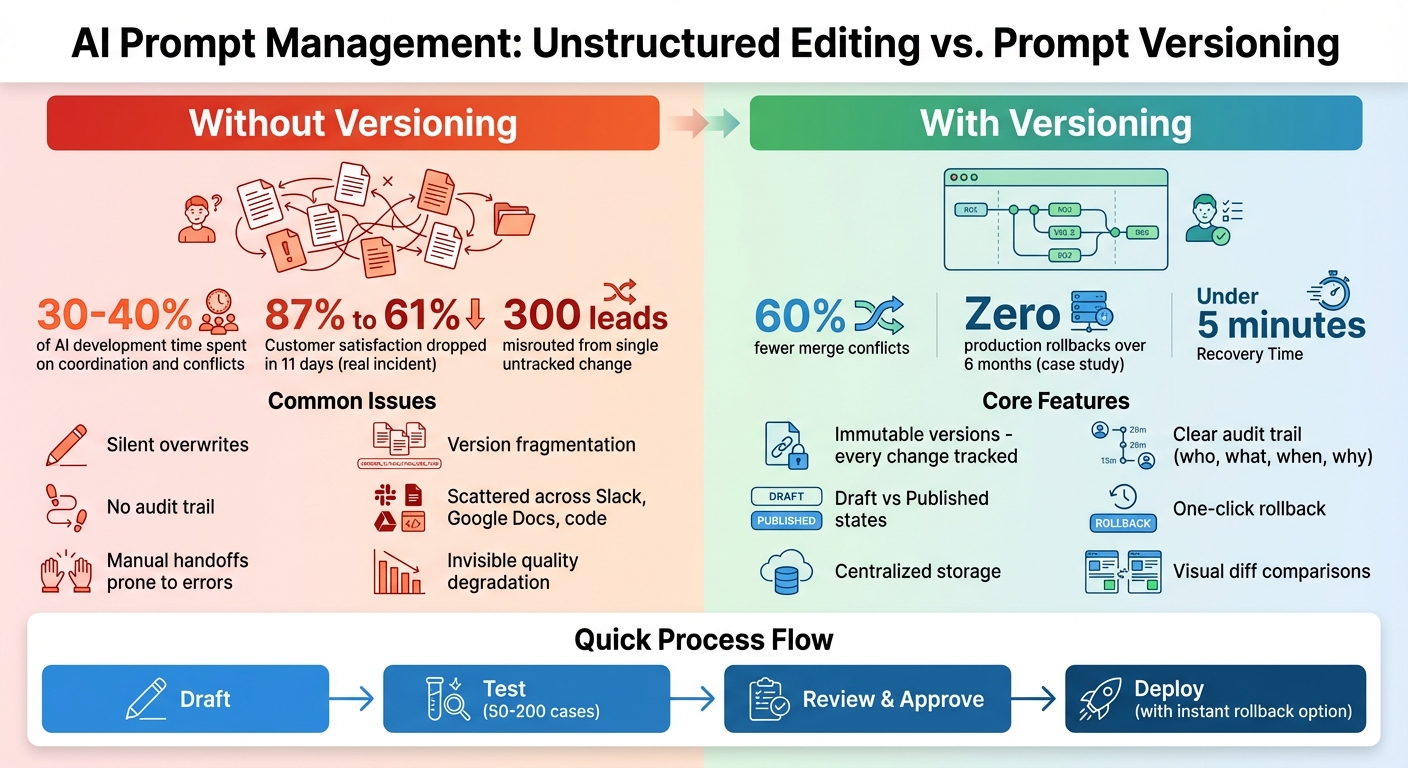
Prompt Versioning vs Unstructured Editing: Impact on Team Productivity and System Stability
How to Manage Prompt Versions | 25 | Latitude
sbb-itb-b6d32c9
What Causes Editing Conflicts in Prompt Development
Editing conflicts occur when multiple team members make changes to the same prompt without a centralized tracking system. Unlike traditional code, prompts often involve collaboration between engineers, product managers, and domain experts. This can lead to parallel edits where no one is fully aware of what others are doing, resulting in direct conflicts.
One major issue is the lack of a single, unified storage location. Prompts often exist in multiple places simultaneously - application code, spreadsheets, Slack threads, or Jupyter Notebooks. For instance, a domain expert might test a prompt in a Google Doc, which is later integrated into the codebase, unaware that another version was updated just minutes earlier. This fragmented workflow can cause silent overwrites, erasing improvements without anyone noticing.
"Prompts behave differently from traditional application code. Small wording changes can significantly alter model behavior, and the same prompt can produce different results across model versions."
– Braintrust Team
Prompt dependencies make these conflicts even riskier. In multi-step workflows or agent systems, even a minor adjustment - like changing the output format of a JSON schema - can disrupt every downstream prompt that relies on it. Without visibility into these dependencies, what seems like a small edit can trigger failures across the entire system.
Problems with Unstructured Editing Methods
Unstructured editing workflows, which lack proper version control, create chaos. Team members are often left wondering what changed, who made the change, or why it was made. When prompts are hardcoded or buried in configuration files, small tweaks can get lost during larger code updates. This leads to "version fragmentation", where teams resort to confusing file names like VERSION_1_FINAL or PROMPT_FINAL_FINAL_USE_THIS, making it nearly impossible to identify the version currently in use.
Manual handoffs compound the issue. Non-technical team members might test prompts in external tools and then share them with engineers through Slack or email. This process is slow, prone to errors, and often results in recent updates being unintentionally overwritten. It's no wonder that engineering teams report spending 30% to 40% of their AI development time on coordination and resolving conflicts.
The high sensitivity of prompts makes this even riskier. A single word change can drastically alter model behavior in unpredictable ways, leading to what experts describe as "invisible quality degradation". Fixing one edge case might unintentionally break a core feature, and without proper version tracking, these issues often go unnoticed until users encounter problems.
How Conflicts Affect Team Productivity and Production Systems
Editing conflicts don't just waste time - they can have serious consequences for production systems. Silent regressions, where changes cause issues without appearing in deployment logs or CI pipelines, are a common problem. For example, if an engineer and a product manager edit the same prompt simultaneously, one person's updates may overwrite the other's without anyone realizing. This can result in critical fixes disappearing and previously solved issues reappearing, forcing teams to spend hours troubleshooting.
The impact can be even more severe in multi-agent architectures. If one prompt's output format is changed without coordination, it can instantly break all downstream agents that depend on it. Companies managing more than 10 prompts in production often rank versioning as one of their top operational challenges.
"Teams lose visibility into what changed and why, which makes it difficult to trace incorrect outputs back to a specific prompt version and creates hesitation around making even small edits."
– Braintrust Team
When conflicts lead to failures, recovery becomes a daunting task. Without proper versioning, teams are left trying to piece together what the working prompt looked like from scattered chat logs or memory. This delay in recovery not only extends downtime but also undermines trust in the system. Worse, untracked edits can introduce vulnerabilities - like safety violations or prompt injection risks - that might only be discovered after significant damage has occurred.
These challenges highlight the importance of implementing robust versioning systems, which will be discussed in the next section.
How Versioning Prevents Editing Conflicts
When it comes to preventing editing conflicts, versioning plays a key role. Instead of overwriting existing text, every prompt change is treated as a new, unchangeable record. This means that when someone on the team edits a prompt, the system generates a new version with its own unique metadata. The result? Previous versions stay untouched, which eliminates the risk of silent overwrites - a common problem in unstructured workflows.
"Prompt versioning is the practice of tracking every change to an AI prompt as an immutable, uniquely identified version."
– Braintrust Team
With this method, all prompt iterations are centralized. No more digging through Slack threads, scattered Google Docs, or bits of code to figure out what changed. The system keeps everything in one place, showing exactly what was updated, who made the change, and when. Adding descriptive version notes - like mentioning an update to improve error handling for user queries - also helps teams understand the reasoning behind each change. This centralization creates a clear path for collaboration and accountability.
Version Control for Team Collaboration
A detailed audit trail is another benefit of versioning, making it easy for teams to trace changes that might affect output quality. For instance, if a domain expert adjusts a prompt in the morning and an engineer makes another tweak later in the day, both versions are saved with clear attribution. This ensures that no one’s work is overwritten accidentally.
Tools like visual diff viewers take this a step further by showing side-by-side comparisons of versions, highlighting exactly what changed. For teams managing a large number of prompts - say, more than 10 in production - this kind of visibility is critical. In fact, versioning is often one of the top operational challenges in such scenarios.
Draft and Published States for Safe Changes
Version control becomes even more effective when paired with separate draft and published states. This setup allows team members to experiment with new drafts or refine wording without affecting the live version users interact with. It’s a safety net that ensures work-in-progress edits don’t accidentally disrupt production.
The draft state acts as a testing ground where changes can be reviewed and tested against a dataset of 50 to 200 cases before approval. This process directly addresses earlier issues, like untested changes causing production failures. Once a draft passes all checks, it can be promoted to "published" status. If something does go wrong, teams can quickly roll back to a previous working version by redirecting traffic to an earlier version ID - no coding required.
Resolving Conflicts When They Happen
Even the best version control systems can’t always prevent overlapping edits. Thankfully, modern tools are designed to help teams resolve conflicts efficiently. Let’s dive into some of the key features that make this process smoother.
Visual Diff and Comparison Views
Visual diff tools are a lifesaver when you need to spot changes quickly. They use color codes - like green for additions and red for deletions - to make edits stand out. Many tools also offer side-by-side panels, so you can compare versions at a glance and immediately see what’s different.
For prompt-specific workflows, diff tools go a step further. They allow teams to compare outputs generated by different prompt versions using the same test inputs. This is especially useful when small wording tweaks lead to unexpected changes in a model’s behavior. After all, in natural language processing, even a single word can completely shift how a model responds, and those shifts aren’t always obvious from the prompt text alone.
While visual comparisons are helpful, they’re just one piece of the puzzle. Structured workflows can make resolving conflicts even more efficient.
Merge Workflows and Change Approvals
Structured merge workflows add an extra layer of organization by requiring changes to go through reviews and approvals before deployment. Tools with role-based access control (RBAC) allow teams to assign specific permissions - for instance, domain experts might draft updates, but only engineering leads can approve and push those updates to production.
Semantic versioning also plays a big role here. By using the X.Y.Z format, teams can clearly signal the scope of a change: a major version update (X) means significant structural changes, while a patch update (Z) indicates a minor fix. Platforms like PromptOT integrate these workflows, making it easier to manage collaborative editing securely. Teams that adopt structured version control report up to 60% fewer merge conflicts compared to traditional file-sharing methods.
These tools and workflows not only streamline conflict resolution but also minimize disruptions, keeping teams focused on their goals.
Testing and Rollback for Safe Prompt Updates
Once conflicts are resolved and changes are merged, the next crucial step is ensuring updates perform reliably in production. Rigorous testing at this stage is key to maintaining stability.
Testing Prompts Before Production Deployment
Prompts act as the logic that directly influences application behavior. To illustrate their impact, consider this: a single untracked prompt change caused a US-based SaaS company's customer satisfaction score to plummet from 87% to 61% in just 11 days. This example highlights why thorough testing before deployment is critical.
A good starting point for testing is using Golden Datasets, which typically consist of 50–200 input/output pairs, to confirm that changes don’t disrupt existing functionality. For smaller teams, a more compact evaluation set of 15 to 30 examples can still be effective. This smaller set should include a mix of happy paths, edge cases, and adversarial inputs.
Testing should be multi-layered. Deterministic checks can validate JSON schemas and flag prohibited content, while semantic checks using embedding similarity help identify shifts in meaning. Additionally, "LLM-as-a-judge" evaluations can assess correctness and tone. Automated evaluation suites integrated into CI/CD pipelines can further streamline this process. These suites run on every pull request and block merges if quality scores drop below a defined threshold - usually above 90% on the Golden Dataset.
One case study showcased the effectiveness of this approach: a 15-test regression suite integrated into a CI/CD pipeline completely eliminated production rollbacks over six months. To ensure consistency, always test prompts in development and staging environments, and pin model versions (e.g., gpt-4o-2024-08-06) to avoid unexpected behavior.
Instant Rollback for Quick Recovery
Even with robust versioning and testing, production issues can still occur, making a swift rollback mechanism essential. The speed of rollback often determines whether an issue remains a minor inconvenience or escalates into a major problem. Industry experts suggest aiming for a Recovery Time Objective (RTO) of under five minutes.
"If rollback takes more than 15 minutes, the system isn't production-ready." – Supergood
Immutable version control enables instant rollback by ensuring deployed prompt versions never change. If needed, you can redirect traffic to the last working version without requiring a full redeployment. Tools like PromptOT simplify this process, offering one-click rollback options via their UI or API. This allows teams to quickly restore functionality when error rates climb or outputs degrade.
For added reliability, automated monitoring and triggers can enhance rollback systems. For instance, setting alerts for error rates exceeding 5% or detecting latency spikes can automatically initiate a rollback to the last stable version. To support post-incident debugging, every execution should log the prompt version ID, model parameters, and input hash, enabling teams to diagnose issues within minutes.
After executing a rollback, it’s essential to add the problematic input to your Golden Dataset. This turns every incident into a learning opportunity, creating a test case that helps prevent similar issues in the future. By doing so, you build a system that grows more resilient with each update.
Centralized Prompt Management Reduces Conflicts
Centralized prompt management takes the benefits of versioning a step further by simplifying workflows and minimizing conflicts, making collaboration smoother and more efficient.
Unified Workflows with Centralized Platforms
When prompts are scattered across tools like code repositories, Slack threads, or spreadsheets, chaos often follows. For organizations managing over 10 prompts in production, versioning becomes one of the top operational hurdles.
Centralized platforms tackle this issue by decoupling prompts from application code. Teams can modify prompt behavior dynamically using APIs or SDKs, bypassing the need for engineering-heavy processes. This setup allows product managers and domain experts to fine-tune prompts through user-friendly visual tools, avoiding the complexities of Git or the need for direct developer involvement.
"When prompts are embedded directly in application code, every small wording change requires a full redeploy. Prompt updates get bundled with unrelated code changes, making it difficult to isolate impact or roll back safely." – Manouk, LangWatch
By integrating creation, testing, and deployment into a single platform, centralized workflows cut down on coordination challenges. Engineering teams have noted that prompt engineering consumes 30% to 40% of total AI development time. Centralized tools streamline this process with features like testing environments, automated evaluation systems, and promotion workflows that ensure only validated prompts make it to production.
These streamlined workflows pave the way for specialized tools like PromptOT to enhance collaboration and reduce conflicts even further.
PromptOT Features for Versioning and Collaboration
PromptOT builds on these principles with advanced features that make prompt versioning simple and error-resistant. Using a block-based system, teams can create prompts from reusable components - such as role, context, instructions, guardrails, and output format - ensuring consistency across the entire prompt library while cutting down on repetitive work.
Granular role-based access control (RBAC) safeguards against accidental overwrites by defining clear permissions for who can view, edit, or deploy prompts. Draft and published states allow teams to refine prompts without impacting production. Each update generates an immutable version ID, complete with timestamps, author details, and side-by-side comparisons, providing a clear audit trail.
If issues occur, PromptOT’s instant rollback feature enables teams to revert to a previous version with a single click through the UI or API. Environment-specific API keys separate development and production traffic, while webhook notifications with HMAC-signed payloads keep teams informed in real time. Additional features like runtime variable interpolation using {{placeholders}} and compatibility with any LLM provider ensure flexibility and adaptability.
Conclusion
Prompt versioning is changing the way AI teams collaborate. Instead of juggling scattered prompts, teams can rely on a centralized system that prevents overwrites, tracks changes, and ensures production remains stable. By treating prompts as structured assets rather than disposable text, teams can sidestep the chaos that often slows down development and causes unnecessary conflicts.
"If you build AI features, you have prompts. If you have a team, you have a versioning problem." – Mahmoud Mabrouk, Co-Founder, Agenta
Separating prompts from application code offers even more advantages. Teams can adjust wording or logic without waiting for lengthy deployment cycles, allowing for faster iteration. Experimental changes stay isolated through environment separation, while instant rollback features make it easy to restore a stable version when needed.
PromptOT simplifies all of this with features like block-based composition, immutable version IDs, draft and published states, and role-based access control. These tools let teams test updates safely, track every modification, and deploy changes with a single API call. Whether managing 10 prompts or 100, it keeps everyone on the same page and ensures production systems stay reliable.
For AI teams aiming to scale effectively, versioning isn't just helpful - it’s essential. With the right tools, you can move from reactive problem-solving to a streamlined, systematic development process. Collaboration, quality, and speed all start with a solid versioning foundation.
FAQs
What counts as a “prompt editing conflict” in real teams?
A “prompt editing conflict” occurs when changes to prompts - such as slight wording adjustments or modifications - result in unintended or problematic outcomes during production. Without effective version control, it becomes challenging to keep track of what’s been changed or to roll back to a reliable version. This can lead to confusion and make resolving issues more inefficient.
How do draft vs. published prompts prevent production breakages?
Draft and published prompts play a key role in reducing production issues. By enabling teams to test and refine prompts in a controlled setting, they help identify and resolve potential problems early. Only stable, verified versions are moved to production, minimizing the chance of errors or disruptions. This approach ensures updates are carefully reviewed and tested before they affect live systems.
What should we log to quickly trace issues to a prompt version?
Logging the prompt version identifier, change history, and related metadata - like the model and settings used - is crucial for maintaining a clear audit trail. This approach ensures that any issues or anomalies can be efficiently traced back to a specific prompt version.
By documenting these details, you create a structured reference point that simplifies troubleshooting and enhances accountability. Whether you're addressing errors or analyzing performance, having this metadata readily available can save time and provide clarity.