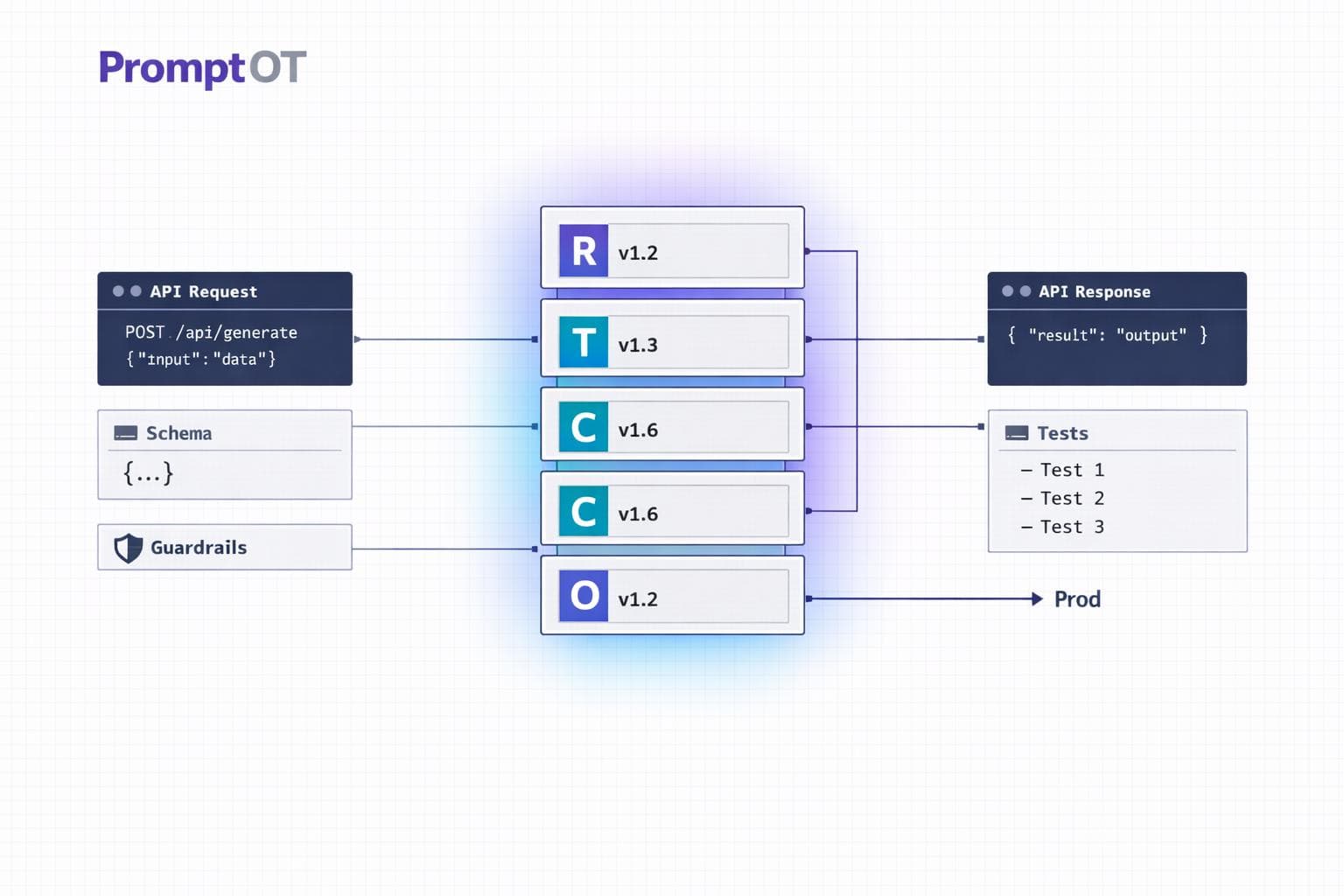
Structured prompt architecture transforms how prompts are managed by treating them as modular, version-controlled assets, not scattered, hardcoded instructions. This approach reduces AI errors by up to 60% and cuts manual processing time by 60–75%, saving companies significant resources - up to $400,000 annually for those managing 50 prompts.
Key benefits include:
- Centralized management: Prompts are organized using formats like JSON or YAML, separating logic from application code.
- Modular design: Prompts are broken into reusable blocks (e.g., role, task, constraints) for easier updates and scalability.
- Version control: Tracks changes, ensures quick rollbacks, and maintains audit trails.
- Efficiency gains: Updates take minutes instead of hours, and structured outputs improve reliability.
This system benefits developers, product managers, and enterprise teams by enabling faster iterations, safer testing, and consistent AI behavior across workflows. It’s a shift from ad-hoc prompt tweaking to building reliable, scalable systems.
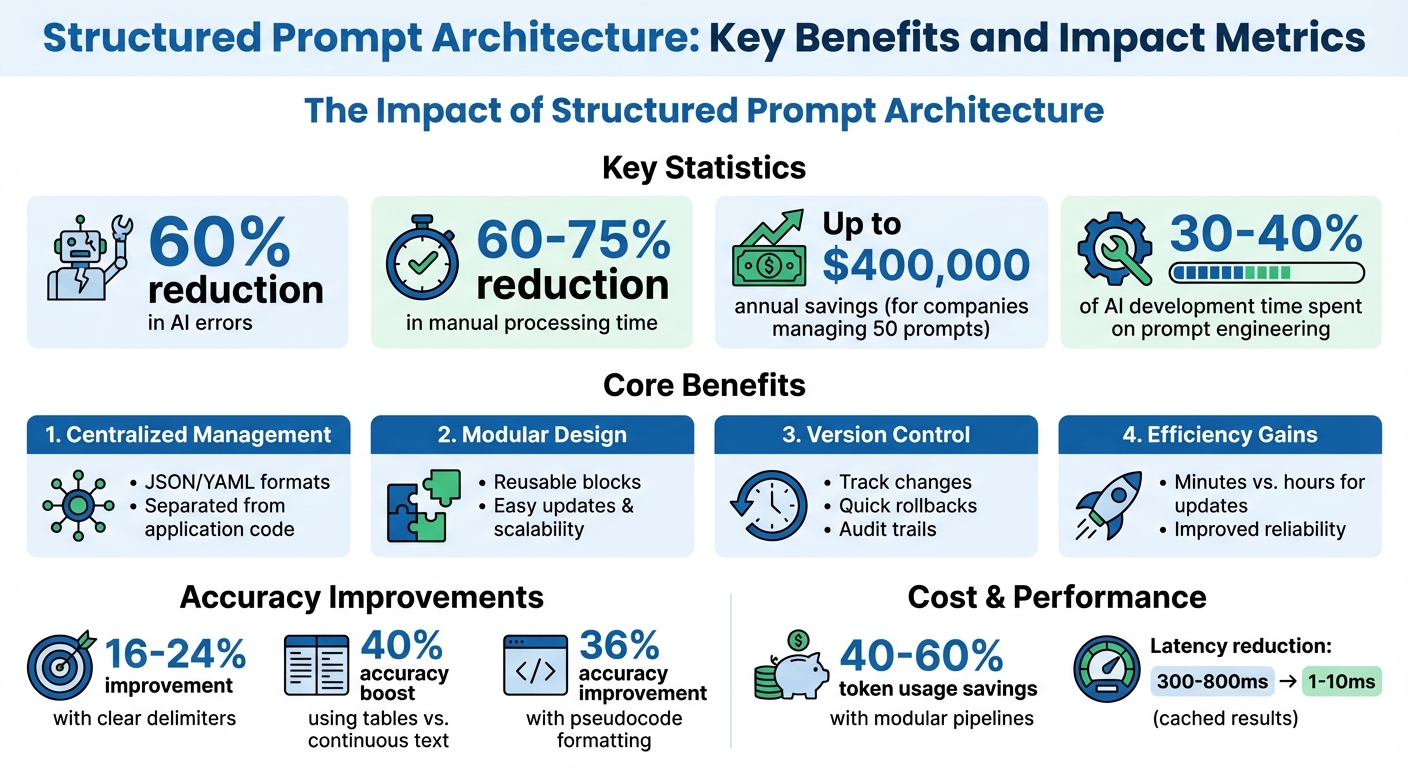
Structured Prompt Architecture: Key Benefits and Impact Metrics
The New Rules of Prompt Engineering (Complete Guide)
sbb-itb-b6d32c9
Core Components of Structured Prompts
Structured prompts are the backbone of modular and scalable prompt design. By breaking prompts into distinct, purposeful sections, you can ensure clarity and consistency in how instructions are interpreted. The RTCCO framework (Role, Task, Context, Constraints, Output) organizes each prompt into clear, functional components. Think of these components as LEGO blocks - each piece can be swapped or adjusted without disrupting the overall system.
Using XML-style tags or Markdown headings to define sections makes these boundaries explicit. This approach minimizes confusion and avoids scenarios where the AI overlooks parts of the prompt. For example, using clear delimiters between sections has been shown to improve accuracy by 16–24%. Similarly, presenting data in tables rather than continuous text can boost accuracy in analytical tasks by 40%. Even framing instructions as pseudocode - like IF/ELSE logic - can enhance accuracy by 36% while also reducing token usage.
"Modular prompting is a technique that structures prompts into distinct segments or modules... It improves consistency, reusability, and control in large language model outputs." – Jono Farrington, OptizenApp
Here’s how each RTCCO component contributes to building a reliable system:
| Component | Purpose | Modularity Contribution |
|---|---|---|
| Role | Defines expertise and tone | Activates specific "knowledge patterns" for specialized tasks. |
| Task | Specifies the desired outcome | Breaks tasks into smaller, manageable, and chainable steps. |
| Context | Provides background information | Ensures the prompt is reusable across sessions by maintaining context independence. |
| Constraints | Sets non-negotiable boundaries | Prevents conflicting instructions in complex workflows. |
| Output Format | Defines the structure of the response | Ensures machine-readability and allows for automated validation. |
System Context and Roles
The first ~200 tokens of your prompt play a crucial role in setting the stage for everything that follows. This is due to the primacy effect - where information presented at the beginning has the most influence. Defining the role early creates a "character" for the model, while placing rules first can lead to a more robotic interpretation.
Precision here is key. Instead of vague instructions like "Act as a marketing expert", be specific: "You are a B2B SaaS marketing strategist with 10+ years of experience in demand generation for enterprise software". This level of detail activates the right knowledge patterns, ensuring the model interprets all subsequent instructions through the proper lens.
Placement also matters. Critical identity information should go at the start (primacy), while non-negotiable rules should be at the end (recency). Instructions placed in the middle of long prompts often get lost - this is known as the "lost in the middle" problem. For instance, moving a critical rule from the middle to the end increased accuracy from 78% to 96% in production testing.
Here’s a practical layout for structuring your prompts:
| Prompt Layer | Purpose | Placement Strategy |
|---|---|---|
| Identity/Role | Sets the expertise and tone | Start (Primacy) |
| Primary Objective | Establishes priority during conflicts | Near Start |
| Instruction Hierarchy | Resolves rule conflicts | Near Start |
| Knowledge/Context | Provides factual background | Middle |
| Output Format | Defines structure, length, and style | Near End |
| Recency Recap | Reinforces critical rules | Final tokens (Recency) |
Adding the reasoning behind rules can further improve adaptability. For example, saying "Do not mention competitors because it kills customer trust" helps the model handle unforeseen scenarios without explicit instructions.
"Identity before rules = character. Rules before identity = robot." – buildyourfish.com
Task Instructions and Input Formatting
Task instructions clarify what the model should do, while input formatting ensures the data is presented in a way that maximizes comprehension. Both need to be explicit and action-oriented. Use strong verbs like "Extract", "Classify", or "Generate" to define clear success criteria.
The way you structure input data can significantly impact performance. Presenting information in tables rather than continuous text can lead to a 40% accuracy improvement for analytical tasks. When separating different content types - like instructions versus reference material - use consistent delimiters:
| Delimiter | Purpose |
|---|---|
--- |
Separates logical blocks (e.g., Role, Task). |
=== |
Divides few-shot examples. |
### |
Marks section subheadings. |
*** |
Indicates semantic breaks (e.g., end of instructions). |
Few-shot examples are also highly effective. Provide 3–5 "input → output" demonstrations to guide the model through edge cases and establish the desired tone and format. Showing examples is often more effective than describing what you want.
For complex workflows, use task decomposition. This involves breaking tasks into smaller, self-contained steps that don’t rely on prior conversation history. Task decomposition improves output quality by an average of 35%.
"Prompt engineering is not about clever tricks - it's about building reliable, testable, and maintainable interfaces to language models." – Chirag Talpada, Developer
Output Specifications and Guardrails
Output specifications are crucial for turning unpredictable AI responses into dependable, machine-readable outputs. Be explicit about the format you expect - whether it’s JSON, XML, or YAML - and use authoritative language like, "Your response MUST be a single, valid JSON object and nothing else".
Templates or example structures are more effective than vague descriptions. Logical naming conventions (e.g., customer_email instead of c_eml) make prompts easier to maintain and improve the model’s contextual understanding.
Guardrails act as safety measures, setting boundaries for what the model should avoid. For example, "Do not hallucinate information" or "If data is missing, write 'NOT FOUND'" prevents the model from guessing or fabricating data. Always include fallback instructions for edge cases.
For production systems, implement multi-layered validation:
- Structural schema validation
- Business logic validation
- Confidence scoring
These layers catch issues like hallucinated URLs or sensitive information (e.g., SSNs or API keys) before the response reaches users. This ensures consistent, reliable outputs.
Here’s a comparison of formats for output specifications:
| Format | Best For | Key Advantage |
|---|---|---|
| JSON | Web APIs and automation | Universal compatibility and reliability. |
| XML | Complex, nested documents | Clear hierarchical structure. |
| YAML | Human-readable configurations | Token-efficient and easy to edit manually. |
Structured outputs make a measurable difference. Teams using them report a 60–75% reduction in manual data processing time. However, it’s important to note that even small prompt errors can compound at scale. For instance, a prompt that works 95% of the time in development could result in 50 failures per 1,000 requests in production. This highlights the importance of guardrails and validation.
"Structured prompting transforms an unpredictable AI into a dependable API, a core component of your software and business workflows." – JSONPrompt.it
These foundational elements prepare the groundwork for designing modular prompts and implementing robust version control, which will be explored in upcoming sections.
Designing Modular Prompts
Modular design takes a "building block" approach to prompts, treating each as an independent component with a specific role. Instead of creating massive, all-encompassing "mega-prompts" that try to do everything, this method focuses on crafting a library of reusable blocks. These blocks can be combined, rearranged, or updated without disrupting the entire system. This approach reduces fragility and keeps things manageable.
Why avoid monolithic prompts? Because they're prone to breaking. Adjusting something as simple as the tone might mess up the JSON output, or adding a new rule could cause earlier instructions to be ignored. This is often called "instruction collision." Modular design sidesteps these issues by isolating each function into its own block, making it easier to test, refine, and expand.
Block-Based Composition
Block-based composition organizes prompts into reusable sections using specific tags like <role>, <input_data>, <requirements>, and <output_format>. Each block has a single purpose and can be swapped or reordered without impacting the others. This standardization ensures seamless integration across different tasks.
For example:
- Use
<role>tags for persona definitions. - Place data in
<input_data>. - Define constraints in
<requirements>.
This structure prevents the model from guessing which parts of the text are instructions versus reference material.
"Markdown was designed for one purpose - making text readable while rendering to HTML... It's a prayer, not a boundary. XML markup prevents that." – Limited Edition Jonathan
Dynamic placeholders, like {customer_name} or {order_id}, also make blocks flexible. These placeholders allow runtime data to be inserted, so the same block can adapt to different contexts.
Here's a quick look at essential tags and their importance:
| Tag | Purpose | Why It Matters |
|---|---|---|
<role> |
Assigns persona/expertise | Ensures consistent tone and focus |
<input_data> |
Defines a slot for information | Creates a standard input point |
<requirements> |
Lists non-negotiable rules | Enforces specific constraints |
<output_format> |
Specifies the structure | Ensures predictable outputs |
<final_check> |
Includes self-correction steps | Improves output quality |
One of the biggest advantages here is separating concerns. For example, a brand manager can tweak the <role> block to adjust tone, while developers focus on the logic or formatting. This division minimizes errors and speeds up iteration.
Prompt Chaining and Conditional Logic
With modular blocks in place, you can create workflows through prompt chaining. This breaks tasks into smaller, ordered steps where the output of one prompt feeds into the next. For instance, a "Planner" breaks down the task, an "Executor" performs it, and a "Reviewer" validates the output. Each block has one job, making debugging easier. If the JSON output is wrong, you know exactly which block to fix.
"Prompt chaining is a strategic approach that breaks down a complex task into a sequence of smaller, more manageable prompts." – Oboe
Conditional routing takes this further. A "Router Prompt" can analyze user intent and direct the request to the right sub-prompt. For example, billing inquiries might go to one chain, while technical questions go to another. State management ensures only relevant context - like requirements or intermediate results - moves forward. This reduces token usage and avoids clutter that could confuse the model.
These methods simplify debugging and pave the way for efficiency gains, which we'll explore next.
Benefits of Modular Design
Modular prompts offer clear advantages in maintainability, cost, and reliability. Teams using modular pipelines with deterministic prompt caching have reported 40–60% savings in token usage. Latency can drop from 300–800 ms for raw calls to as little as 1–10 ms for cached results in high-throughput systems. Debugging becomes far easier since issues are confined to specific blocks, whether it's the data input, logic, or formatting.
"The mega-prompt is brittle. It's a house of cards... A modular architecture, however, isolates each function." – Jono Farrington, OptizenApp
Here's a comparison of monolithic and modular architectures:
| Feature | Monolithic "Mega-Prompt" | Modular Prompt Architecture |
|---|---|---|
| Maintainability | Fragile; small changes can break everything | Resilient; modules can be updated independently |
| Debugging | Hard to trace errors | Errors are confined to specific blocks |
| Scaling | Prone to instruction conflicts | Scales easily with specialized modules |
| Cost/Latency | High; processes full context | Lower; processes only necessary blocks |
| Testing | Requires full-system testing | Allows testing of individual components |
Collaboration also gets a boost. Different team members can manage different blocks - product managers handle personas, developers manage logic, and compliance teams oversee guardrails. This approach reduces overlap and confusion. Considering that prompt engineering accounts for 30–40% of AI development time, modular design can significantly cut down on effort while streamlining updates and troubleshooting.
Version Control and Prompt Management
Managing prompt versions is essential for creating stable, production-ready AI systems. Hardcoding prompts into your codebase makes even minor updates a hassle, requiring full code deployments and complicating version tracking. A better approach? Treat prompts as separate assets, managed outside your codebase. This keeps your system adaptable and ensures reliable performance.
"Prompts are the magic that makes your LLM system work. They are your secret sauce." – Jared Zoneraich, PromptLayer
For companies managing 10+ prompts in production, version control is one of the top challenges. It helps avoid regressions and allows quick rollbacks when needed.
Drafts, Versioning, and Rollback
The first rule of effective versioning is immutability. Once a prompt version is created and assigned an ID, it should never be altered. Even a small fix, like correcting a typo, requires a new version. This ensures that logs and debugging always reference the exact text and settings used.
"Prompt versioning is the foundational mechanism... management turns versioning into an operational workflow." – Braintrust
Each version should include the full context: the prompt text, model settings (e.g., GPT-4o, temperature, max tokens), and retrieval configurations. This approach ensures you can replicate the exact behavior of any version.
To track changes effectively, use unique version IDs. Options include content-addressable hashes or semantic versioning (e.g., v1.0.0). Semantic versioning is particularly useful:
- Major versions for significant changes, like altering output formats.
- Minor versions for adding features.
- Patch versions for small adjustments.
Every version should include metadata detailing the changes, the reason behind them, and evaluation results. Clear commit messages explaining the "why" of each update help teams stay aligned and make version history more valuable.
Define lifecycle states - Draft, Staging, Production, Deprecated - to ensure smooth transitions and avoid accidental deployments. This structure keeps production clean and organized.
When prompts are separate from your code, rolling back is quick and painless. You can revert to the last stable version instantly, without redeploying the entire application.
| Feature | Git-Based Versioning | Dedicated Prompt Registry |
|---|---|---|
| Access | Limited to engineers | Collaborative (PMs, SMEs, Engineers) |
| Iteration Speed | Slow (requires PR/Code Deploy) | Instant (UI-based or API update) |
| Visibility | Changes hidden in code diffs | Clear side-by-side prompt diffs |
| Observability | None | Traces linked to specific versions |
| Best For | Solo developers or <5 prompts | Team collaboration and production-scale applications |
This structured approach to versioning is a stepping stone to managing prompts effectively across different environments.
Environment-Specific Management
To maintain system integrity, prompts should be separated by environment - Development, Staging, and Production. This ensures that experimentation doesn’t interfere with live operations. Each environment should have dedicated API keys and point to specific prompt versions.
| Environment | Purpose | Impact |
|---|---|---|
| Development | Rapid experimentation | No user impact |
| Staging | Validation and A/B testing | Internal testing |
| Production | Stable, validated versions | Live user impact |
Environment-scoped API keys add an extra layer of protection. For instance, a development key might allow unlimited testing, while a production key enforces strict limits and detailed logging.
Before moving prompts to production, they should pass staging evaluations. Set a quality threshold - like 90% accuracy on a curated dataset of 50 to 200 test cases - and block updates that don’t meet this bar. This prevents regressions from reaching users.
To simplify updates, use stable aliases or tags (e.g., prod-active) in your application code. This way, you can update prompts in your management system without touching the codebase. It’s a modern, flexible approach that enables instant updates and rollbacks.
"Leaving prompts hardcoded in your application is the modern equivalent of magic numbers in source code." – Alex Ostrovskyy
Tools like PromptOT make this workflow seamless, offering features like draft/published states, version control with instant rollback, and environment-scoped API keys. This allows teams to iterate in development, validate in staging, and deploy confidently to production - all without modifying the codebase.
Deploying and Managing Prompts in Production
Once you've organized and versioned your prompts, the next step is ensuring they integrate seamlessly into live workflows. This process isn’t a one-and-done task - it’s ongoing. It requires automated evaluation, constant feedback, team collaboration, and adaptable delivery mechanisms to keep everything running smoothly.
Automated Evaluation and Optimization
Before deploying prompts to production, they need to pass rigorous quality checks. This involves running them against a "Golden Dataset" of 50 to 200 test cases that cover typical scenarios and edge cases. Automated evaluation methods - like exact match tests, regex checks, or even using a secondary LLM to assess output - help ensure the prompts meet standards for correctness, tone, and relevance.
To streamline this process, integrate these checks into your CI/CD pipeline. Set thresholds for acceptable performance, and block deployments if scores fall short. This ensures that any changes are measurable and prevents regressions from slipping into production.
"A prompt is not code, but it behaves like a deployment artifact. When you change a prompt in production, you change how your application behaves." – Agenta
But testing doesn’t stop there. Once prompts are live, monitor their performance continuously. Track low-scoring queries and feed them back into your evaluation dataset to address issues like "prompt drift", which can occur due to model updates or evolving user behavior. This feedback loop not only improves prompt quality but also fosters better coordination across your team.
Team Collaboration and Role-Based Access
Managing prompts in production is a team effort. Product managers, copywriters, and domain experts all contribute to refining tone, accuracy, and user experience. Role-Based Access Control (RBAC) is key here, allowing specific roles to handle different aspects of prompt management. For example, domain experts can adjust prompt content, while engineers focus on deployment infrastructure.
For teams managing 10 or more prompts, clear role separation is critical. A 2025 survey revealed that 31% of teams still rely on manual or ad-hoc methods for managing prompt changes, wasting 30–40% of engineering time. Centralized systems with built-in review workflows can help streamline the process by requiring approvals before prompts move from staging to production.
Tools like PromptOT simplify collaboration by offering features like AI-assisted rewriting and role-based permissions. This allows non-technical team members to refine prompts through a user-friendly interface while engineers maintain control over deployment and API keys. With these collaborative structures in place, the next step is ensuring efficient prompt delivery.
API-Based Prompt Delivery
Delivering prompts to your application can be handled in three primary ways:
| Integration Path | Mechanism | Best For |
|---|---|---|
| Live Fetching | The app fetches the active prompt via SDK/API at runtime | Teams needing quick iteration without redeploying code |
| Proxy/Gateway | Middleware assembles prompts and calls the LLM | Teams prioritizing observability and simplified key management |
| CI/CD Webhooks | Prompt updates trigger a Pull Request in Git | Teams with strict compliance or Git-first workflows |
Live fetching is the most adaptable option. Your app retrieves the latest prompt version via an API, substitutes variables like {{user_name}} with actual data, and caches the result locally to reduce latency. Adding TTL (time-to-live) caching ensures your app can rely on the cached prompt if the backend becomes unavailable.
PromptOT supports this workflow with environment-specific API keys and webhook notifications. These notifications (secured with HMAC-signed payloads) alert your system whenever prompts are updated. To minimize deployment risks, consider progressive rollouts like canary releases - starting with 5–10% of traffic - or A/B testing. Monitor key metrics such as accuracy, latency, and token usage, and have rollback mechanisms ready in case performance issues arise.
Conclusion
Key Takeaways
Building reliable AI systems starts with structured prompt architecture. By separating prompts from code, you can iterate faster while reducing errors by as much as 60% and cutting manual processing time by 60–75%. These improvements don’t just streamline operations - they also enhance overall system reliability.
Beyond technical gains, modular design plays a critical role. Using reusable blocks and defining clear XML boundaries helps avoid instruction overlap and ensures consistency across your prompt library. Version control adds another layer of robustness, giving you the flexibility to experiment, roll back changes, and maintain an audit trail that ties every output to its corresponding prompt version. Additionally, role-based access allows domain experts to refine content while engineers focus on infrastructure - a crucial balance, especially since prompt engineering can take up 30–40% of AI development time.
"Leaving prompts hardcoded in your application is the modern equivalent of magic numbers in source code. It's a quick way to get started, but it creates a brittle, unmanageable system that cripples your ability to iterate." - Alex Ostrovskyy
By treating prompts as versioned, deployable assets - integrated seamlessly through APIs and SDKs - structured architecture eliminates these pitfalls. This approach transforms prompts into a manageable and scalable part of your workflow.
Next Steps
To put these ideas into action, start by auditing your current prompt setup. Look for hardcoded prompts, those without version history, or areas where modularity could improve efficiency. If your production environment involves managing more than 10 prompts, consider adopting a three-pillar architecture: a collaborative management UI, a backend API as the central source of truth, and a lightweight SDK for runtime integration.
Leverage environment-specific deployment and AI-assisted rewriting to further optimize your system. Incorporate automated evaluations into your CI/CD pipeline, use a temperature of 0 for classification tasks to ensure consistent results, and implement caching with a time-to-live (TTL) to enhance resilience. These strategies serve as a practical guide to help high-performing AI teams streamline their workflows and achieve better outcomes.
FAQs
How do I convert my current prompts into RTCCO blocks?
To effectively convert prompts into RTCCO blocks, it's all about structure. Break each prompt into distinct sections like Role, Task, Constraints, and Output Format. Using clear delimiters, such as JSON or XML, helps keep everything organized and easy to follow.
For scalability, think modular. Create reusable components that can be applied across multiple scenarios. And don't forget to track changes - versioning is key for refining and improving these blocks over time.
This approach improves clarity, consistency, and makes managing prompt designs far more efficient.
What should I version with each prompt change?
Versioning prompts is crucial for maintaining consistency, reproducibility, and safety in their development and usage. Every update - whether it’s a tweak in wording, structure, or parameters - should be recorded as a new version. This practice makes it easier to track changes, roll back to previous versions if necessary, and align efforts across teams.
Leveraging tools like Git can streamline this process. It provides structured workflows, ensures thorough testing, and allows for smooth rollbacks when needed. By treating prompts as first-class artifacts, you create a clear historical record and enable effective collaboration among team members.
How do I test prompts before deploying to production?
To ensure prompts are effective before deployment, it's important to follow a clear and organized process. Start by designing structured tests to evaluate performance under various conditions. Incorporate A/B testing to compare different versions and identify what works best. Use regression test suites to monitor changes and ensure updates don’t introduce new issues.
Adding automated evaluations and conducting large-scale testing can provide broader insights while minimizing bias. This combination helps maintain consistency and reliability across different scenarios, giving you confidence in the results after comprehensive validation.