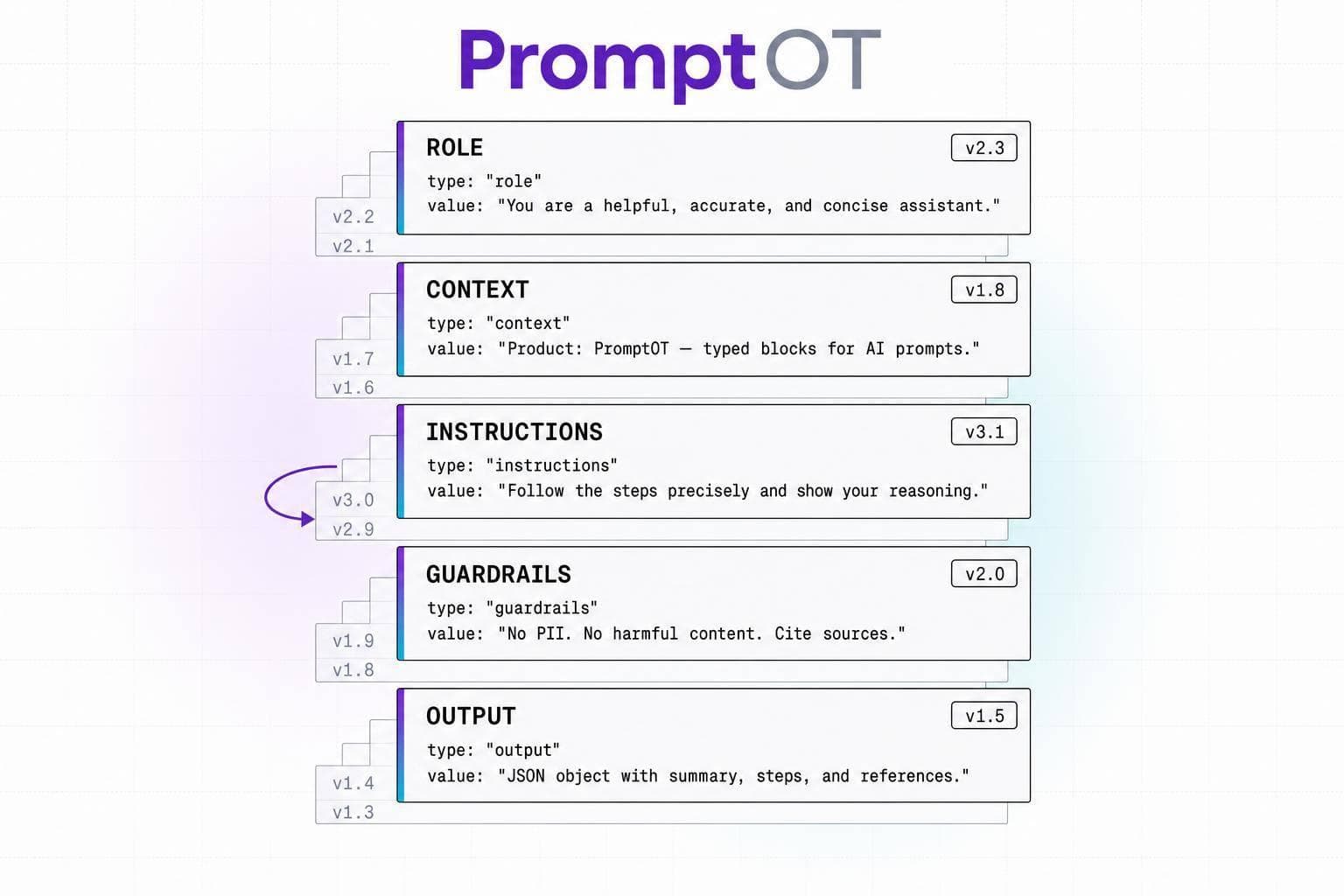
If you change a production prompt without version control, you are changing product behavior without a safe release process.
I’d sum up the article like this: typed block versioning turns prompts from loose text into release artifacts with clear parts, fixed history, and fast rollback. The core idea is simple: split prompts into role, context, instructions, guardrails, and output format, then version each part so teams can review changes, test them, and revert in under 60 seconds instead of digging through logs for 15+ minutes or more.
Here’s what matters most to me:
- Versioning and deployment are different. One stores history. The other points production to the live version.
- Typed blocks make diffs readable. I can see whether someone changed safety rules, task logic, or output structure.
- Guardrails work better when isolated. Safety rules are easier to review when they are not mixed into a long prompt.
- Rollback gets much faster. Some teams move back to a known-good version with a pointer change instead of a redeploy.
- Eval gates cut regressions. Teams often block releases if scores drop by more than 3% from baseline.
- Golden datasets matter. A set of 50 to 200 test cases helps catch drift, schema failures, and edge-case errors before release.
- Shared blocks reduce drift across teams. A common guardrail or output schema can stay aligned across dev, staging, and production.
- Audit trails matter in regulated work. Teams need to answer: what exact instructions was the system following at this time?
If I had to reduce the whole piece to one takeaway, it would be this: prompt management should work like software release management. Typed block versioning does that with immutable versions, block-level review, evaluation gates, environment scoping, and instant rollback.
Quick comparison
| Area | Single prompt text | Typed block versioning |
|---|---|---|
| Review | Hard to scan | Clear by block |
| Safety checks | Buried in text | Guardrails stand on their own |
| Rollback | Often tied to redeploy | Pointer change |
| Audit trail | Often incomplete | Fixed version history |
| Team workflow | High friction | Clear handoff across roles |
| Output stability | More parse risk | Better schema control |
So if you run prompts in production, I’d treat them like code releases - not like copy edits.
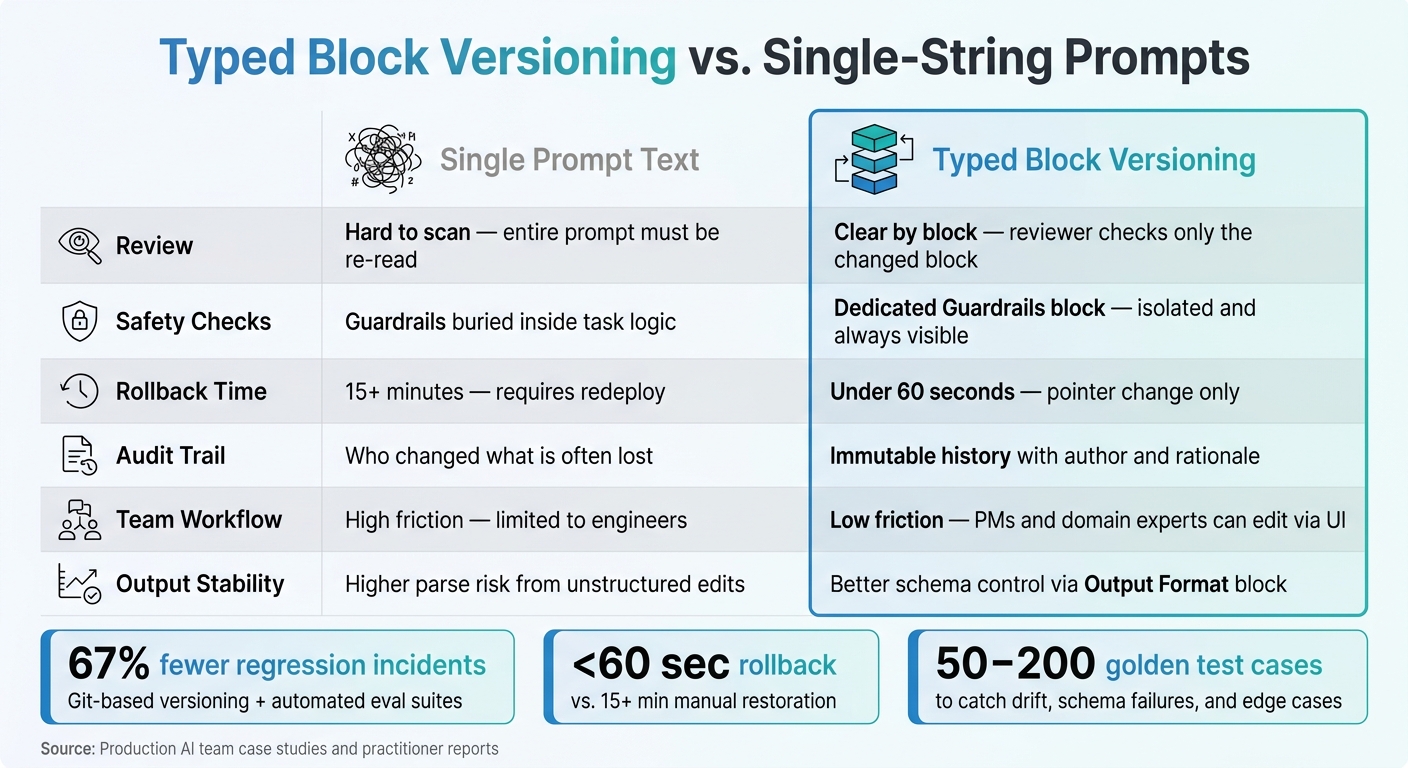
Typed Block Versioning vs. Single Prompts: Key Metrics & Benefits
Why Your LLM App Needs Git-Like Versioning for Prompts #ai #llm #prompt #git #version #shorts
sbb-itb-b6d32c9
What Typed Blocks Add to Prompt Versioning
Typed blocks split a prompt into separate parts, and each part gets its own version history. Each block has a clear job. That makes prompt drift easier to catch and less likely to spread across teams. In practice, prompt edits start to look more like controlled releases than casual text changes.
Core Block Types and Their Roles
Role, context, instructions, guardrails, and output format split tone, input, task logic, safety, and structure into distinct sections.
The Role block shapes the model's tone and reasoning. The Context block stores background data, RAG documents, or user input in a separate place from instructions. That separation lowers risk from untrusted input, especially when clear XML delimiters are used. The Instructions block contains the main task logic and nonnegotiable rules, so if something goes wrong, it's easier to pinpoint intent. The Guardrails block keeps safety limits and “do not” rules in one place, which gives reviewers a clear spot to check instead of hiding those rules inside a long paragraph. The Output Format block defines the expected structure, such as a JSON schema, Markdown layout, or length cap. That helps downstream code parse responses with fewer surprises.
Research Findings on Structure, Consistency, and Safety
Structured prompts improve consistency and make safety review easier at scale. Because each block has a clear meaning, platforms can check whether required parts are present. For example, a system can flag a customer-facing prompt that is missing a guardrail block before it goes to production. Block-level versioning also makes diffs easier to read. A reviewer can see that a guardrail changed, not just that some lines shifted inside one large prompt blob.
| Block Type | Typical Content | Research-Noted Benefit |
|---|---|---|
| Role | Persona, expertise, behavioral baseline | Establishes consistent tone and reasoning strategy |
| Context | Background data, RAG docs, user input | Improves grounding and helps resist risk from untrusted input |
| Instructions | Task directives, step-by-step logic | Clearer intent; easier to isolate logic errors |
| Guardrails | Safety constraints, negative constraints | Simplifies safety reviews and policy enforcement |
| Output Format | JSON schema, Markdown layout, length limits | Increases parsing reliability for downstream code |
Instruction order also affects adherence, so changing block order can change behavior, not just layout. That matters a lot once prompts enter production review and release, where small formatting shifts can have very real effects.
PromptOT as a Typed Block Model in Practice
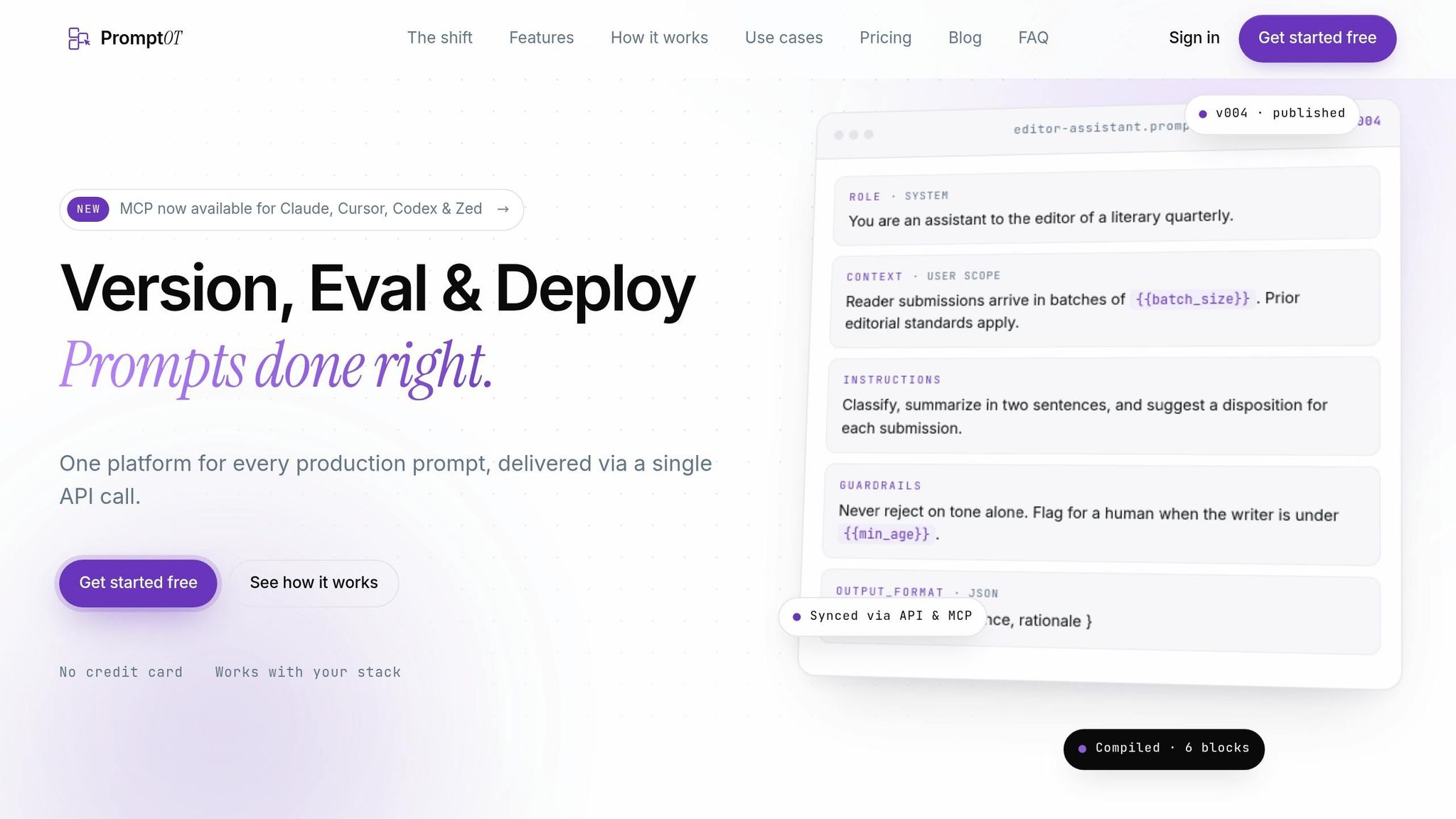
PromptOT gives teams a way to compose typed blocks, version them as draft and published releases, and compile them into a single API call. Guardrail blocks are treated as core parts of the prompt, not optional text. That keeps safety limits visible and reviewable at each release stage. That release model sets up the reliability and safety evidence covered in the next section.
Evidence on Reliability, Safety, and Scalability
The value of typed blocks shows up in three practical areas: rollback speed, safety review, and working across multiple teams.
Reliability Gains from Immutable Versions and Rollback
Immutable versions turn rollback into a pointer change instead of a redeploy. That sounds small, but in practice it's a big deal. If a prompt edit causes trouble, teams don't need to rebuild or re-ship anything. They can just point back to the last clean version.
Research and ops reports tie unversioned prompt edits to slower incident recovery. A February 2026 longitudinal study confirmed meaningful behavioral drift across transformer services over a ten-week period. With immutable versions, teams can isolate the change in about 30 seconds. Mean time to recovery (MTTR) can drop from days to minutes once immutable versioning is in place.
| Dimension | Unversioned (In-Code/Config) | Typed Block Versioning |
|---|---|---|
| Rollback Time | 15+ minutes (requires redeploy) | <60 seconds (pointer change) |
| Auditability | Who changed what is often lost | High; immutable history with author/rationale |
| Team Coordination | High friction; limited to engineers | Low friction; PMs and domain experts can edit in UI |
That same separation helps with safety work too. When rollback is clean and version history is clear, reviews stop feeling like guesswork.
How Guardrail Blocks Support Safety Review
When safety instructions sit inside one long instruction block, edits to tone or helpfulness can weaken guardrails without anyone noticing right away. Dedicated guardrail blocks fix that by giving reviewers one stable place to check safety constraints.
Because the block stands on its own, diffs make it much easier to spot whether a guardrail changed. The change isn't buried inside a wall of prompt text. That extra traceability gives teams a cleaner review path before release.
A common rule is simple: block releases when eval scores drop more than 3% from baseline. Pair that threshold with a golden dataset of 50 to 200 curated test cases, including historical failures and edge cases, and teams get a repeatable way to catch safety regressions before users ever see them.
Scaling Across Teams, Environments, and Prompt Libraries
As prompt libraries grow, tiny differences start to pile up across environments. One team updates a safety line, another tweaks output format, and soon prompts drift apart. Reusable typed blocks cut down that problem because a shared block - like a standard guardrail or output format - can be updated once and propagated in a consistent way.
Scale also depends on clean environment boundaries. Clear promotion steps from dev to staging to production, paired with canary releases that route 5% to 10% of live traffic to a new version for 24 to 48 hours, help teams catch issues that test datasets miss.
PromptOT supports this directly through environment-scoped API keys, so development and production prompts stay separated without extra infrastructure work.
| Feature | Single-String Prompts | Typed Block Versioning |
|---|---|---|
| Root-Cause Isolation | Hard to tell if logic or tone changed | Block-level diffs isolate specific instruction changes |
| Safety Assurance | Guardrails mixed with instructions; high risk | Dedicated guardrail blocks for safety review |
| Collaboration at Scale | Reviewers spend time on formatting noise | Focus stays on semantic changes and token impact |
| Auditability | Who changed what is often lost | High; immutable history with author/rationale |
Case Studies and Patterns from Production AI Teams
The practical test comes down to this: how teams measure prompt changes and keep them under control in production.
Metrics That Case Studies Commonly Track
The same set of metrics shows up again and again in practitioner reports: rollback time, regression incident counts, evaluation scores against golden datasets, structured output error rates, and review cycle time.
Each one tells you something different.
Rollback time shows how fast a team can return to a prior prompt version when something goes wrong. Regression incident counts track how often a prompt update leads to a measurable drop in output quality. In one implementation, Git-based versioning paired with automated evaluation suites cut regression incidents by 67%.
Evaluation scores show whether a new version still performs well against known edge cases and past failure examples. That matters because a prompt can look fine in casual testing, then fall apart on the exact cases that used to break it.
Structured output error rates are a big deal for teams that rely on JSON parsing or schema-constrained responses. Even a small prompt edit can trigger a spike in parse failures. And review cycle time tracks how long it takes to inspect and approve a change. If the diff is obvious, a review can take about 30 seconds. A more careful pass takes around 3 minutes.
Those metrics don’t just sit in a dashboard. They shape the release controls teams put in place.
PromptOT Patterns Seen in Practice
In production, teams tend to use the same controls their metrics are built around: draft/published states, rollback, environment scoping, and automated evaluation.
The pattern is pretty straightforward. Teams use draft/published states, instant rollback, environment-scoped keys, guardrail blocks, and webhook-triggered evaluations to keep releases controlled.
Governance Patterns That Support Reliable Prompt Releases
Governance turns those controls into release policy.
One production registry used ACTIVE, SHADOW, and DEPRECATED states to roll back prompt versions in under one second without redeploying code. Manual restoration took 15+ minutes by comparison. That same setup was built to catch subtle regressions, including instruction conflicts where adding formatting requirements caused models to ignore length constraints.
The table below shows the governance capabilities that appear most often in practitioner reports and how typed block versioning supports each one:
| Operational Capability | Typed Block Versioning Support | Example Mechanism |
|---|---|---|
| Draft-to-Published | Separates experimental iterations from production | Mutable draft state for iteration; immutable published state for delivery |
| Role-Based Access | Controls who can promote versions to production | Domain owners approve intent; platform teams own evaluation gates |
| Auditability | Immutable history with author and rationale for every change | Content-addressable hashes and mandatory changelogs |
| API-First Delivery | Decouples prompt logic from application deployments | Registry serving active versions via a single API call |
| Webhook Evaluation | Triggers automated scoring on every new version | CI/CD pipeline running LLM-as-a-Judge on publish events |
| Environment Scoping | Keeps development and production prompts cleanly separated | Label-based references (e.g., production vs. staging) |
Teams in healthcare, finance, and legal add one more layer. They use immutable history plus captured runtime context to answer a simple but high-stakes question: what instructions was the agent following at a specific timestamp?
Conclusion: What the Research Says About Scalable Prompt Management
The case studies all land in the same place: typed block versioning is what makes prompt changes manageable in production.
When you split a prompt into clear, typed parts - role, context, instructions, guardrails, and output format - changes become easier to review, track, and ship with less risk.
Typed blocks help with review because a reviewer can check one changed block instead of reading the entire prompt again. And immutable versions make each result traceable to the exact prompt and model settings that produced it.
Immutable versions also make rollback simple. It becomes a pointer change, not a messy rewrite. And when guardrails live in their own blocks, safety rules stay visible during review instead of getting buried inside task logic. That separation matters.
At scale, governance is the piece that keeps typed blocks safe to use. Role-based access, change rationales, evaluation gates, and environment scoping give teams room to move without losing control. PromptOT puts this model into practice with typed blocks, draft/published states, instant rollback, environment-scoped API keys, and first-class guardrails built into the workflow.
Prompt management is software engineering. Treat prompt changes like governed releases, not ad hoc text edits, or regressions are bound to follow. Typed blocks shift prompt updates from risky edits to controlled releases.
FAQs
How do typed blocks reduce prompt regressions?
Typed blocks help cut prompt regressions because they make prompts modular and much easier to handle. Instead of treating a prompt like one long, fragile string, you split it into reusable parts like roles, context, instructions, guardrails, and output formats.
That setup makes day-to-day edits less risky. You can change one section without throwing off the rest of the prompt.
Versioning also helps a lot. When each block has its own version, you can test updates in a controlled way, roll back a single problem area, and keep production changes precise, consistent, and easier to audit.
What should go into a golden dataset?
A golden dataset is a curated group of 50 to 200 test cases that match inputs with known-good outputs or clear quality benchmarks. In plain English, it gives you a trusted yardstick for judging whether a prompt change made things better or quietly broke something.
Build it from real production traffic, then mix in hand-crafted scenarios to fill the gaps. That way, you’re not testing only the happy path.
Your dataset should include cases that cover:
- Core functionality
- Resolved edge cases
- Adversarial inputs
- Format-critical outputs that downstream systems parse
This set acts as a gate for prompt promotions and helps catch regressions before release.
How is rollback different from redeployment?
Redeployment updates a prompt by shipping new application code to your servers. That can take time, and it can add more risk while the new code rolls out.
A rollback is different. It’s an instant configuration change that points your app to a previously stable, immutable prompt version. With PromptOT, you can do this in under 60 seconds - without changing or redeploying application code.