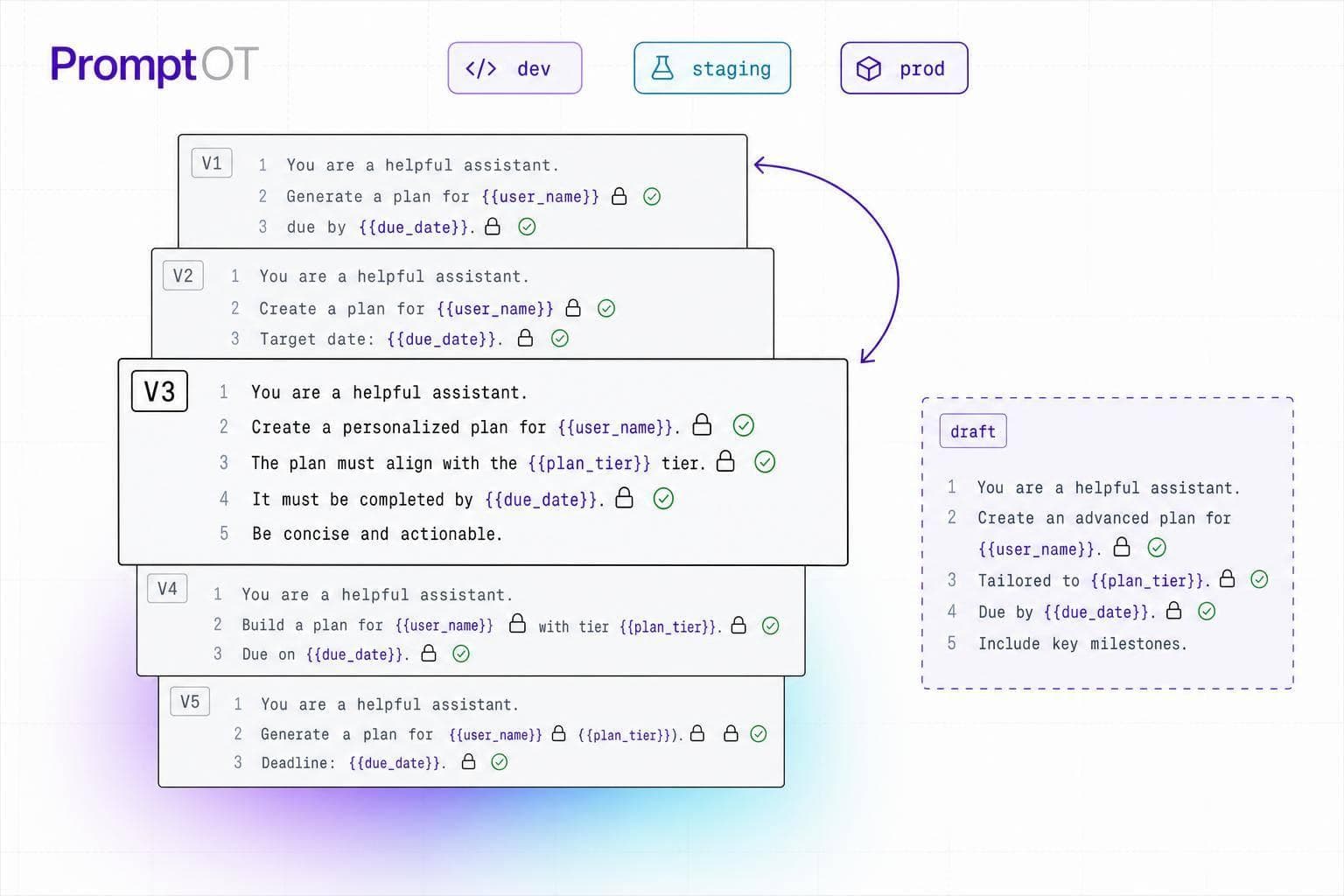
Most prompt failures come from variable mistakes, not from the prompt itself. If I want prompt updates to ship safely, I need five checks in place: lock the variable contract, separate draft from published versions, validate runtime values before interpolation, verify each environment, and monitor live behavior with a rollback plan.
Here’s the short version:
- Define every placeholder up front: name, type, required/optional status, and default value
- Keep prompt text and app code in sync: even one rename can break requests
- Validate inputs before interpolation: check presence, type, shape, format, and length
- Treat user input as a risk point: sanitize it and keep it out of instruction blocks unless escaped
- Release prompts like config: use draft/published states, version IDs, and environment-specific keys
- Test before promotion: run a 50–200 case golden dataset and block release if scores drop below 90%
- Watch live traffic by version: track unresolved
{{placeholders}}, token spikes, schema errors, and latency - Make rollback immediate: repoint production to the last known-good version without waiting for app redeploy
A prompt with dynamic variables is only as safe as its variable contract and release process. If the contract is loose, the prompt can fail at runtime, leak raw placeholders, or produce output your downstream code can’t parse.
Quick view of the release gate:
| Check | What I verify | Why it matters |
|---|---|---|
| Variable contract | Names, types, required fields, defaults | Stops code-to-prompt mismatch |
| Version flow | Draft vs. published separation | Keeps unfinished edits out of production |
| Runtime validation | Presence, type, shape, format, length | Blocks bad values before interpolation |
| Environment check | Right version, right key, right config | Prevents drift across dev, staging, and prod |
| Monitoring and rollback | Quality, schema, tokens, latency | Lets me revert fast when a version fails |
If I treat prompts like versioned configuration instead of hardcoded strings, I get safer releases, cleaner rollbacks, and fewer production surprises.
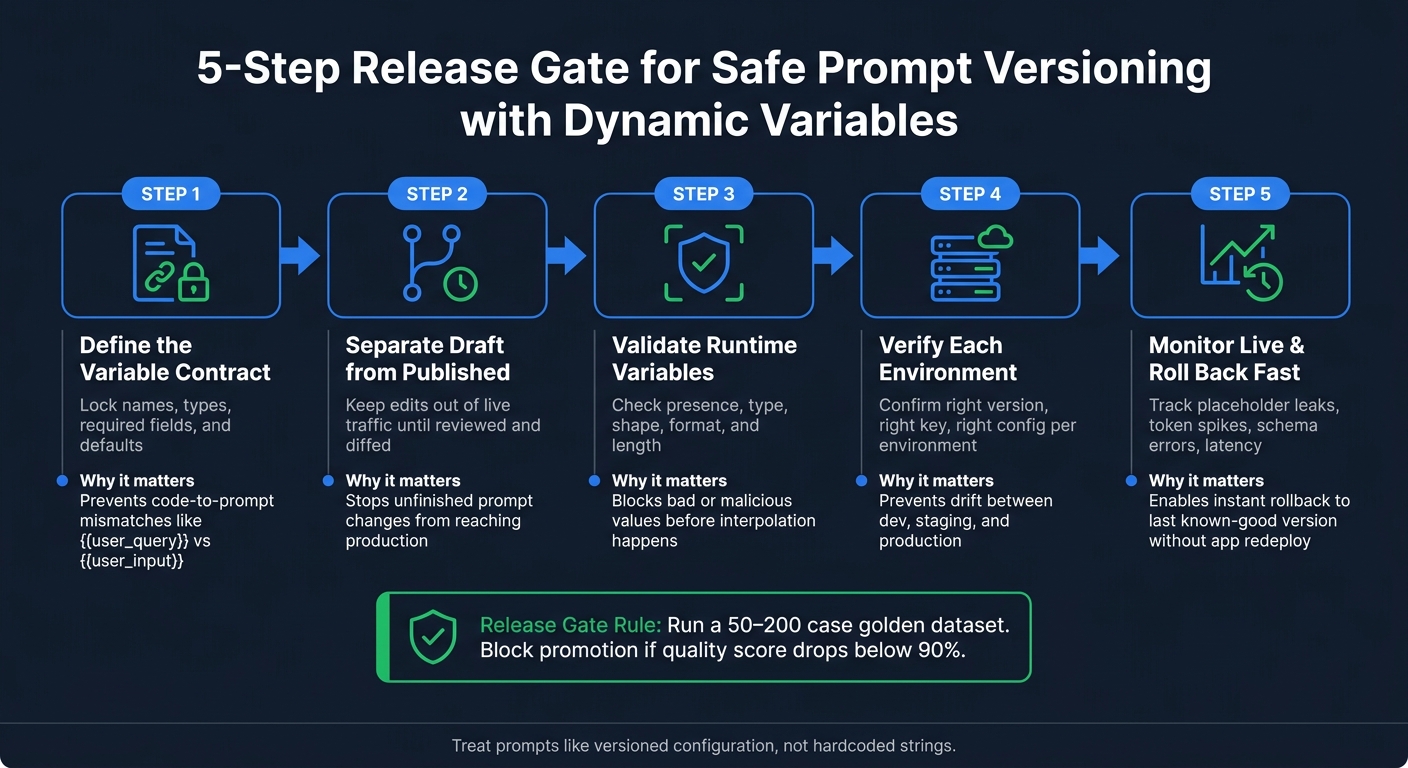
5-Step Release Gate for Safe Prompt Versioning with Dynamic Variables
LLM Ops Tutorial: Prompt Engineering, Versioning, and Dynamic Generation
sbb-itb-b6d32c9
1. Define variable rules before creating a new prompt version
Set the variable contract before you touch the prompt text. That means locking each placeholder’s name, type, and whether it’s required. If you skip this step, you can run into deploy-time mismatches like {{user_query}} vs. {{user_input}}. Use that contract as the single source of truth for every version that follows.
Set naming, typing, and required field rules
It helps to group variables by job:
- User context:
{{user_name}},{{user_role}} - Retrieved content:
{{retrieved_docs}},{{history}} - Configuration:
{{output_language}},{{tone}} - Runtime context:
{{current_date}},{{env}}
This makes the template easier to read and easier to maintain.
For each variable, define the name, type, description, required flag, and default value. That lets you validate templates both when they’re written and when they run. If a variable is optional, give it a default so the prompt still works when the app doesn’t send that value. A prompt version is only safe when the prompt text and the calling code use the exact same variable contract.
Document placeholder syntax and escaping behavior
Once the contract is set, lock down how interpolation works. Use one format - {{variable_name}} - and write it down plainly so every teammate and every integration follows the same rule.
You also need to spell out how literal braces should work. Say your prompt asks the model to return a JSON template that includes {{key}} as a placeholder. If you haven’t planned for that, the interpolation layer may try to resolve it by mistake. That’s the kind of small issue that turns into a production bug at the worst time, so document the escape rule early.
Handle interpolation on the server side so every integration goes through the same parser.
Decide how missing or renamed variables should fail
Next, define failure behavior. If a required variable is missing, the request should fail. If an optional one is missing, the system should fall back to its default. Also decide what happens with empty values or values that are too large before you publish the prompt.
Renamed variables need extra care. Changing {{user_query}} to {{user_input}} might look minor, but it can break downstream code that still sends the old key. Before publishing, diff all added, removed, and renamed placeholders so the prompt and the application stay aligned.
2. Follow a safe workflow from draft to production
Once the variable contract is locked, the next job is getting changes into production without breaking anything.
Keep draft edits separate from published versions
Don’t edit a prompt in place while it’s handling production traffic. Even a small wording change should begin as a draft.
A simple way to enforce that split is with environment-scoped API keys. Your production key should always point to the published version, while your development key should pull the latest draft version. That line in the sand helps keep in-progress edits out of live traffic.
PromptOT supports this setup with draft and published states, plus version history. Published versions should be treated as immutable. If you make a change, it should create a new version ID that can show up in logs and traces.
Review variable contract changes before publishing
Before you promote a draft, compare its variable contract with the published version. The highest-risk changes are the ones that change the contract itself.
| Change Type | Risk Level | Example |
|---|---|---|
| Renaming a variable | High | {{user_query}} → {{user_input}} breaks the API caller |
| Changing required/optional status | High | Making a field required causes runtime failures if the app doesn't send it |
| Changing output format or behavior | High | Switching from prose to JSON |
| Typo fix or variable naming cleanup | Low | Small wording edits |
Adding or removing variables also needs a close review. The application has to send the right values, and it also has to stop sending fields you’ve retired.
Go line by line through prompt changes and check three things:
- Contract impact
- Output changes
- Downstream parser impact
Prepare rollback before promoting a version
Pick your rollback path before you publish. Find the last known-good version and make sure it still works with your current application code. Save the prompt text, model parameters, and the reason for the change with the version so you can restore the prior version exactly if needed.
If you do roll back, don’t overwrite history. Restore the last known-good version as a new version instead, like "v12: restore v10," so the audit trail stays intact.
After release controls are in place, validate runtime variables before interpolation.
3. Validate runtime variables before interpolation
Once a version is published, validate every runtime value before interpolation. Version control gets you to deployment. Validation is the last check before interpolation.
Run presence, type, and shape checks
Start with the basics: does every required variable exist, and does each value match the expected type? If a required field is missing, stop the request right away. Don’t let it slip through and create broken output.
Then check the shape of structured values. If a variable should be a JSON object, confirm that it parses before interpolation. If you expect dates, numbers, or other formatted values, make sure they match the format your downstream code expects.
You should also enforce length limits. Very long values - like a pasted document or a full conversation history - can push the compiled prompt past the model’s context window. Set character or token limits for each variable, then truncate or reject anything that goes over.
The table below shows what each check is doing in production:
| Check | What to Validate |
|---|---|
| Presence | Required variables exist |
| Type | Values match registry types (string, number, array, object) |
| Shape | Arrays and objects have the expected structure |
| Length | Values stay within character or token limits |
| Format | Values preserve the expected formatting and escaping |
After those structural checks pass, move on to sanitizing user-supplied content.
Sanitize user-supplied values and empty inputs
User-supplied values need closer attention. Trim leading and trailing whitespace before interpolation. A value like " support agent " may look harmless, but that extra padding can shift model attention in ways that are annoying to debug. Put hard length limits on any field that accepts free-form text, and escape or reject line breaks that could break instruction boundaries.
The biggest rule is simple: never interpolate a user-supplied value straight into a system prompt or instruction block without sanitization. Escape placeholder syntax in all user-supplied content before interpolation. If someone includes {{variable_name}} in their input, that can trigger nested interpolation or inject instructions you never meant to allow. The same goes for any delimiter characters your prompt uses as structure.
Be clear about empty strings and nulls. They are not the same thing, and your validation layer should not treat them the same way. A null in an optional field might trigger a default value. An empty string in a required field should usually be rejected. Write down the exact rule for each variable so the code stays clear and future reviews don’t turn into guesswork.
Then tie each failure mode to a fixed response.
Define failure responses and fallback behavior
When validation fails, use fixed rules. If a required variable is missing, reject the request. If an optional variable is missing, apply the default from the variable registry and continue. If type or shape validation fails, reject and log it. Don’t coerce types at runtime.
For length violations, decide ahead of time whether you’ll truncate with a warning or reject the request outright. Truncation is safer for UX. Rejection is safer for output quality.
Log the prompt version and the validation error details so you can trace failures and spot repeat issues fast.
4. Verify prompt delivery by environment and monitor after release
Check environment-scoped configuration before launch
After runtime validation, make sure each environment still points to the prompt version you meant to ship. Development, staging, and production should each use the right version and the right API keys.
Run the same checks in every environment with realistic payloads and edge cases. This is where you catch unresolved placeholders, wrong values, and config drift before release. Then do a quick diff before promotion. Check whitespace, newline boundaries, and the exact versioned prompt text.
Run the version against a 50–200 case golden dataset, and block promotion if quality metrics fall below 90%. If staging fails, stop the rollout before any live traffic changes.
Monitor interpolation failures and output quality
Tag every LLM call with the prompt version ID so live metrics stay tied to a single release. Once that version is live, track interpolation and quality signals by version ID. Watch for unresolved {{variable}} placeholders in prompts or outputs. Track token counts for each request too. Dynamic variables, like retrieved context, can quietly bloat prompt size and drive costs up with no visible error.
Use one scoring method for both offline and live checks so your thresholds stay consistent.
| Monitoring Type | What to Watch |
|---|---|
| Interpolation | Unresolved {{variable}} placeholders in output; empty values render into output |
| Quality | Output schema shifts; golden dataset score drops |
| Performance | Token count spikes; latency increases per prompt version |
| Model drift | Behavior changes after model provider updates, even with no prompt edits |
Set rollback triggers
If live metrics drift, fall back on rollback rules you defined before release, not after something breaks. A drop in quality score, a spike in schema errors, or a broken output schema should all trigger an immediate rollback. For softer regressions, send only 1%–10% of traffic to the new version first.
Rollback is simple: repoint prod to the last known-good version ID. That takes less than a minute and does not need an application redeploy.
After any rollback, save the production inputs that exposed the failure and add them to your golden dataset. Those edge cases often turn into your best regression tests for the next version.
Conclusion: Core checks for safe prompt versioning with dynamic variables
Safe prompt versioning with dynamic variables comes down to five core checks. Treat them as the release gate for every new prompt version.
Start with variable contracts. Every required variable should be clearly named, typed, marked as required, and checked before promotion. If that contract is loose, the rest can fall apart fast.
Then lock down draft-to-published controls. Test edits should stay out of live traffic until they pass draft review, diff checks, and evaluation. That extra pause can save you from pushing half-finished prompt changes into production.
Next is pre-interpolation validation. Variables are a trust boundary, not just a convenience. Check that each one exists, matches the expected type, and is safe to use before interpolation happens.
After that, verify the environment. Each environment should point to a specific prompt version and runtime config. That helps stop config drift, where staging and production slowly drift apart and no one notices until something breaks.
Finally, keep monitoring and rollback tight. Track versioned calls, watch for placeholder leaks and token spikes, and keep the last known-good version ready for instant rollback. Monitor the live version closely, then revert fast if output quality drops.
PromptOT keeps these controls in one workflow. It supports this setup with draft and published states, environment-scoped keys, runtime interpolation, and instant rollback.
FAQs
What is a variable contract?
A variable contract is a reusable prompt structure with defined placeholders, such as {{user_name}} or {{context}}, that get filled at runtime.
Think of it as a formal agreement between the prompt template and the application. It makes sure the needed data - names, types, and expected formats - is supplied during compilation.
That keeps prompt building consistent and reproducible, while also separating template logic from application data.
How do I test prompt versions safely?
Treat prompt versions like production code. Keep them outside your app, use environment-scoped keys, and test every change before release against a fixed dataset of 50–200 inputs.
That dataset should include:
- representative cases
- edge cases
- adversarial inputs
This isn’t busywork. It’s how you catch prompt regressions before they hit users.
Add release gates in your CI/CD flow. Then use canary rollouts or shadow testing to watch how a new prompt behaves before full launch. Also, always log the prompt version ID. That gives you traceability and makes rollback immediate if something goes sideways.
In PromptOT, pass runtime data through variables. For stability, set default placeholder values too. That small step helps prevent prompts from breaking when input data is missing or shaped a little differently.
When should I roll back a prompt?
Roll back a prompt as soon as a production version starts slipping, whether that shows up as output regressions, formatting issues, or safety violations.
With PromptOT, earlier versions stay immutable and easy to access, so you can revert to the last known stable version fast. And by using environment-scoped pointers or aliases, you can handle the rollback as a simple config change instead of doing a full application redeploy.