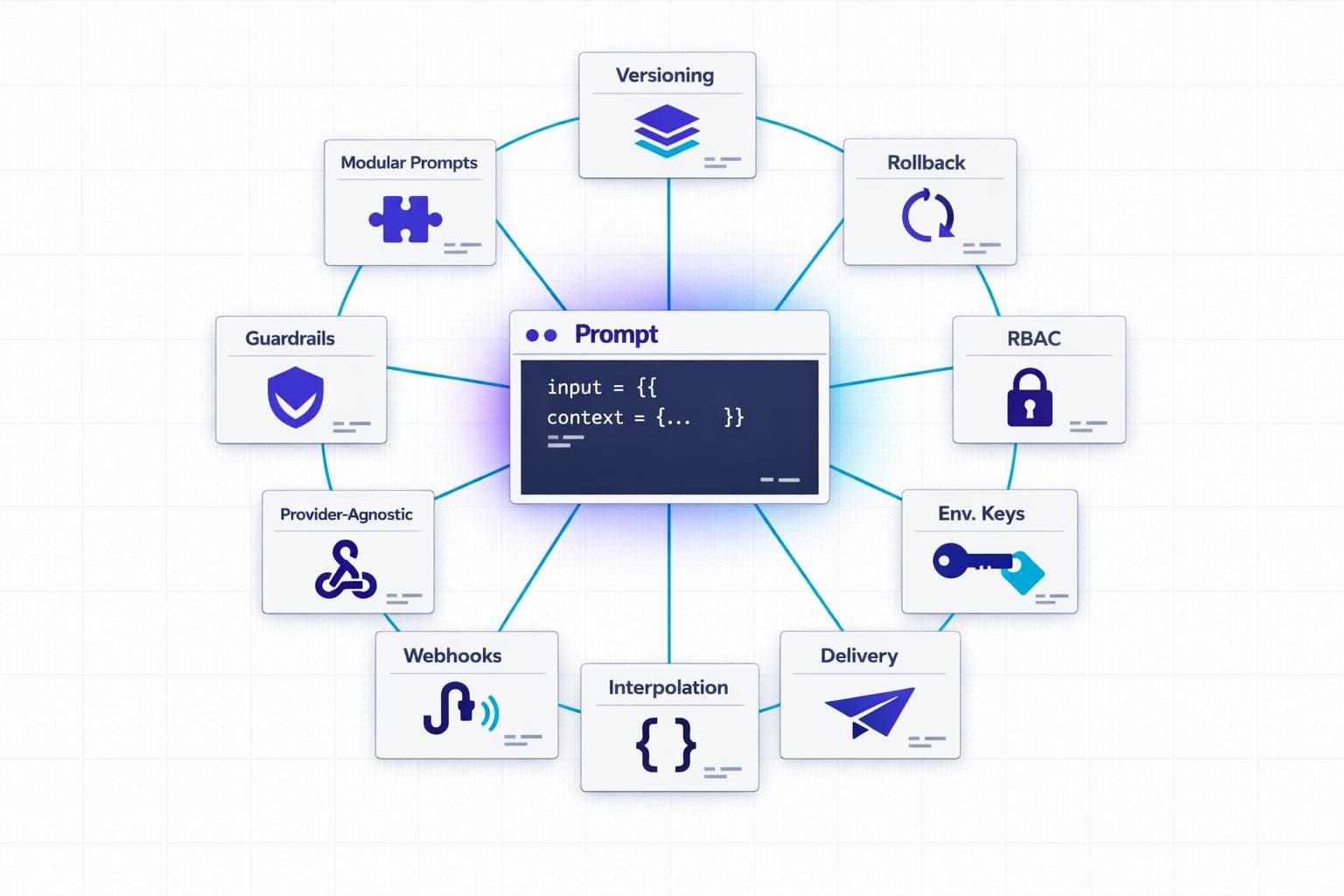
Managing prompts effectively is critical for scaling AI applications in enterprises. Without the right tools, teams face inefficiencies like manual updates, poor version control, and compliance risks. This article highlights 10 key features that streamline prompt management and make it more reliable, secure, and scalable:
- Block-Based Prompt Composition: Break prompts into reusable components for easier updates and collaboration.
- Version Control: Use draft and published states to test changes without disrupting production.
- Instant Rollback: Quickly revert to stable versions to handle unexpected issues.
- Role-Based Access Control (RBAC): Define permissions to improve collaboration and security.
- Environment-Scoped API Keys: Separate credentials by environment to reduce security risks.
- AI-Powered Block Rewriting: Automate prompt refinements with machine learning.
- Webhook Notifications: Enable real-time updates and workflow automation.
- Guardrail Blocks: Ensure safety by filtering and monitoring outputs.
- Variable Interpolation: Use placeholders for dynamic updates without redeploying code.
- LLM-Agnostic API Delivery: Switch between AI providers without rewriting code.
These features help teams save time, improve collaboration, and ensure compliance while scaling AI systems. Whether you're struggling with manual processes or looking to optimize your workflow, these tools can transform how you manage prompts.
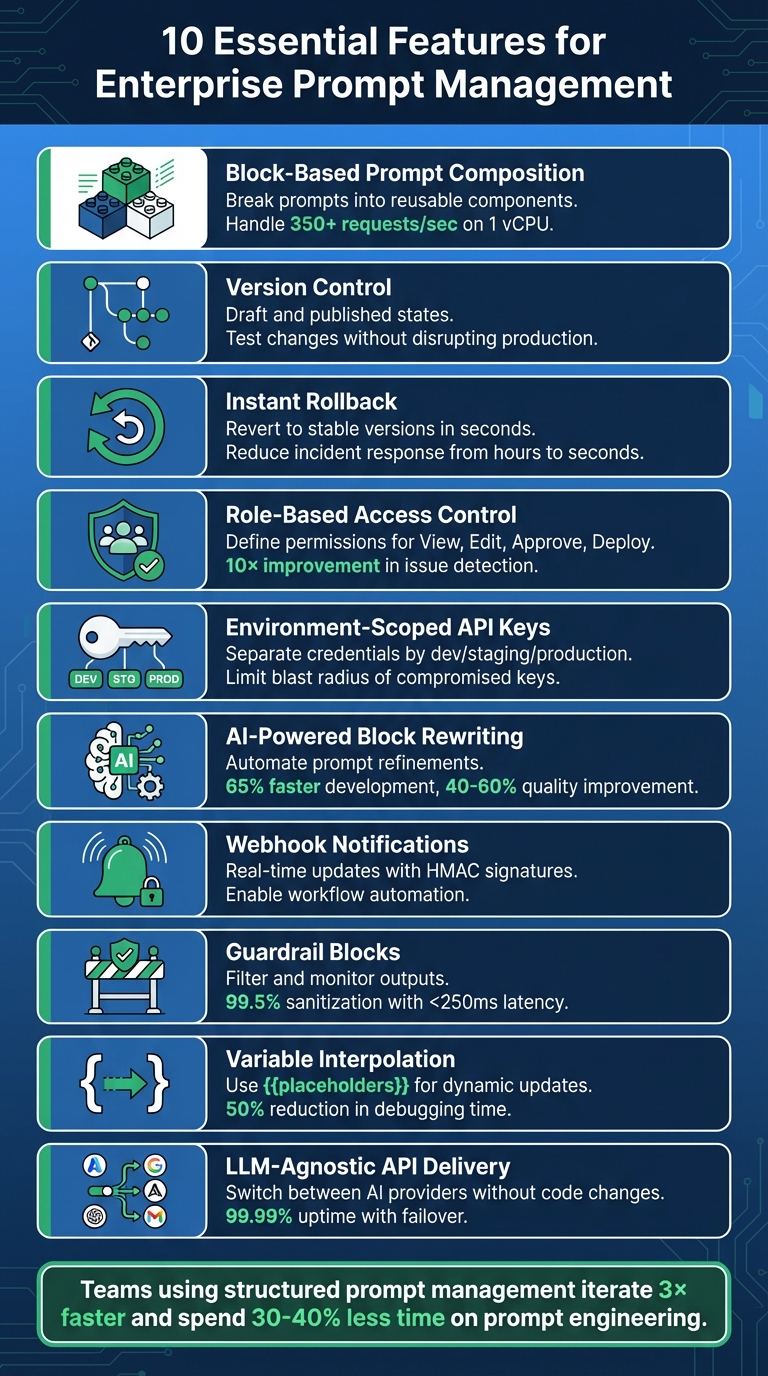
10 Essential Features for Enterprise Prompt Management
Prompt Management 101 - Full Guide for AI Engineers
sbb-itb-b6d32c9
1. Block-Based Prompt Composition
Block-based prompt composition transforms large, cumbersome text prompts into smaller, reusable components. Instead of treating prompts as a single block of text, they are divided into distinct parts - like role definitions, context, instructions, guardrails, and output formats. Each block has a specific function and can be rearranged, updated, or reused without touching the underlying code.
Scalability and Flexibility for Enterprise Use
This modular approach makes it easier for enterprises to manage and update prompts efficiently.
When prompts are hard-coded, even minor updates might require redeploying the entire application. This can result in teams spending 30-40% of their prompt engineering time redoing work or troubleshooting issues. Block-based systems solve this by centralizing prompt templates in one place. These templates can be accessed through an API at runtime, allowing quick and dynamic updates. Impressively, a well-optimized implementation can handle 350+ requests per second on just 1 vCPU, dynamically resolving prompt blocks as needed.
Dynamic variable interpolation - using placeholders like {{user_name}} or {{product_category}} - further simplifies customization. This allows prompts to adjust automatically without requiring changes to the template itself. This is especially valuable for businesses managing thousands of prompt variations tailored to different customer groups, regions, or specific use cases.
Collaboration and Team Management Features
Beyond operational efficiency, block-based composition improves team collaboration.
With modular prompts, non-technical team members - like subject matter experts, product managers, or compliance officers - can directly edit specific blocks through an easy-to-use interface. This eliminates the need for lengthy back-and-forth with engineering teams. For example, a compliance team can "lock" safety-related blocks while product teams refine tone or instructional elements.
This division of responsibilities reduces the chances of conflicting updates. Features like role-based access control ensure that only authorized users can modify sensitive components, such as guardrails or system prompts. Every change is tracked with version IDs, timestamps, and author details, which is essential for meeting regulatory requirements.
This structured and collaborative approach makes block-based systems a natural fit for any LLM environment.
Ease of Integration with Existing Workflows or LLM Providers
Block-based systems are designed to work seamlessly with any LLM provider. Compiled prompts are delivered via REST API, making them compatible with providers like OpenAI, Anthropic, or Google Gemini, without needing changes to the core application. This flexibility allows teams to test the same prompt across different models or switch providers based on cost, performance, or availability.
For workflows involving multiple steps, block-based management simplifies dependencies. If, for instance, a JSON schema block is modified, all related prompts automatically stay in sync. Additionally, environment-specific resolution ensures that experimental changes remain in testing while production systems only use approved versions.
"Prompts are logic - they deserve the same deployment rigor as code." - Adaline
2. Version Control with Draft and Published States
Expanding on modular composition, effective version control ensures that prompts remain accurate and stable as they evolve. Without it, even minor updates can become a headache. A simple two-minute edit might spiral into hours - or even days - of work, involving engineering reviews, testing, and redeployments. By introducing draft and published states, teams can experiment freely during development while keeping the production environment steady.
Scalability and Flexibility for Enterprise Use
Draft states offer a safe space for product managers and domain experts to test different prompt variations without affecting live systems. These variations can be evaluated in staging environments before promoting a finalized version to production using environment-based deployment. Applications then automatically pull the right version based on their runtime setup.
Immutability plays a key role here, ensuring that once a version is created, it remains unchanged. This consistency is crucial for debugging and meeting compliance standards. To validate new versions, a carefully curated "golden dataset" of 50 to 200 test cases is often sufficient before moving forward. This structured process encourages smoother collaboration across teams.
Collaboration and Team Management Features
Aliases like @production or @staging simplify workflows by letting developers use labels instead of hardcoding specific version numbers. Once a new prompt passes testing, updating the alias automatically applies the changes in production - no need for a full redeployment. This system also supports approval gates, ensuring that only prompts meeting strict criteria, such as a 90% score on regression tests, make it to production.
Security and Compliance for Sensitive Data
Version control also strengthens security and compliance, particularly for industries handling sensitive information. Regulated sectors often require complete prompt lineage - the ability to trace exactly what instructions the AI received at any given time. By tracking version IDs, timestamps, and author details, version control provides an automatic audit trail. Multi-stage approval workflows further reduce risks by requiring peer reviews before prompts are deployed to production.
This structured approach ensures both accountability and reliability, critical for maintaining trust in high-stakes environments.
3. Instant Rollback Capabilities
Instant rollback capabilities act as a critical safety net in prompt management, complementing robust version control. Even with thorough testing, updating prompts can sometimes lead to unexpected production issues. These might include hallucinations, degraded output quality, or behavioral changes that negatively affect user experience. When such problems arise, instant rollback allows teams to revert to a stable version immediately - no need for engineering intervention or a full code redeployment. This feature becomes especially important as organizations scale and aim to maintain compliance.
Scalability and Flexibility for Enterprise Use
Traditional systems tie prompts directly to code, requiring time-consuming file edits, testing, and redeployments. By separating prompts from code and storing them in a database-backed system, teams can switch between versions instantly using an API or UI. This drastically reduces incident response times, cutting them from hours to just seconds.
"Building LLM systems without proper prompt management is like developing software with FTP instead of Git - technically possible, but no modern team would consider it." - Engineering Leader
This approach also supports enterprise-scale operations. Teams can experiment on isolated branches without jeopardizing production stability. For example, if a version fails in staging, rolling back is as simple as pointing a mutable alias (like @production) back to the previous version ID.
Security and Compliance for Sensitive Data
For industries managing sensitive or regulated data, instant rollback is more than just a convenience - it’s a compliance tool. Each rollback action is logged with details like who initiated it, when it occurred, and the reason for the change. This creates an immutable audit trail, helping organizations meet standards such as NIST SP 800-92. Some advanced systems even automate rollbacks when certain thresholds are breached. For instance, if reliability scores drop below 90% on regression tests, the system can automatically revert to the last stable version.
Ease of Integration with Existing Workflows or LLM Providers
Instant rollback fits seamlessly into modern workflows, even in environments using multiple LLM providers like OpenAI, Anthropic, or AWS Bedrock. LLM-agnostic gateways ensure that teams can switch providers without needing to rewrite integration code. These systems resolve prompt versions at runtime with minimal latency, streamlining operations. By adopting structured prompt management, debugging time is reduced by 50%, and teams can iterate on prompts three times faster.
4. Team Collaboration with Role-Based Access
Role-based access control (RBAC) takes teamwork to the next level by making prompt management a collaborative effort rather than a developer-only task. Combined with features like version control and instant rollback, it ensures smoother workflows across teams.
Collaboration and Team Management Features
RBAC redefines how teams manage prompts by creating clear permissions for different actions - View, Edit, Approve, and Deploy. This structure lets non-technical team members participate in the process without risking the stability of production environments. It’s a game-changer for organizations looking to streamline their workflows and reduce bottlenecks.
By separating prompt content from code, RBAC allows teams to update and refine prompts without lengthy delays. A great example of this is Notion’s 2024 implementation of a centralized prompt management system. With environment-based deployments and automated evaluations, they boosted their issue detection rate from 3 to 30 per day - a 10× improvement - by moving away from manual coordination through tools like Slack and Notion docs.
"Dividing the roles and allowing some to work on prompt engineering, some on code infrastructure, and some on prompt deployment is best practice." - Agenta
RBAC doesn’t just improve collaboration; it also strengthens security practices.
Security and Compliance for Sensitive Data
RBAC isn’t just about teamwork - it’s also a vital tool for maintaining security and meeting compliance standards, especially in regulated industries. By limiting who can deploy prompts to specific environments like development, staging, or production, organizations can prevent unauthorized changes from going live. Detailed audit trails further enhance compliance by keeping a record of every action taken.
Approval workflows add another layer of security. Teams can require peer reviews before marking a prompt version as “production-ready.” This ensures that every change is carefully reviewed for quality, safety, and regulatory compliance. Treating prompts as production assets rather than experimental code is critical when dealing with sensitive information.
RBAC’s structured approach doesn’t just stop at security - it also scales effortlessly for larger organizations.
Scalability and Flexibility for Enterprise Use
As organizations grow, they need systems that can adapt. RBAC offers granular permission tiers, such as Admin, Editor, and Viewer roles, which can be scoped to specific projects or folders. This ensures that boundaries remain clear, even as teams expand.
Additionally, integration with identity providers through SSO protocols like OIDC or SAML streamlines permissions management. This automation reduces administrative workload while bolstering security across the board, making it easier for enterprises to maintain control without sacrificing efficiency.
5. Environment-Scoped API Keys
Environment-scoped API keys add a strong layer of security by separating credentials across development, staging, and production environments. This setup reduces potential damage if a key is compromised. For instance, if a development key is leaked, it won’t expose sensitive production data or impact your production budget. This straightforward approach plays a significant role in securing enterprise systems.
Security and Compliance for Sensitive Data
By assigning different permissions to keys based on the environment, you can limit the capabilities of development keys - such as restricting access to less costly models or enforcing lower rate limits - while keeping production keys fully functional. This level of control is crucial for AI systems that might interact with databases or handle financial transactions.
"Use different API keys for your development, staging, and production environments. This limits the blast radius if a key for a lower environment is compromised." - ApX Machine Learning
To manage these keys securely, centralized secrets management tools like AWS Secrets Manager, HashiCorp Vault, or Azure Key Vault come in handy. They provide encrypted storage, automatic key rotation, and detailed audit trails that track key access and usage. These logs are essential for meeting SOC 2 compliance and adhering to internal security policies. One key rule: never hardcode API keys. Instead, use environment variables or secret managers to keep them secure.
Ease of Integration with Existing Workflows or LLM Providers
Environment-scoped keys don’t just enhance security - they also simplify integration with your development processes. Applications can reference logical environments (like "production" or "staging") rather than embedding specific LLM provider keys in the code. At runtime, the system automatically determines the appropriate API key and prompt version based on the environment. This eliminates the need to redeploy code for updates and helps avoid interruptions during deployments.
For multi-tenant applications, dynamic credential injection allows each customer to use their own LLM provider keys while ensuring complete isolation. To maintain reliability, fallback credentials can be configured. If dynamic keys are unavailable, the system can seamlessly switch to static environment variables, ensuring uninterrupted service without manual intervention.
6. AI-Powered Block Rewriting
AI-powered block rewriting takes the modular approach to the next level by using machine learning to refine individual components of a prompt, such as role definitions, instructions, and context blocks. Instead of spending hours manually adjusting prompts, teams can rely on AI to generate better versions based on performance data and established best practices. This approach is especially helpful for enterprises managing multiple variations of prompts.
Scalability and Flexibility for Enterprise Use
Automated rewriting significantly reduces the time needed to create effective prompts. Companies that adopt structured AI optimization frameworks have reported a 65% faster development of production-ready prompts. Additionally, formal prompt engineering programs can improve output quality and consistency by 40–60%. By focusing on optimizing modular blocks - like role-based templates or sections with domain-specific knowledge - businesses can create prompts tailored to different scenarios. This strategy allows enterprises to scale their AI capabilities 3.2x faster while achieving a 43% higher reuse rate across various departments.
"AI prompt optimization refers to the systematic process of refining instructions given to AI systems to produce more accurate, relevant, and valuable outputs." - Dejan Markovic, Co-founder, hypestudio.org
AI feedback loops play a key role here, continuously improving prompt components using performance data and satisfaction metrics. This reduces the need for constant manual adjustments and ensures that prompts remain reliable - an essential factor for enterprise-level operations. These automated updates not only save time but also integrate smoothly into existing workflows.
Ease of Integration with Existing Workflows or LLM Providers
AI-rewritten prompts are designed to integrate effortlessly into current development pipelines. By decoupling prompt logic from application code, non-technical team members can directly update prompts through a management interface. Applications can then fetch the latest versions via API connections. Teams can also perform side-by-side comparisons of AI-optimized prompts against their original versions before deployment, ensuring improvements don’t unintentionally cause issues. Additionally, optimized prompts maintain the use of dynamic variables (e.g., {{customer_name}}), allowing them to fit seamlessly into existing data workflows.
7. Webhook Notifications with HMAC Signatures
Webhook notifications are a game-changer for enterprise-level prompt management. Instead of relying on constant API polling, your systems can react in real-time whenever a prompt version is published, updated, or deployed. This push-based approach reduces latency, trims down unnecessary API calls, and ensures that local caches stay synchronized. It’s especially useful for triggering automated workflows without delay.
Security and Compliance for Sensitive Data
To ensure webhook requests are authentic and tamper-free, HMAC (Hash-based Message Authentication Code) signatures are used. Here’s how it works: when a webhook is sent to your endpoint, it includes a signature header. This header is created by hashing the raw request body with a shared secret key. On your end, you can recompute the hash and compare it to the signature to confirm the request’s legitimacy.
"For signature verification, it is essential to use the raw body of the request. If you are using a framework, ensure that it does not alter the raw body, as any manipulation will cause the verification process to fail." - Orq.ai Documentation
To add another layer of security, many enterprise platforms include a timestamp in their signed payloads, such as the X-MLflow-Timestamp header. By rejecting requests with timestamps older than 5 minutes, you can thwart replay attacks, where intercepted requests might be reused maliciously. Additionally, validating webhook URLs to reject private or loopback IP addresses can protect against SSRF (Server-Side Request Forgery) vulnerabilities.
Ease of Integration with Existing Workflows
Once security is locked down, webhooks can seamlessly integrate into your workflows. For example, they can fit right into CI/CD pipelines, allowing prompt updates to trigger automated builds or pull requests - no need for a full application redeployment. Considering that prompt engineering can take up 30–40% of AI development time, this automation can save significant effort. With webhook-driven processes, your systems can automatically update local caches, sync templates with repositories like GitHub, or send notifications to team communication tools - all without manual intervention.
To handle scalability, your webhook handler should return a 2xx status code immediately and move any heavy lifting to background workers. Use unique idempotency keys, like a webhook-id, to manage retries efficiently in case of exponential back-off. Always verify signatures using constant-time methods, such as crypto.timingSafeEqual, and require HTTPS-only endpoints to safeguard your shared secret.
8. Guardrail Blocks as First-Class Components
After establishing solid version control and secure API integrations, guardrail blocks play a critical role in ensuring safety throughout the deployment process. These blocks act as control mechanisms designed to filter, validate, and monitor the AI pipeline, preventing unsafe outputs at every step. When treated as first-class components, guardrails are managed as a unified, versioned unit alongside instructions and variables. This ensures that every update is tracked and deployed consistently, avoiding the complications of scattered safety rules. By centralizing these controls, the framework mirrors the structured approach used in prompt version control, further strengthening system reliability.
"A production prompt is not just text. It includes... output constraints and guardrails. [We treat] all of these as a single versioned unit." - LangWatch
Security and Compliance for Sensitive Data
Guardrails function as a protective layer between human input and machine output, reducing the risk of exposing sensitive data such as PII, PHI, PCI, or proprietary code. These safeguards rely on techniques like online tokenization to mask sensitive information and response modulation to filter out potentially harmful outputs. By doing so, they prevent leaks through logs, caches, or training pipelines.
Advanced guardrail systems achieve impressive metrics, sanitizing at least 99.5% of requests with less than 1% false negatives, all while maintaining a latency of under 250ms for 99% of requests. To reach such precision, consider tagging data with context-aware sensitivity labels like Public, Internal, Confidential, or Restricted. Additionally, secure Retrieval-Augmented Generation (RAG) methods can be employed to encrypt and control access to data sources while generating embeddings from tokenized inputs.
Ease of Integration with Existing Workflows
Decoupling guardrails from application code simplifies their integration into existing workflows, improving both flexibility and compliance. This separation allows safety policies and behaviors to be updated in real-time without requiring a full redeployment of applications. By storing guardrail blocks in a centralized registry instead of embedding them in code, these components can be reused across various applications and agents. Teams can dynamically fetch guardrails via an API or AI Gateway, enabling instant updates to safety policies.
To ensure robust implementation, establish formal review processes for any changes to guardrail blocks or prompt templates before they go live. Incorporating automated evaluation gates into CI/CD pipelines can help catch potential quality or safety issues before deployment. Additionally, Role-Based Access Control (RBAC) allows legal and compliance teams to independently review and approve guardrail configurations, ensuring adherence to organizational standards.
9. Variable Interpolation with Runtime Placeholders
Building on our earlier discussion around secure and adaptable prompt management, variable interpolation takes customization to a new level by enabling changes to prompts without the need for redeploying code. It extends modular prompt designs by automating customization at runtime.
With variable interpolation, static templates transform into dynamic workflows by separating logic from runtime data. Instead of embedding fixed values like user names, database schemas, or legal disclaimers directly into prompts, placeholders such as {{user_name}} or {{database_schema}} are used. These placeholders are resolved during runtime, allowing non-technical users to update templates through a user interface while engineers focus on managing data injection. This eliminates the need for code redeployments to make simple updates.
Scalability and Flexibility for Enterprise Use
Runtime placeholders make it possible for a single template to handle millions of queries automatically. Structured prompt management has been shown to reduce debugging time for LLM-related issues by 50%, while teams using this approach iterate on prompts three times faster than those relying on hardcoded solutions. Additionally, organizations with mature prompt standardization practices report 43% higher reuse rates for prompts across various departments.
The backbone of this scalability is a modular prompt architecture. Enterprises often create "master prompt skeletons" that include placeholders for components like database schemas, few-shot examples, or legal disclaimers. These elements are then dynamically imported as snippets or variables. This modular approach ensures consistency across thousands of prompts while allowing each application to inject its own specific context. Advanced templating tools like Jinja2 or Python f-strings enable even more complex logic, such as loops or conditional formatting, directly within the prompt.
Security and Compliance for Sensitive Data
Placeholders also enhance security by ensuring sensitive information, such as Personally Identifiable Information (PII), is not stored in the prompt management system itself. Instead, this data is injected securely at runtime. This separation creates a clear security boundary, keeping prompt templates clean and auditable while ensuring sensitive data flows through secure channels. Organizations can further enhance security by classifying prompts and retrieved content before they are sent to the model. Managed services can mask PII/PHI with custom identifiers to prevent unauthorized access.
"Separate 'instructions' from 'data.' Never mix retrieved content (RAG, web pages, PDFs, tickets) directly into the model's control channel." - Svitla
Maintaining strict context boundaries is essential. For example, labeling untrusted segments (like variables) allows systems to down-rank or ignore instructions originating from user-provided data. This practice helps prevent prompt injection attacks, where malicious input attempts to manipulate the model's behavior.
Ease of Integration with Existing Workflows or LLM Providers
Runtime placeholders are designed to integrate smoothly with existing enterprise workflows. Using standardized templating syntax, such as double braces ({{variable_name}}), makes them compatible with frameworks like LangChain or LlamaIndex. When prompts are stored in a centralized management system, non-technical users can update them via a user interface, and applications automatically fetch the latest versions.
| Integration Path | Mechanism | Ideal Use Case |
|---|---|---|
| Live Fetching | App fetches template via SDK; interpolates variables locally | Teams aiming for fast iteration without adding latency to critical workflows |
| Proxy / Gateway | App sends variables to a gateway; gateway resolves prompt and calls LLM | Teams seeking built-in observability, cost tracking, and provider abstraction |
| CI/CD Webhooks | Prompt changes trigger a webhook that creates a PR in the code repo | Organizations requiring strict compliance and manual code reviews |
Centralized registries with runtime fetching can reduce the time required for a prompt update from hours or even days (due to deployment cycles) to just 2 minutes. For optimal performance, client-side caching can be implemented to execute variable interpolation at memory speed, avoiding network delays. This rapid update cycle boosts operational efficiency, enabling teams to adapt quickly to new requirements.
10. LLM-Agnostic API Delivery
LLM-agnostic API delivery rounds out the key features needed for enterprise-level prompt management. Instead of locking into specific LLM providers with hardcoded calls, this system lets you use stable identifiers (like support-bot:production) to reference prompts. You can then switch models or providers by simply updating configurations, not your codebase.
Scalability and Flexibility for Enterprise Use
This setup eliminates vendor lock-in and allows seamless runtime model switching. For instance, if you want to transition from GPT-4 to Claude or experiment with another provider, all it takes is a registry update - no need to rewrite application logic. It also supports automatic failover, so if your main provider hits rate limits or goes offline, requests can be automatically routed to a backup provider. This ensures high reliability, boasting up to 99.99% uptime.
High-performance gateways, like Bifrost, keep latency minimal - adding just 15 microseconds per request while handling up to 5,000 requests per second. Similarly, TrueFoundry's AI Gateway processes over 350 requests per second with a latency of 3–4 ms on a single vCPU. These capabilities ensure that centralized delivery remains fast and efficient, even at enterprise scale.
Centralizing delivery doesn’t just improve performance; it also strengthens security and compliance measures.
Security and Compliance for Sensitive Data
By centralizing API delivery, you can keep provider API keys out of your application code, reducing security risks. Role-based access control ensures that only authorized personnel can deploy prompts. Additionally, governance policies - like setting cost limits for teams or throttling usage rates - can be enforced through virtual keys that map to specific departments or features.
Ease of Integration with Existing Workflows or LLM Providers
An LLM-agnostic API simplifies how you integrate with existing systems. For example, by updating the base_url in OpenAI SDKs (Python or Node.js) to point to your gateway's endpoint, you enable centralized management. The gateway then handles authentication, routing, and monitoring for various providers, including OpenAI, Anthropic, Google Gemini, AWS Bedrock, Azure, and Mistral. This single layer provides a unified dashboard to track token usage, latency, and costs across all providers.
| Integration Path | Mechanism | Best For |
|---|---|---|
| Live Fetching | App fetches the prompt from the management system at runtime | Fast iteration without code deploys |
| Proxy / Gateway | App calls the gateway, which resolves the prompt and calls the LLM | Built-in observability and automatic failover |
| CI/CD Webhooks | Management system triggers a pull request in Git on prompt change | Strict release processes and compliance needs |
Conclusion
Managing production prompts without the right tools is like sticking with FTP when you could be using Git - it’s outdated and inefficient. Right now, engineering teams are spending an estimated 30–40% of their AI development time on prompt engineering. Unfortunately, a lot of that effort goes to waste, often due to avoidable issues like recreating work or debugging problems that proper version control could have solved. One example: an e-commerce company suffered a $2 million revenue loss because an untested prompt change caused their AI agent to recommend out-of-stock items.
The ten features outlined earlier lay the groundwork for managing prompts effectively and efficiently. Tools like block-based composition, version control with instant rollback, environment-specific keys, and LLM-agnostic delivery elevate prompts from fragile text strings to robust, production-ready components. Companies adopting structured prompt engineering frameworks have reported a 37% improvement in satisfaction with AI outputs, along with the ability to iterate three times faster on optimizations.
To get started, take a close look at your current prompt management process. Are prompts buried in microservices, hidden in configuration files, or stored in spreadsheets? Does a simple text update require a full engineering deployment cycle? Are product managers forced to pass prompt versions back and forth due to a lack of centralized access? If any of this sounds familiar, you’ve likely identified areas that need immediate attention. Measuring how long it takes to move a prompt from experimentation to production - the "iteration loop" - can reveal whether your tools are helping or holding you back.
PromptOT addresses these challenges by treating prompts as first-class production assets, applying the same rigor as application code. With features like block-based composition, environment separation, role-based access control, and instant rollback, your team can confidently deploy AI features while maintaining full control and auditability. By adopting these practices, you’ll streamline iterations and ensure smoother, more secure AI deployments.
FAQs
How can I implement prompt versioning without changing my app code?
You can handle prompt versioning without touching your app's code by leveraging a prompt management system that treats prompts as versioned assets. This setup involves creating a prompt registry where each version is stored with unique identifiers and accompanying metadata. Your application can then dynamically reference prompts using these identifiers, making it easy to update or manage versions without the need to modify the app's core codebase.
What’s the safest way to let non-engineers edit prompts?
Using a structured prompt management system is the safest way to handle prompts effectively. These systems often include features like collaboration tools, version control, and review workflows to streamline the process. Centralized tools, such as prompt registries, make it possible for non-technical team members to participate securely by offering role-based access, version tracking, and approval processes. This setup ensures that every change is traceable and managed, significantly lowering the chances of errors or inconsistencies in production environments.
How can we switch LLM providers without breaking production?
To change LLM providers without disrupting your operations, rely on structured prompt lifecycle management techniques such as prompt versioning and migration strategies.
Prompt versioning allows you to systematically track, review, and revert changes, which helps reduce risks during the transition. On the other hand, migration strategies - like redesigning prompts and conducting rigorous testing - ensure the system remains stable throughout the process.
Additionally, maintaining clear documentation and performing thorough testing before making the switch can further safeguard reliability and ensure smooth continuity in your production environment.