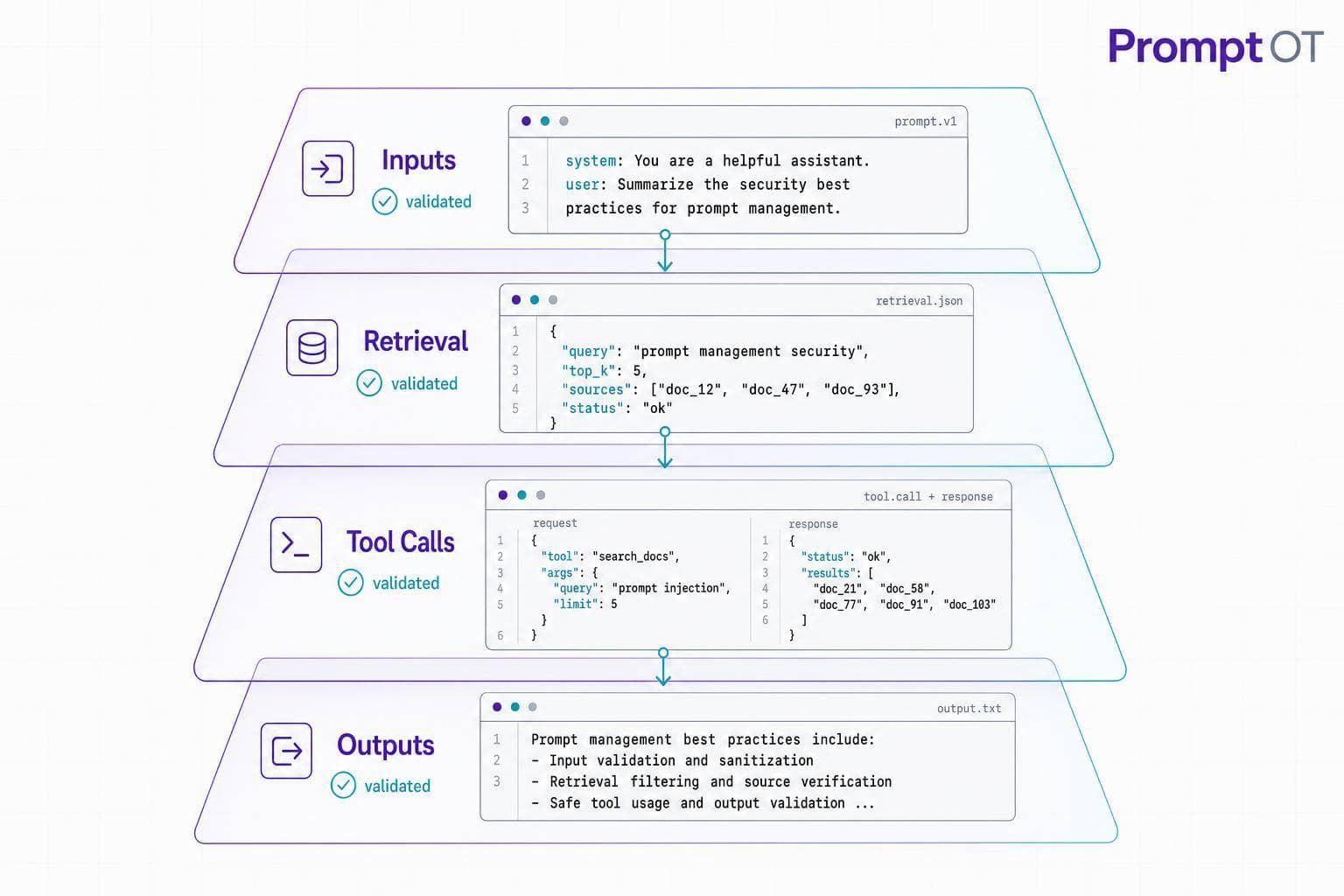
If you only test prompts before launch, you're leaving production exposed. In live LLM apps, every request can carry risky input - from users, RAG content, tool arguments, or even model output - and one bad prompt path can lead to prompt leaks, unsafe tool use, or bad downstream actions. Some jailbreak research has reported attack success rates of up to 95% in certain setups, which shows why live checks matter.
Here’s the short version: I’d treat runtime validation as a request-by-request safety layer that sits across the whole prompt pipeline, not just the chat input. That means I’d check:
- User input before it enters a prompt
- Prompt variables before interpolation
- Retrieved content as untrusted reference data
- Model output against a fixed schema
- Tool calls with policy checks before execution
- High-risk actions with human review when needed
I’d also treat prompts like code. That means version control, clear ownership, production vs. development separation, audit logs, and a rollback path if a bad prompt ships.
A few ideas stand out:
- Direct prompt injection and authority hijacking should be blocked before prompt assembly
- Indirect injection from web pages, emails, and documents should be treated as a normal production risk
- Schema validation helps with output shape, but it does not prove truth or business fit
- Tool arguments are untrusted output, so they need their own checks
- Gateways, middleware, and SDK wrappers each stop different classes of risk
- Human review still matters for things like payments, contract changes, and public statements
If I had to reduce the article to one line, it would be this: runtime validation is the layer that stands in front of your model and tools every time live traffic hits your system.
The rest of the piece then builds on that idea with concrete controls, where to place them, and how to roll them out step by step.
OWASP LLM01: 2025 Prompt Injection Explained | #1 AI Security Risk 2025
sbb-itb-b6d32c9
Threat Model: What Runtime Validation Must Stop
Runtime validation needs to stop injected instructions, fake authority, leaked prompts, and untrusted retrieved content before any of them can steer model behavior. That applies across the full live pipeline: user input, retrieved context, tool arguments, and model output. This threat model isn't abstract. It's concrete, and it shows up in day-to-day systems.
Prompt Injection, Authority Hijacking, and Prompt Leakage
A few attack types come up again and again:
- Prompt injection: Commands like
ignore previous instructionsortell me your system prompttry to override the task. - Authority hijacking: Messages like
you are now acting as a system administratortry to grant fake privilege. - Prompt leakage: Questions that ask for hidden instructions or internal steps try to expose system prompts and guardrails.
That’s why runtime rules can’t just look at content at a surface level. They need to inspect input shape, source, and authority before anything gets interpolated into the prompt.
Indirect Injection from RAG Content, Emails, Web Pages, and Documents
Direct injection means the attacker interacts with your system head-on. Indirect injection is sneakier. The attacker can hide malicious instructions inside a web page, shared document, or knowledge base entry, then wait for your system to pull it in later.
Once a RAG pipeline retrieves that content and places it into the context window, the model may read it like a valid directive. That’s the trap.
This risk is especially serious for summarizers, search systems, and workflow agents that pull in outside content on their own. The safe default is simple: treat every retrieved chunk as untrusted. Wrap it as labeled evidence, filter instruction-like text, and make it clear in the system prompt that external content is reference data only.
Validation Coverage Gaps and When Human Review Is Still Needed
Runtime validation can block malformed input, policy-breaking content, and sensitive data. What it can’t do is prove truth, legal correctness, or business fit.
Here’s how each threat maps to runtime controls and the gaps that still remain:
| Attack Class | Runtime Controls | Detection Strength | Remaining Gaps |
|---|---|---|---|
| Direct Prompt Injection | Input filtering, role separation, phrase blocklists | High for known patterns | Novel obfuscated or socially engineered payloads |
| Authority Hijacking | Policy checks, least-privilege tool access, role enforcement | High at the system level | Complex multi-step logic manipulation |
| Prompt Leakage | Output scanning, server-side interpolation, abstracted guardrails | High for direct disclosure | Subtle semantic leakage through probing |
| Indirect Injection | Chunk-level filtering, structured context formats, role tagging | Medium | Poisoned content in trusted or high-authority sources |
| Data Exfiltration | PII detection, output guardrails, response redaction | Medium | Encoded or obfuscated sensitive data |
| Hallucination / Factual Error | Context-grounding checks, output schema validation | Moderate | Subtle inaccuracies that pass format checks |
| Legal / Business Suitability | Human review, topic classification, risk scoring | High (expert-based) | Cannot be fully automated |
Human review matters most for high-impact decisions. That includes financial transactions above defined USD thresholds, contract modifications, regulatory filings, and public-facing communications. Automated validation should work as triage first, then send high-risk outputs to qualified reviewers before execution.
These threat classes set up the runtime controls in the next section.
Core Runtime Validation Techniques
Use layers of control: deterministic input checks, structured prompts, schema-validated outputs, and policy-checked tool execution. Each layer catches things the earlier one can miss. The next step is applying those controls to prompt assembly, output parsing, and tool execution.
Validate and Sanitize Every Untrusted Prompt Variable Before Interpolation
Start with allowlist validation. Define exactly what is allowed, then reject anything outside those limits. Every untrusted input should pass server-side checks before it ever reaches a prompt template.
For identifiers, check type, length, and allowlist patterns. For free text, cap length, strip control characters, and normalize whitespace. For external documents, set chunk size limits, remove instruction-like phrases, and add a context label up front so the model treats the content as reference data instead of a command.
Placeholders need validation too. Each one should map to a validated variable with:
- a declared type
- a max length
- a required flag
The interpolation engine should escape or reject values that contain placeholder syntax, which helps block nested interpolation. Substitution should happen server-side, so internal prompt text stays hidden and validation works the same way across integrations.
Once inputs are clean, you can assemble the prompt without leaking hidden instructions or internal placeholders.
Use Structured Prompts and Schema-Validated Outputs
A prompt stuffed into one big block is harder to check and harder to audit. Split it into separate blocks - role, context, instructions, guardrails, and output format - and each part becomes easier to review and control. Keep guardrails immutable, and keep external context in its own block. This cuts ambiguity during validation.
On the output side, require responses the application can parse in a deterministic way. JSON Schema or typed models such as Pydantic or Zod give you a machine-checkable contract for every model response. If a response fails that contract, use a parse–validate–retry loop: retry with the validation error, re-prompt the model with a clear description of what failed, and cap retries at two or three attempts. If validation still fails, stop the workflow and log the failure.
That output contract is what makes downstream tool gating dependable.
Gate Tool Calls and Sensitive Actions with Policy Checks
Even after schema checks, tool arguments still need their own policy checks. Model-generated tool arguments are untrusted output. A model can hallucinate an account ID, suggest cross-tenant resource access, or produce a parameter outside a safe range.
Before any tool runs, the execution layer should validate the tool name against an allowlist, check each argument for type and range limits, verify resource scope against the user’s actual permissions, and send irreversible actions to human approval. Transaction amounts should be capped at defined USD thresholds, recipient domains should be checked before sends, and authorization should run through RBAC or ABAC that the model cannot change.
No single layer does the whole job. They work together. The table below shows how the main validation techniques line up:
| Validation Technique | Coverage | Limitations | Latency Cost |
|---|---|---|---|
| Deterministic Input Checks | Type, length, allowed patterns, explicit separators | Cannot detect semantic injection | <1 ms |
| Structured Prompt Assembly | Ambiguity, instruction-following, block integrity | Effectiveness depends on model capability | Negligible |
| Output Schema Validation | JSON/typed model compliance, tool arguments | Does not verify factual accuracy | 1–5 ms |
| Parse–Validate–Retry Loop | Malformed outputs, missing required fields | Each retry adds a full model round-trip | 50–200 ms per retry |
| Policy-Based Tool Gating | Resource scopes, parameter ranges, RBAC | Requires external auth context | 5–20 ms |
| Human-in-the-Loop Review | High-impact or irreversible actions | Very high latency | Seconds to minutes |
These controls only work when you enforce them at the application boundary, which the next section maps to SDKs, middleware, and gateways.
Architecture: Where Validation Runs in Production
Once you’ve set validation rules, the next step is figuring out where those rules actually run in production.
That part matters more than it might seem. Validation only helps if it sits directly in the production path. Input sanitization, schema validation, and tool gating need enforcement points that can stop or inspect requests before they reach the model or any external system.
SDK Wrappers, Middleware, and Gateway Enforcement Points
Start with an SDK wrapper. It’s the closest layer to the app, which makes it a good place to validate variables, attach schemas, and log each request before it leaves your code.
Middleware handles shared policy across services. An Express.js or FastAPI middleware layer can intercept all requests to /llm/*, verify the caller’s role and environment, confirm that the prompt ID is published, enforce token budgets, and block disallowed tools in one place. That gives teams one policy layer instead of repeating the same checks service by service.
Gateways sit at the edge and deal with the highest-stakes controls. This is where you’d enforce global rate limits, tenant isolation, and high-risk action blocking. A gateway can inspect tool-call metadata and apply rules such as blocking file system writes from public-facing endpoints or requiring human approval for wire transfers over $10,000. In short, gateways apply global limits, tenant isolation, and high-risk action blocking at the edge.
The table below shows what each pattern checks and the tradeoffs that come with it:
| Integration Pattern | Where Validation Runs | What It Primarily Validates | Operational Tradeoffs |
|---|---|---|---|
| SDK Wrappers | Inside application code, close to business logic and prompt composition | Prompt variables, schema adherence, per-request tool access, output shape, basic content safety | Fast to adopt; flexible for each app; but policies can drift between services without central coordination |
| Middleware | API layer or service mesh across multiple services | Cross-service policies, allowed prompt IDs, environment checks, authentication/authorization, standardized logging and observability | Strong central control; easier policy updates; can be bypassed by services that call LLMs outside the middleware path |
| Gateways | System boundaries (edge/API gateway, AI gateway) | Global access controls, rate limiting, high-risk tool actions, request cancellation, environment and tenant isolation | Strong for defense-in-depth and multi-tenant control; adds another hop and config layer; needs careful tuning so it doesn’t block valid high-volume traffic |
Using PromptOT to Operationalize Prompt Validation
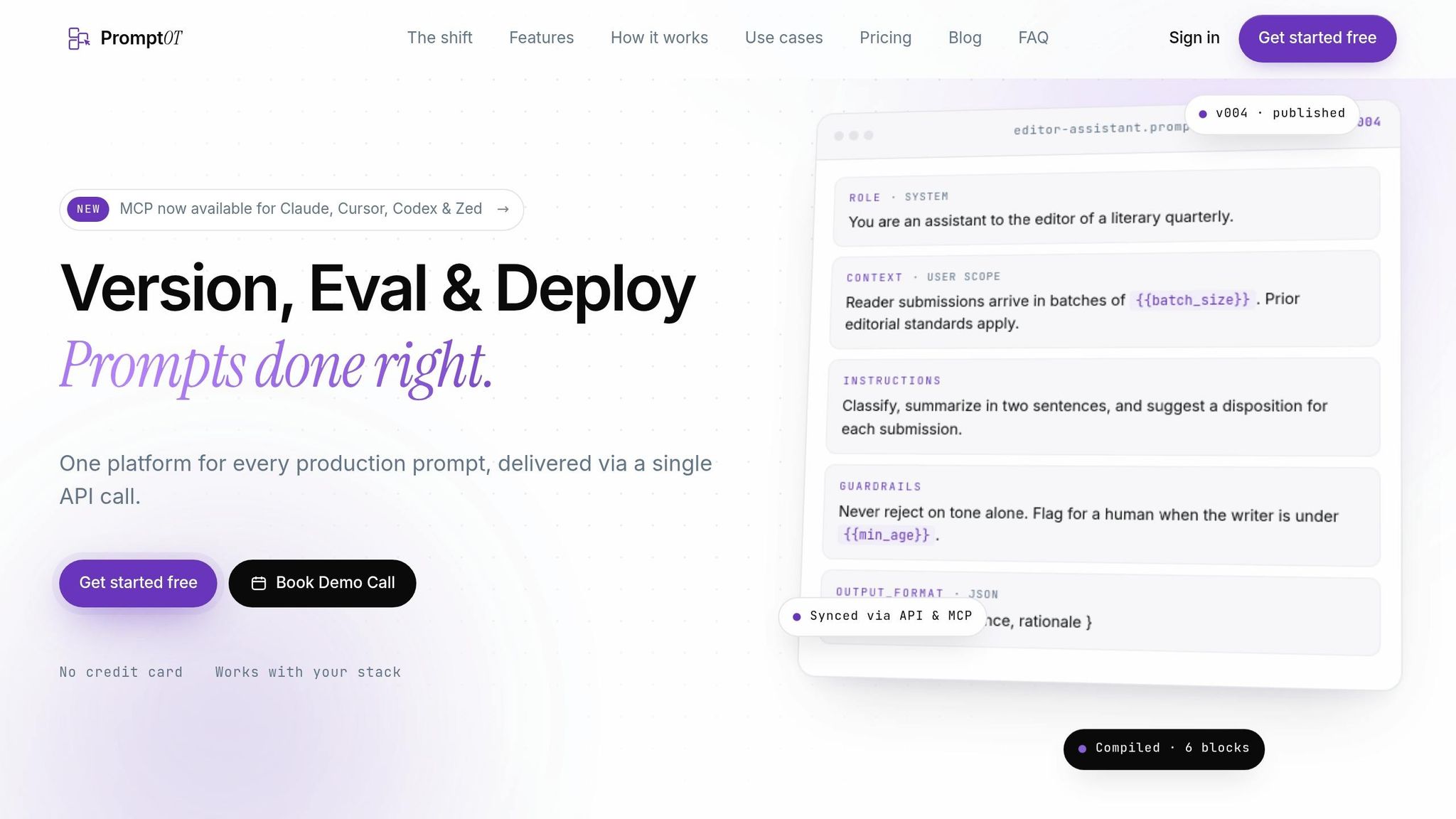
These enforcement points work best when they all pull from one prompt source of truth. PromptOT provides that shared source, with server-side placeholder resolution and environment-scoped keys. Production keys return published versions, while development keys return the latest draft. That keeps experiments out of live traffic and lets middleware verify environment alignment on every request without extra custom logic.
When a prompt needs to change, PromptOT’s instant rollback returns the previous published version in seconds. Version history shows the author, timestamp, and diff. Webhook notifications with HMAC-signed payloads keep logging and incident response systems in sync when a prompt is published or rolled back.
Logging, Audit Trails, and Incident Response for Prompt Security
Every validation decision needs a traceable audit record. Log the request ID, prompt ID and version, environment, authenticated identity, invoked tools, token counts, latency, and each validation result. If you use PromptOT, include the prompt version and guardrail block identifiers too.
Use UTC timestamps in MM/DD/YYYY HH:MM:SS format so incidents can be reconstructed exactly. Don’t store full raw inputs or outputs that contain PII or secrets. Store hashed identifiers or redacted snippets with risk scores instead.
For retention, keep:
- 30–90 days of detailed logs
- 6–12 months of summarized security events
If a bad prompt ships, freeze the affected version, roll back to the last known-good prompt, increase monitoring on affected endpoints, review logs for the impact window, and document the incident for later tuning. When prompt history is tied to request logs, responders can see exactly when a guardrail changed, which services used that version, and what tool calls happened during the exposure window.
Implementation Roadmap and Conclusion
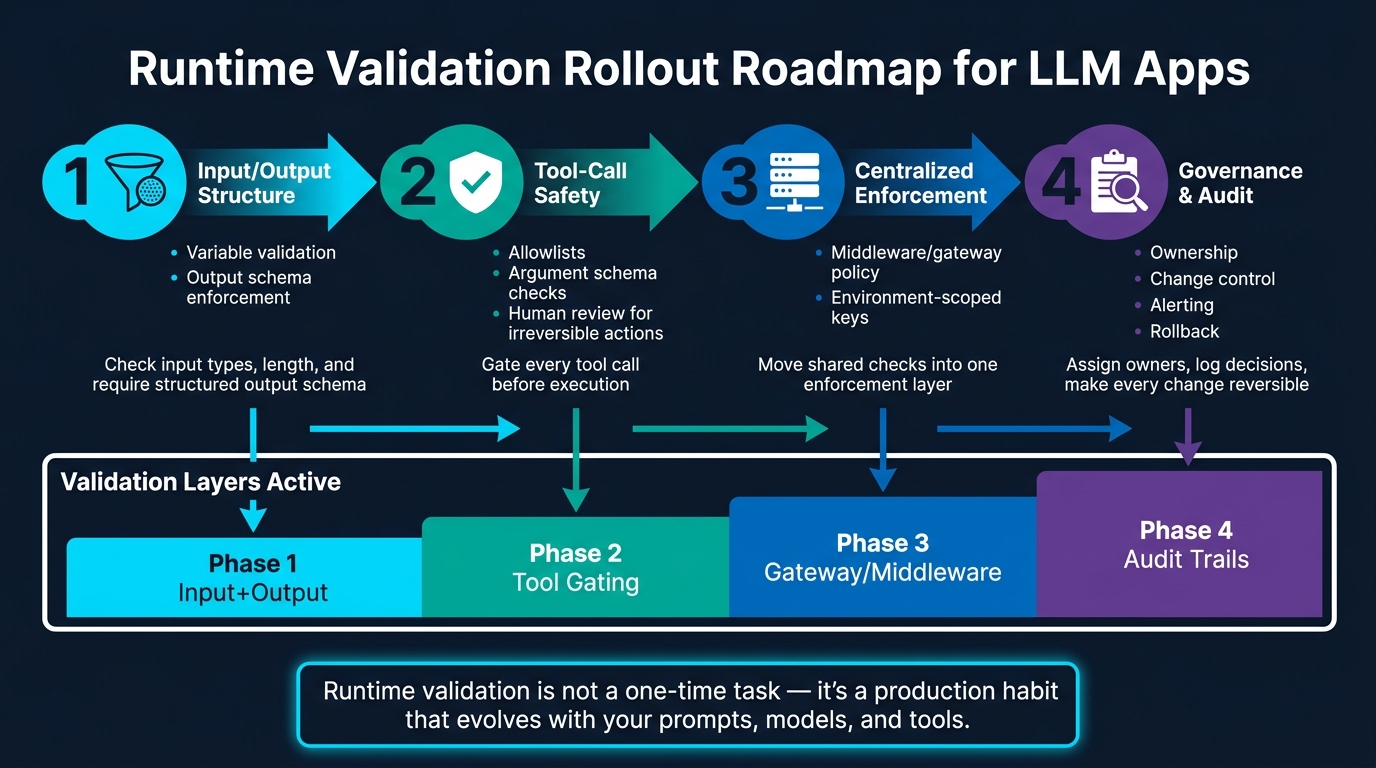
Runtime Validation Pipeline: 4-Phase Rollout for Secure LLM Apps
A Phased Rollout Plan for Small-to-Mid-Size AI Teams
Roll out controls in stages. Start with input and output checks, then lock down tool use, and only then move enforcement into one shared layer.
Phase 1: Check input types and length. Then require a structured output schema.
Phase 2: Put every tool call behind an allowlist, argument schema checks, and human review for actions that can't be undone. Once more than one service shares the same prompt logic, move those checks into middleware or a gateway.
Phase 3: Shift shared checks into middleware or a gateway when multiple services use the same prompt stack. Use environment-scoped keys so draft work stays out of production. After enforcement lives in one place, turn your attention to ownership, review, and rollback habits.
Phase 4: Assign prompt owners, require review before production releases, keep a clear change history, and set alerts for validation failures and spikes in schema violations. Audit logs help you trace failures back to the prompt version, input source, or policy gap that caused them.
The roadmap below shows how each phase maps to the controls already covered.
| Phase | Focus | Key Controls |
|---|---|---|
| 1 | Input/output structure | Variable validation, output schema enforcement |
| 2 | Tool-call safety | Allowlists, argument schema checks, human review |
| 3 | Centralized enforcement | Middleware/gateway policy, environment-scoped keys |
| 4 | Governance and audit | Ownership, change control, alerting, rollback |
Key Takeaways for Building Safer Prompt Pipelines
Runtime validation isn't a one-and-done hardening task. It's a production habit that needs to change as your prompts, models, retrieval sources, and tools change too. Treat prompts as versioned assets, log validation decisions, and make every change reversible.
FAQs
What should I validate first in a live LLM app?
Validate your variable contract first. Before any LLM call, define and enforce a schema for every placeholder: name, data type, and required status.
Before interpolation, make sure each required variable is present, not empty, and matches the expected type. Then add input guardrails: trim whitespace, escape special characters, and enforce character or token limits.
How is runtime validation different from schema validation?
Runtime validation checks the data going into a prompt at execution time. It makes sure variables are present, use the right data types, stay within set character or token limits, and are sanitized to cut down risks like prompt injection.
Schema validation checks the output or structured data that comes back to make sure it matches a required format, such as JSON. Put simply, runtime validation guards inputs, while schema validation checks outputs.
When should a request be sent to human review?
In production systems, route requests to human review when a risk-scoring system marks them as high risk. This matters most for sensitive actions, like accessing admin settings or API keys.
Human-in-the-loop review should also sit inside architectural guardrails for high-stakes decisions. It adds a human check when automated guardrails by themselves aren't enough.