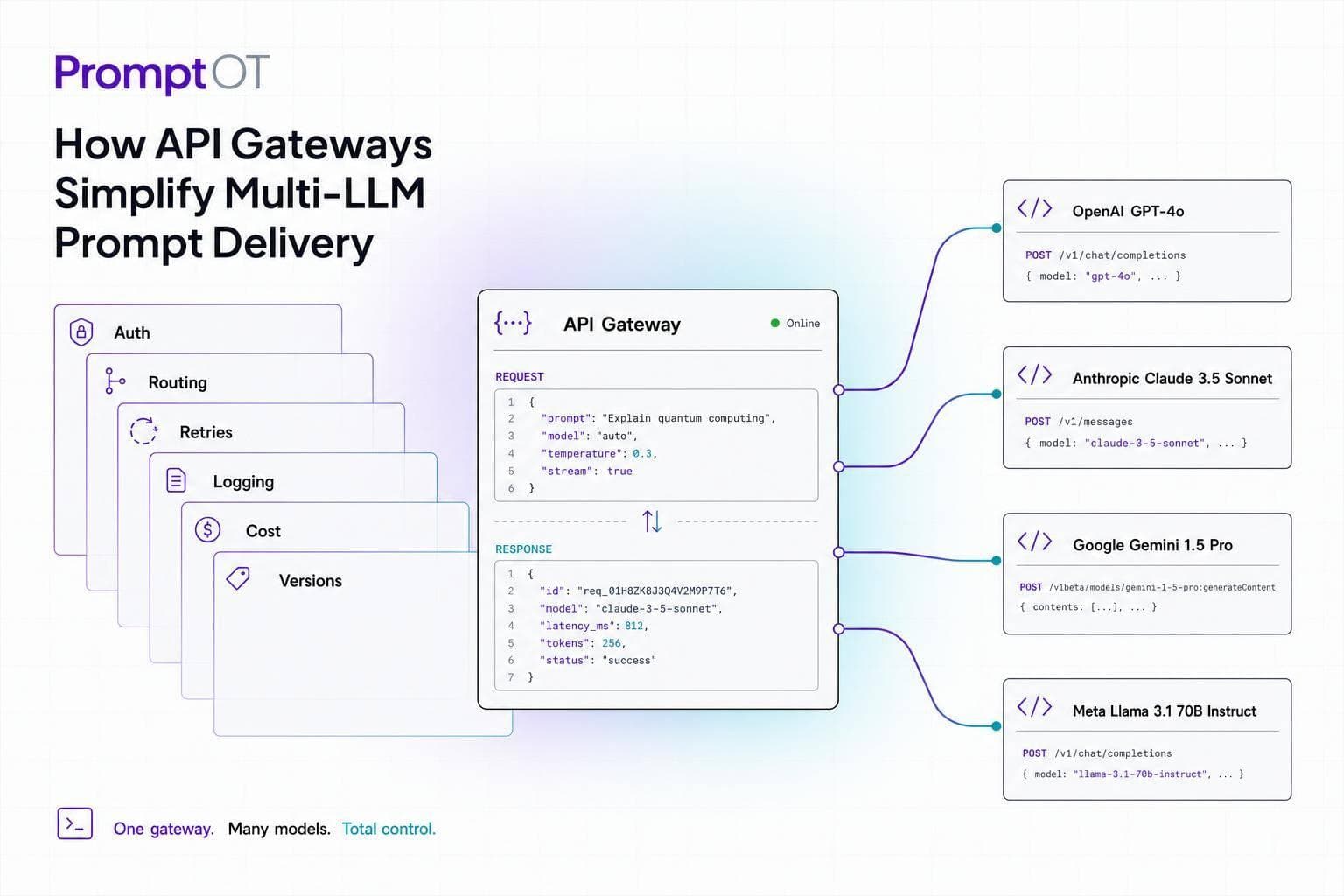
If you use more than one LLM, an API gateway turns a messy setup into one request path. I’d boil the article down to this: your app sends one prompt format to one endpoint, and the gateway handles provider auth, model routing, payload conversion, retries, logs, and fallback.
That matters because multi-model stacks get messy fast. One provider may use one message format, another may use a different schema, and each has its own keys, limits, and error patterns. A gateway moves that work out of app code and puts it in one control layer.
Here’s the short version:
- One endpoint for many model providers
- One request shape instead of provider-specific payloads
- Alias-based routing like
fast,smart, orcheap - Static or rule-based routing by task, tenant, budget, or provider health
- Fallback on
429,5xx, or timeout to cut failed requests - Central logs and spend tracking using tokens, latency, and model data
- Safer key handling so raw provider secrets stay out of app code
- Prompt version control through PromptOT, separate from delivery rules
One stat stood out to me: about 0.2% to 1.5% of LLM calls can fail from 429 or 5xx errors even when a provider status page looks fine. That’s why routing and fallback matter just as much as model choice.
I’d think about the stack in two parts: the gateway decides where the prompt goes, and PromptOT decides what gets sent. That split lets you change prompts, models, and backup paths without editing application logic each time.
The rest of the article explains that request path in plain terms: normalize the input, map it to an alias, send it to the right provider, watch usage and cost, and keep prompt edits safe with versioning and rollback.
What Are LLM Gateways With Detailed Implementation
sbb-itb-b6d32c9
What an API gateway does for LLM traffic
An API gateway sits between your app and LLM providers and acts as a routing and translation layer. Your app sends one request, and the gateway takes care of auth, normalization, routing, retries, and logging. That split helps your app stay steady while the gateway deals with differences between providers. For prompt delivery, it also keeps provider-specific formatting out of application code.
One endpoint, one request shape, multiple providers
Many gateways use a chat-completions-style schema as the shared request format. The gateway then converts system prompts, tools, JSON mode, and multimodal inputs into each provider’s expected format. For example, Anthropic’s Messages API uses a different structure, while Google Gemini uses a contents/parts format. So your chatbot, summarization pipeline, or agent workflow doesn’t need provider-specific code scattered through it.
Model aliases are one of the most useful parts of this setup. Instead of hardcoding a model version, you point to a logical name like production-reasoning or chat-standard. The gateway maps that alias to the actual provider model in config, which means you can switch providers when cost, latency, or availability changes - without touching application code.
That’s a big deal for prompt portability. The same prompt can run across providers just by changing one alias in the gateway config.
Why teams use a gateway in production
Once the gateway normalizes requests, it also becomes the main control point for access, usage, and logs. If you work with more than one provider, that solves a few day-to-day production headaches.
Credential management usually comes first. A gateway stores provider API keys in a secure vault and issues scoped virtual keys to each service or team. In plain English, fewer raw credentials end up sitting in code.
Token-aware rate limiting is another area where LLM gateways stand apart from standard API gateways. A standard gateway may count requests per second. An LLM gateway also tracks tokens per minute (TPM) and active streaming connections. That gives teams a better handle on spend and helps reduce provider-side throttling.
Then there’s observability. Each request can be logged with metadata like user ID, feature tag, model used, token count, and latency. That gives you a clean cost-attribution layer across providers and makes audits much less painful.
How to route prompts to the right model
Once request normalization is set up, the next step is routing: deciding which model should handle each prompt. That part can be dead simple or a bit more conditional. It depends on how steady, or how messy, your workloads are.
Static routing for predictable workloads
Static routing maps a logical alias to a single model. For example, fast might point to Llama-3, while smart points to Claude 3.5.
This setup works well when your workloads are consistent and you want to keep the architecture simple. If you need to swap models later, you do it in config instead of changing application code. That’s a clean way to handle model changes without turning every update into an engineering project.
Put plainly: static routing fits fixed choices. If the same kind of request should almost always go to the same model, static routing is usually enough.
Static routing works when the choice is fixed; dynamic routing works when the choice depends on the request.
Dynamic routing and fallback rules
Dynamic routing makes sense when traffic shifts by tenant, task, or budget. Instead of hardwiring one alias to one model, the gateway checks a set of signals before making a choice.
Those signals can include:
- Task type
- Tenant ID
- Budget cap
- Provider health
- Available rate-limit capacity
A common pattern is to send lighter jobs like summarization and classification to smaller models, while sending harder reasoning tasks to larger models. That way, you’re not paying top-shelf model costs for work a smaller model can handle just fine.
Of course, routing isn’t only about picking the best path when things are normal. It also needs a backup plan when things break.
When the primary provider returns a 429, a 5xx, or times out, the gateway can move to the next provider in the fallback chain without the user seeing the switch. A circuit breaker can then pause traffic to that provider for a cooling-off window.
The core idea is simple:
- Use static routing for predictable traffic
- Use dynamic routing for variable traffic
- Use fallback rules for outages
These routing rules are encoded directly in aliases, credentials, and environment keys - covered in the next section.
How to configure the gateway and prompt delivery flow
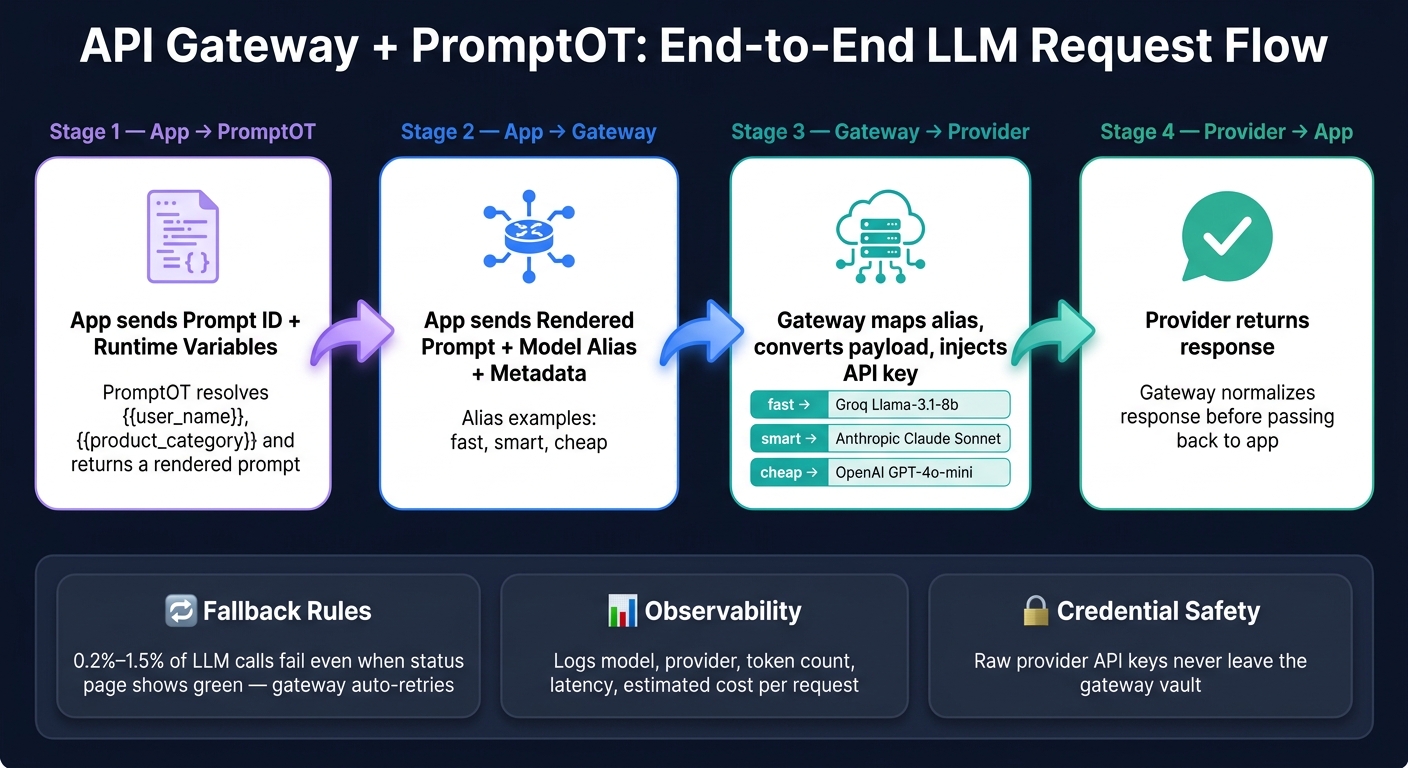
How API Gateways Route LLM Prompts: End-to-End Request Flow
Provider credentials, model aliases, and environment keys
Store provider keys in the gateway so a single app key can route to many providers. The gateway then uses the matching provider key behind the scenes.
You can also define aliases like fast, smart, and cheap so the app routes by intent instead of hard-coding a model name.
| Alias | Provider | Model ID | Use Case |
|---|---|---|---|
fast |
Groq | llama-3.1-8b-instant |
Quick UI chat |
smart |
Anthropic | claude-sonnet-4-6-20251001 |
Complex reasoning |
cheap |
OpenAI | gpt-4o-mini |
Batch summarization |
Use separate gateway endpoints or keys for dev and prod. That keeps test traffic and live traffic from getting mixed together.
At the config level, keep it lean. The gateway only needs the fields required to resolve a request: provider name, base URL, auth method, model alias, and environment key.
Once routing is set, the next job is to split prompt content from prompt delivery.
Where PromptOT fits in the request path
Gateway config decides where a request goes. PromptOT defines what the app sends.
Put another way: the gateway handles delivery, while PromptOT handles prompt composition.
PromptOT sits before the gateway in the request path. It builds prompts from typed blocks, resolves runtime variables like {{user_name}} or {{product_category}}, and returns a rendered prompt that the gateway can send to the provider.
Example request flow from app to provider
Here’s what the full path looks like across the stack:
- App → PromptOT: The app calls PromptOT with a prompt ID and runtime variables. PromptOT resolves the variables and returns a rendered prompt.
- App → Gateway: The app sends the rendered prompt to the gateway along with the model alias and metadata headers for tracing.
- Gateway → Provider: The gateway maps the alias to a provider model, converts the payload into that provider’s native format, and injects the provider API key.
- Provider → App: The provider returns a response, and the gateway normalizes it before passing it back to the app.
The nice part is that you can swap the alias in gateway config to shift traffic without changing app code.
Next comes usage tracking, retries, and rollback.
Monitor usage, handle failures, and keep prompt changes safe
Logs, rate limits, retries, and budget controls
Once routing is live, the next job is control: monitoring, retries, and rollback.
Start by logging every request at the gateway layer. A well-set-up gateway should log the model, provider, token counts, latency, and estimated cost, without storing raw prompt text. That gives you enough detail to debug problems and watch spend, while keeping sensitive data out of logs.
Rate limits matter here too. LLM gateways need both request-per-minute and token-per-minute caps, because one long-context request can eat far more capacity than a bunch of short ones. Add monthly budget caps that throttle or block overages, and you get clear spend control instead of nasty surprises at the end of the month.
Retries should live in the gateway, not inside each service. That helps prevent retry storms, where several services all retry the same failure at once. Use exponential backoff, add circuit breakers after repeated 5xxs, and probe the provider in half-open mode before sending traffic back. In production, roughly 0.2% to 1.5% of LLM calls fail due to 429 or 5xx errors even when a provider's status page still shows green.
Prompt versioning and rollback
Prompt safety is the other side of safe delivery.
PromptOT handles prompt version control. Teams can update instructions, guardrails, or output format in draft, while production changes happen only when someone publishes them. If a published update leads to worse results, rollback brings back the previous version without any app changes. The app keeps making the same API call, and PromptOT serves the prior version.
Conclusion: A simpler path for multi-LLM delivery
Gateway controls and prompt versioning let teams change models and prompts without touching app code.
FAQs
When do I need dynamic routing instead of static aliases?
Static aliases work well when your needs stay fixed. For example, you might send certain customer tiers or internal tools to set models every time.
Use dynamic routing when you need live optimization for speed, cost, or uptime. That includes routing based on latency, provider pricing, prompt complexity, automated failover during outages, or traffic splitting for A/B tests.
How does fallback work without duplicate retries?
API gateways cut down duplicate retries with circuit breakers and a clear fallback chain.
If the primary provider keeps failing, the circuit breaker stops sending traffic to it for a cooling-off period. That means the gateway doesn’t keep banging on the same locked door.
Instead, requests move right away to the next healthy provider, rather than sitting around waiting for each option to time out. The result is fewer repeat failures and routing that stays in line with your set priority order.
What should I log at the gateway without storing prompt text?
Log request lifecycle metadata, including the requested model, timestamp, processing latency, token usage, cost, internal trace IDs, and the provider that handled the call.
For compliance or debugging, store redacted prompt versions only. Remove personally identifiable information before saving anything.