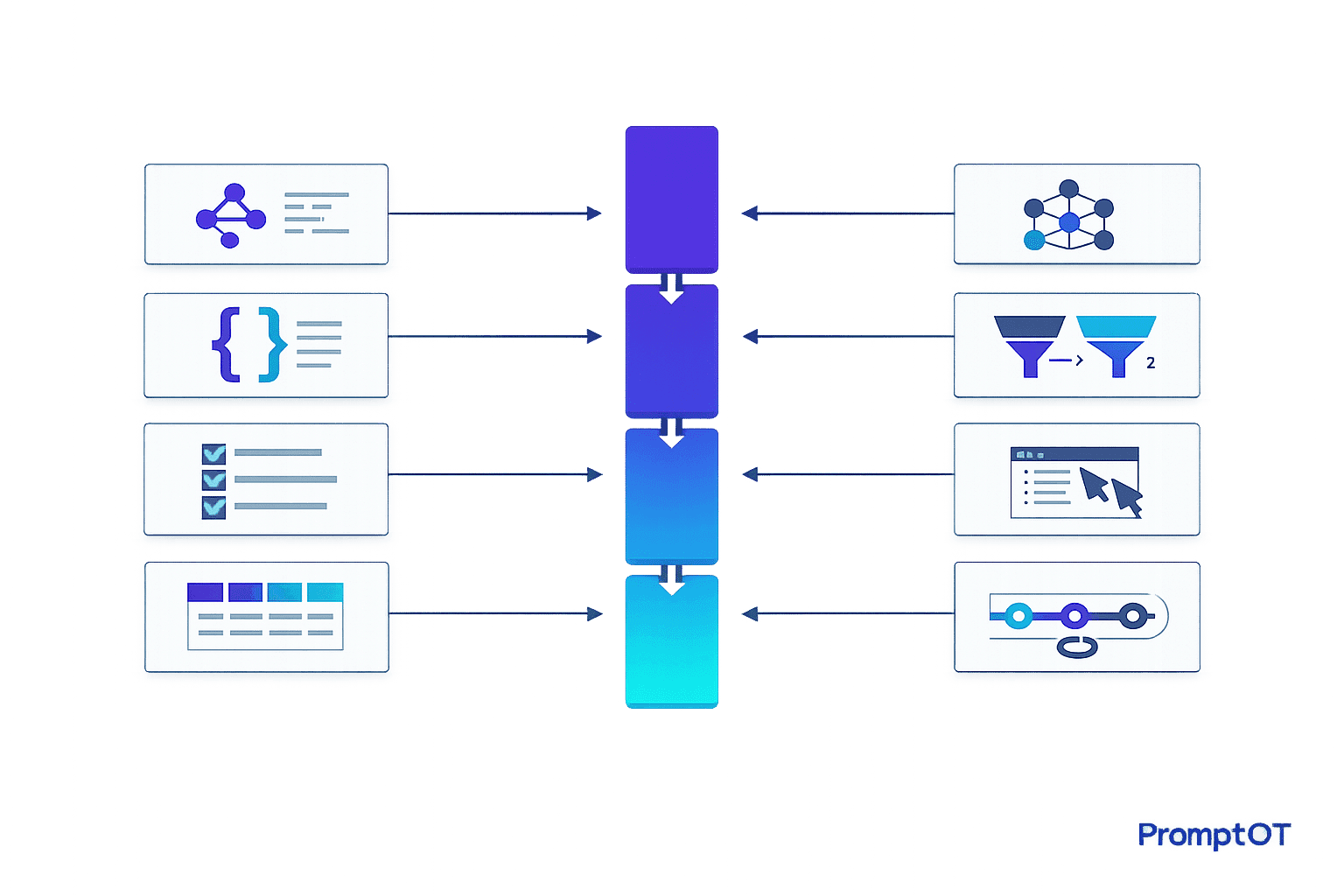
Managing LLM projects effectively is all about reducing chaos and improving teamwork. These projects often involve engineers, product managers, and compliance teams working together on prompts - the core instructions that power AI systems. Without structure, teams can lose 30–40% of their time fixing errors or miscommunications. Worse, mistakes like untested prompt changes can cost millions, as seen when a major e-commerce company lost $2M in early 2026.
Here’s how to improve collaboration:
- Centralized Prompt Repositories: Use version control to track changes and avoid conflicts.
- Standardized Guidelines: Templates ensure clarity and consistency across teams.
- Clear Documentation: A single source of truth keeps workflows efficient.
- Automated Feedback Systems: Catch errors early with measurable benchmarks.
- Defined Roles (RACI Matrices): Assign clear responsibilities to avoid confusion.
- LLM Agents: Automate repetitive tasks and streamline workflows.
- Token-Level Routing: Optimize costs and precision by assigning tasks to expert models.
- Real-Time Collaboration Tools: Keep distributed teams aligned with shared workspaces.
These strategies help teams stay organized, reduce errors, and speed up development cycles. Start with shared repositories and templates, then scale up with automation and role-based workflows to handle complex projects efficiently.
Coalesce 2024: Putting your data team to work on LLM products
sbb-itb-b6d32c9
1. Use Shared Prompt Repositories with Version Control
Organizing prompt management in a centralized repository can transform scattered experiments into a streamlined team effort. When prompts are stored across platforms like Slack, Google Docs, or in hardcoded files, it’s easy to lose track of the versions running in production. A centralized repository acts as the single source of truth for all prompt versions, ensuring every change is tracked and accounted for.
Keeps Teams Aligned and Minimizes Conflicts
Version control systems provide a clear, unchangeable audit trail showing who made changes, when, and why. For example, side-by-side comparisons (diffs) can highlight adjustments between customer-facing language and technical parameters, helping avoid misunderstandings or conflicts.
Role-based access control (RBAC) adds another layer of security by limiting who can modify production prompts. This reduces the risk of errors. As César Miguelañez from Latitude explains:
"Effective prompt versioning... improves team collaboration, reduces errors, and boosts task outcomes by up to 30%".
This structured approach to versioning not only resolves potential conflicts faster but also speeds up the deployment of updated prompts.
Speeds Up Prompt Iteration and Deployment
Housing prompts in a dedicated registry allows domain experts to test and refine prompts independently. Environment tiers like Development, Staging, and Production ensure that untested changes don’t make it into live systems, and they allow for quick rollbacks if needed. One example showed a 40% boost in user engagement after refining prompts through iterative, data-driven analysis.
This efficiency in iteration and deployment, combined with clear documentation, keeps teams working smoothly and effectively.
Enhances Knowledge Sharing and Communication
Commit messages and modular designs transform version histories into a dynamic knowledge base. This allows new team members and stakeholders to quickly understand the evolution of prompts. Updates, such as compliance changes, can also be implemented and communicated seamlessly.
2. Create Standard Prompt Engineering Guidelines and Templates
Centralized version control is just the beginning. Standardizing guidelines and templates takes prompt management to the next level by ensuring consistency and clarity. When prompts are treated as structured, reusable assets, inefficiencies that slow progress are eliminated.
Improves Team Alignment and Reduces Conflicts
Shared templates act as a single source of truth, preventing the chaos that can arise when team members accidentally overwrite each other's work. Version-controlled rule files - like .cursor/rules/ or CLAUDE.md - capture essential team knowledge, making unwritten standards explicit. This approach allows new team members to quickly align with the group's direction.
A modular design approach divides prompts into components, such as system context, task instructions, and quality guidelines. This segmentation makes it easier for non-technical stakeholders, like product managers or legal experts, to update specific sections (e.g., tone or compliance guidelines) without touching the application code. Such clarity strengthens collaboration across teams working on LLM projects.
Increases Efficiency in Prompt Iteration and Deployment
Separating prompts from the codebase and storing them in centralized registries speeds up iteration cycles. By defining environment tiers - Development for quick edits, Staging for validation with production-like data, and Production for stable versions - teams ensure that only thoroughly vetted changes make it to end users.
As the Braintrust team explains:
"Prompt management brings structure to this process by treating prompts as production assets that can be versioned, reviewed, tested, and deployed independently of application code".
Introducing metric gates - like requiring prompts to achieve over 95% accuracy on regression tests - ensures that only high-quality prompts are promoted to production, minimizing the risk of costly errors.
Supports Better Communication and Knowledge Sharing
Standard templates not only make prompts easier to reuse but also improve communication within teams. Templates with consistent placeholders can be applied across different datasets, while shared libraries for common instructions, safety measures, and few-shot examples save time and prevent teams from duplicating efforts.
Structured review workflows, which include mandatory peer reviews and stakeholder sign-offs, ensure that quality, safety, and compliance standards are met before deployment.
Adopting these standardized workflows can significantly boost development speed - often by 2–4× - while team-wide commands for tasks like branch creation, testing, and documentation keep distributed teams aligned.
3. Document Model Specifications and Workflows Clearly
When teams rely on well-structured repositories and standardized templates, clear documentation becomes the glue that holds everything together. It ensures that model behavior and workflows are mapped out in a way that promotes smooth collaboration across teams.
Relying on scattered prompts across Slack, spreadsheets, or multiple repositories wastes precious time. Hours are lost searching for the right versions, leading to frustration and inefficiency. A centralized, clearly documented system eliminates this chaos, creating a single source of truth for model behavior and parameters. This approach, built on standardized templates, keeps everyone on the same page and working in sync.
Improves Team Alignment and Reduces Conflicts
Good documentation doesn’t just organize information - it defines roles and responsibilities. By setting role-based governance, it clarifies who can view, edit, and deploy prompts. This protects production stability while giving domain experts the tools they need to contribute effectively.
Audit trails add another layer of clarity. By recording every change - complete with author names, timestamps, and detailed commit messages - teams can trace the evolution of a model’s behavior. This makes it easier to understand shifts and roll back changes when necessary. For example, in March 2025, a major global consulting firm ditched its chaotic system of managing prompts across 30+ Google Sheets tabs. With a structured system in place, domain experts could update prompts directly without needing repository access, cutting out collaboration bottlenecks and manual back-and-forth.
Increases Efficiency in Prompt Iteration and Deployment
Clear documentation doesn’t just keep things tidy - it speeds up the work. Following structured workflows can triple iteration speed and cut debugging time in half. Teams can ensure that only validated versions of prompts make it to production, saving time and reducing errors.
"Building LLM systems without proper prompt management is like developing software with FTP instead of Git - technically possible, but no modern team would consider it." - Mahmoud Mabrouk, Co-Founder of Agenta.
Supports Better Communication and Knowledge Sharing
A modular design approach makes documentation even more powerful. Reusable prompt snippets - like components for system context, safety measures, or formatting rules - help maintain consistency across projects and reduce redundant work. A searchable prompt library, tagged by use case, model compatibility, and author, allows team members to quickly locate relevant examples instead of starting from scratch.
Files like CLAUDE.md take this a step further by capturing team standards, architecture decisions, and key focus areas for code reviews. These version-controlled records create a shared knowledge base that can cut onboarding time by 50% and improve development speed by 2–4×.
4. Set Up Automated Feedback Systems and Review Cycles
Once you’ve implemented standardized repositories and templates, the next step is to introduce automated feedback systems. These systems eliminate the delays and biases that come with manual reviews. By relying on measurable data, they help catch regressions early, ensuring that issues don’t make it into production. This approach creates a system where improvements in prompt development are both consistent and measurable.
Increases Efficiency in Prompt Iteration and Deployment
Automated evaluation systems streamline the process by incorporating structural checks and LLM-based scorers to assess subjective qualities like relevance and helpfulness. Regression tests allow teams to compare prompt updates against a baseline, ensuring changes improve performance. Additionally, integrating these systems into CI/CD pipelines ensures that only prompts meeting quality benchmarks are deployed, as pipelines automatically block subpar merges.
"Shipping a prompt that 'feels' better without proof is a fast way to rack up regressions. The fix is not magic wording; it is process." - The Statsig Team
For example, Braintrust’s free tier offers 1 million trace spans and 10,000 evaluation scores per month, making it easier for teams to thoroughly test prompts without additional costs during the development phase. This scalability supports robust workflows without breaking the budget.
Improves Team Alignment and Reduces Conflicts
Automation doesn’t just speed up iterations - it also brings consistency to evaluations across teams. By using objective scores instead of subjective judgments, automated systems help reduce disagreements about prompt quality. To simplify the process, teams can rely on pass/fail metrics with clear reasoning rather than ambiguous 1-5 scoring scales. LLM-based evaluators handle subjective checks, freeing team members to focus on final approvals.
Clear environment tiers also ensure that quality checkpoints are well-defined. Webhook triggers can further streamline workflows by notifying team members or activating CI/CD pipelines as soon as a prompt is committed. Low-performing prompts are automatically flagged and reintroduced into evaluation datasets, reducing the chances of repeated failures.
Supports Better Communication and Knowledge Sharing
Automated tracing systems capture key data - inputs, outputs, latency, and costs - for every LLM call. This creates a searchable timeline that teams can use for debugging and optimization. Such a shared record improves collaboration, allowing teams to have informed discussions about performance issues or future improvements. By decoupling prompts from application code and storing them in a centralized registry, teams can update and test prompts independently of deployment cycles.
"Systematic evaluation connects prompt changes to measurable outcomes and exposes regressions before users encounter them." - Braintrust Team
5. Define Team Roles and Responsibilities with RACI Matrices
When it comes to LLM projects, knowing exactly who is responsible for what can save a ton of time and confusion. These projects often involve engineers, product managers, domain experts, and compliance teams - all working together toward a shared goal. Without clear role definitions, teams can get bogged down in debates over ownership instead of focusing on delivering results. That’s where a RACI matrix comes in. It assigns four specific roles to every task: Responsible (the person doing the work), Accountable (the decision-maker), Consulted (provides input), and Informed (kept in the loop). This structure ensures that every task - like tweaking a prompt - has a clear owner and a smooth communication process.
Improves Team Alignment and Reduces Conflicts
One of the biggest advantages of using RACI is that it assigns a single decision-maker to each task. This eliminates confusion over who’s in charge and keeps everyone focused on their responsibilities. In LLM workflows, this clarity is especially important because non-technical stakeholders, like product managers or subject-matter experts, often need to make edits to prompts. By defining their role in the RACI framework, they can contribute without jeopardizing production stability. For example, the model makes it clear who handles tasks like prompt engineering or QA testing, streamlining accountability across the board.
"RACI designates a single decision-maker for each task and outlines all activities, allowing everyone to focus on their work instead of debating about ownership." - Slack
Supports Better Communication and Knowledge Sharing
Clear communication is another major benefit of the RACI model. It spells out who needs to be "Consulted" for input and who needs to be "Informed" about progress, which eliminates guesswork and prevents dropped handoffs. This is critical in LLM projects, where engineers focus on infrastructure while non-technical stakeholders define user experience or provide domain-specific insights. For instance, by marking legal leads or security specialists as "Consulted", teams can ensure their expertise is factored into prompt engineering before finalizing the work.
| Role | RACI Category | Typical LLM Project Responsibility |
|---|---|---|
| Prompt Engineer | Responsible (R) | Optimizing prompts for accuracy, tone, and edge cases. |
| Project Manager | Accountable (A) | Final sign-off on product requirements and deployment. |
| Legal/Compliance | Consulted (C) | Reviewing outputs for sensitive terms or regulatory risks. |
| Customer Success | Informed (I) | Receiving updates on feature rollouts to prepare for user inquiries. |
This clear division of roles not only reduces friction but also ensures that projects run smoothly and efficiently.
Enables Scalable and Flexible Project Management
Using RACI within a "PromptOps" framework takes project management to the next level. It treats prompts as shared, governed assets, which helps avoid "shadow prompting" - a situation where teams unknowingly create redundant or conflicting prompts. To make this system work seamlessly, teams can integrate the RACI chart into tools like Slack or project dashboards. This keeps roles and responsibilities visible during day-to-day operations. As AI applications grow in scale, managing dozens (or even hundreds) of prompts across various regions and user segments becomes much easier with this level of organization.
6. Use LLM Agents for Collaborative Task Execution
With structured repositories and automated feedback already in place, integrating LLM agents takes collaboration and task execution to the next level. These agents go beyond simple chatbot functionality, offering autonomous systems capable of managing complex, multi-step tasks. Here’s how they can enhance workflows on LLM projects.
LLM agents can break down tasks into specialized roles - like Planner, Coder, Tester, and Reviewer - and execute them with minimal human intervention. This structured approach ensures clear steps with validation points that help avoid cascading errors. Companies using these agent-driven workflows have reported a 60–80% reduction in AI-generated errors compared to single-shot prompting setups.
Boosts Efficiency in Prompt Iteration and Deployment
By adopting a plan–execute–test–fix workflow, teams can significantly improve efficiency. In this process, agents clarify objectives, outline plans, make minor edits, run tests, and summarize results. This structured method is essential, as large language models can produce incorrect outputs 15–30% of the time on complex tasks.
For example, in February 2026, platforms like Braintrust introduced AI assistants that allowed non-technical team members to create test datasets and perform evaluations using natural language. This innovation eliminated bottlenecks that previously required engineering input, streamlining workflows.
"The critical principle is separation of judge and jury: the agent that produces output should never be the sole evaluator of that output." - Douglas Liles, CEO of Good Combinator
Improves Communication and Knowledge Sharing
LLM agents also function as collaborative hubs, answering technical questions in public channels and auto-generating pull request descriptions. By storing agent instructions in version-controlled files (e.g., .cursor/rules, CLAUDE.md), teams can ensure consistent adherence to architectural patterns and coding standards.
This shared context is particularly valuable for onboarding new team members. For instance, using shared AI rules has been shown to cut onboarding time for new hires by 50%.
Scales and Simplifies Project Management
Decoupling prompts from application code through a prompt content management system empowers non-technical stakeholders, like product managers, to refine prompts without waiting for engineering release cycles. Teams can further stabilize systems by setting permission tiers. For example, agents could have read-only access in production environments and supervised write access in staging environments.
The CollabLLM framework is a great example of this scalability in action. It has improved user satisfaction by 17.6% and reduced the time users spend on document creation tasks by 10.4%.
7. Apply Token-Level Routing to Optimize Expert Model Collaboration
Token-level routing takes the concept of agent-driven workflows a step further by allowing models to collaborate on individual tokens. This approach introduces a level of precision where a router directs each token to the most appropriate expert model for processing.
Boosts Efficiency in Prompt Iteration and Deployment
One of the standout benefits of token-level routing is its ability to cut costs by engaging expert models only when necessary. For example, the AgentDropout framework achieved impressive results: a 21.6% reduction in prompt tokens and an 18.4% reduction in completion tokens, all while improving accuracy by 1.14 points on benchmarks like MMLU and GSM8K.
In scenarios with limited resources, edge-based routing systems shine. They can improve accuracy by as much as 60%, even when only about 7% of tokens are routed to a larger cloud-based LLM.
"Since routing decisions are made at the token-level, Co-LLM provides a granular way of deferring difficult generation steps to a more powerful model." - Colin Raffel, Associate Professor, University of Toronto
Frameworks like FusionRoute take this further by using logit-level blending. This method refines the next-token predictions of expert models, leading to performance gains of 3–7% in areas such as mathematical reasoning and instruction following. For instance, in a math task, token-level collaboration between a base model and a math-specific LLM (Llemma) corrected an error, accurately calculating "a³ · a² if a = 5" as 3,125 instead of 125.
This fine-tuned control not only streamlines processes but also sets the stage for more efficient project workflows.
Supports Scalable and Flexible Project Management
Frameworks such as Expert-Token-Routing make it easy to scale and adapt systems by allowing modular additions or removals of models without requiring a complete retraining of the system. This flexibility is especially useful for teams handling specialized content. Whether your project involves medical terms, legal jargon, or technical documentation, you can integrate new domain-specific models as needs evolve.
Systems like CITER add another layer of efficiency by routing "non-critical" tokens to smaller language models while reserving "critical" tokens for larger, more capable models. This approach helps teams manage inference costs without sacrificing quality.
Further innovation comes from latent-level collaboration, where models exchange hidden representations instead of text. This technique reduces token usage by a staggering 70.8% to 83.7%, slashing API costs and speeding up iteration cycles.
8. Enable Real-Time Collaboration Across Distributed Teams
For distributed teams, having tools that allow real-time collaboration is a game-changer. These tools create a shared workspace where engineers, product managers, and domain experts can work together seamlessly. By centralizing everything, they eliminate the chaos of scattered prompts across Slack threads, spreadsheets, and .env files. Just like shared repositories and version control simplify prompt management, real-time collaboration tools ensure clarity and keep everyone on the same page. This shared environment fosters continuous and clear communication among team members.
Improves Team Alignment and Reduces Conflicts
Role-Based Access Control (RBAC) plays a key role in maintaining order during real-time edits. It separates permissions for viewing, editing, and deploying, ensuring that domain experts can tweak prompt behavior without risking unauthorized changes to live environments. Every change is logged in an audit trail, making it easy to trace back issues during incident reviews.
Adding review workflows further strengthens this process. Requiring peer or stakeholder approval for critical prompts ensures that legal, compliance, and technical teams are aligned before any deployment. Version-controlled rule files also help maintain consistency, ensuring that AI assistants stick to the same coding standards and architectural guidelines across the team.
Supports Better Communication and Knowledge Sharing
Using structured repositories and decoupling prompts from code allows for real-time, cross-functional collaboration. This approach empowers non-technical stakeholders to make updates without waiting for engineering release cycles. Features like in-app commenting and version-specific discussion threads make reviews and troubleshooting faster, even when team members are working asynchronously.
"A single source of truth eliminates version fragmentation by clearly identifying and tracing every prompt version".
Decoupling prompts also enables non-technical team members to work independently with shared libraries of reusable templates - whether for system preambles, few-shot examples, or legal disclaimers - reducing duplication. Integrating AI assistants with platforms like Slack helps break down silos by allowing non-technical members to access AI-generated insights informed by shared codebase indexes. For large projects, sharing the AI's codebase index can dramatically speed up onboarding, helping new developers get up to speed in minutes instead of hours.
Comparison Table
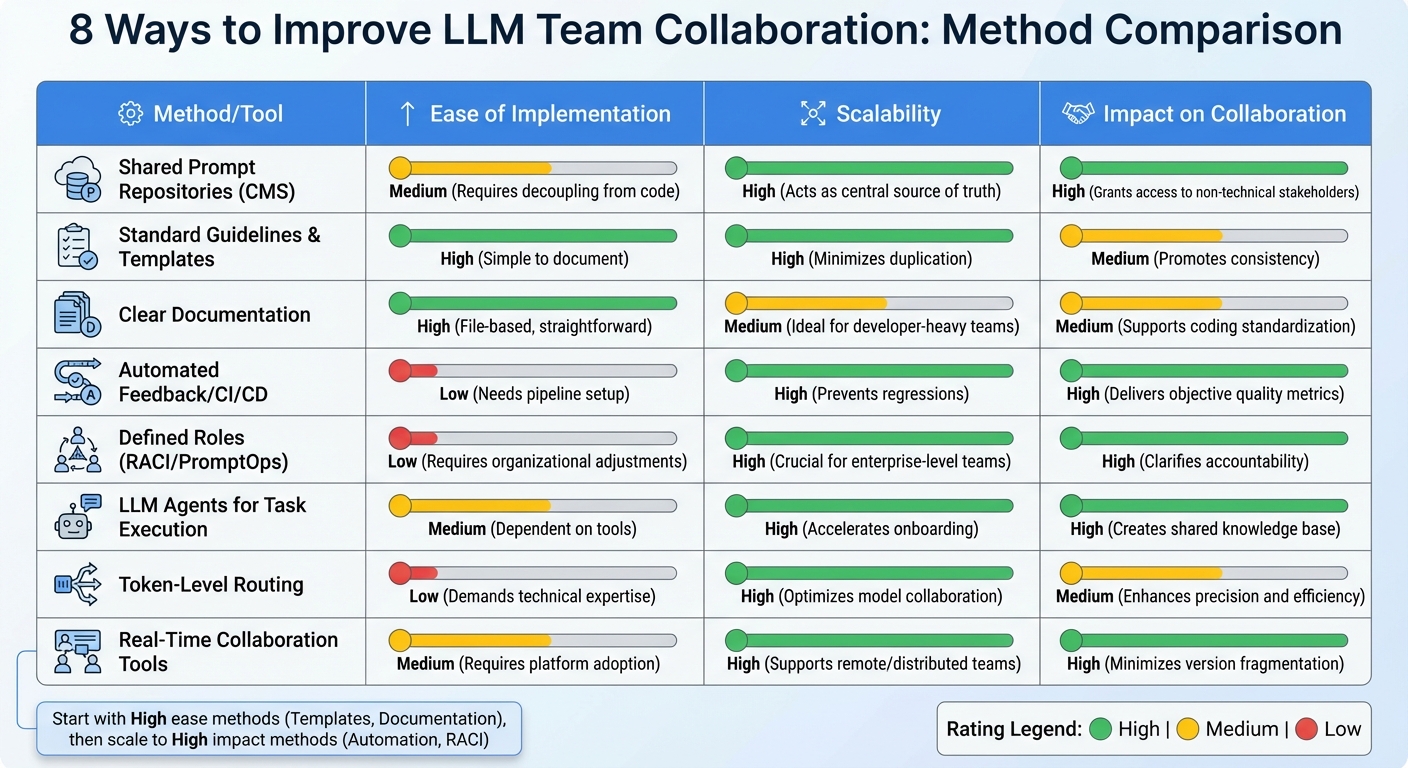
Comparison of 8 LLM Team Collaboration Methods: Implementation, Scalability, and Impact
To bring these strategies into focus, here's a table comparing key collaboration methods based on ease of implementation, scalability, and their impact on teamwork.
| Method/Tool | Ease of Implementation | Scalability | Impact on Collaboration |
|---|---|---|---|
| Shared Prompt Repositories (CMS) | Medium (Requires decoupling from code) | High (Acts as a central source of truth) | High (Grants access to non-technical stakeholders) |
| Standard Guidelines & Templates | High (Simple to document) | High (Minimizes duplication) | Medium (Promotes consistency) |
| Clear Documentation | High (File-based, very straightforward) | Medium (Ideal for developer-heavy teams) | Medium (Supports coding standardization) |
| Automated Feedback/CI/CD | Low (Needs pipeline setup) | High (Prevents regressions) | High (Delivers objective quality metrics) |
| Defined Roles (RACI/PromptOps) | Low (Requires organizational adjustments) | High (Crucial for enterprise-level teams) | High (Clarifies accountability) |
| LLM Agents for Task Execution | Medium (Dependent on tools) | High (Accelerates onboarding) | High (Creates a shared knowledge base) |
| Token-Level Routing | Low (Demands technical expertise) | High (Optimizes model collaboration) | Medium (Enhances precision and efficiency) |
| Real-Time Collaboration Tools | Medium (Requires platform adoption) | High (Supports remote and distributed teams) | High (Minimizes version fragmentation) |
This comparison highlights a key takeaway: as teams grow and operations become more complex, adopting structured methods - like automated CI/CD and defined roles - can dramatically improve efficiency. These strategies are crucial for streamlining LLM prompt management and fostering better team coordination.
For newer teams, starting with shared repositories and standard templates is a no-brainer. They’re easy to set up and provide immediate benefits. But as operations scale, automated feedback systems and well-defined roles become indispensable. For instance, systematic testing with hundreds of test cases can uncover significantly more issues than manual checks, making rigorous testing a must for production-level stability.
"PromptOps is not a nice-to-have. It is the operating system for the age of enterprise AI." – ITSoli
For enterprise teams, prioritizing automated feedback and role-based access control is essential. Low-effort, high-scalability methods - like version-controlled rules and detailed documentation - offer excellent returns for teams still growing. However, more advanced approaches, such as automated CI/CD gates, become critical when managing a large number of prompts across multiple environments.
Conclusion
Improving team collaboration on LLM projects isn't about adopting every tool available - it’s about creating structured workflows that bring both technical and non-technical teams together. This philosophy, central to PromptOT's approach, forms the backbone of any successful LLM project. The eight strategies discussed here tackle key challenges like version chaos, reduced quality, unclear responsibilities, and sluggish iteration cycles.
By implementing centralized version control, non-technical stakeholders can contribute directly without unnecessary delays, which speeds up development considerably.
Automated feedback systems and systematic testing replace trial-and-error methods with measurable quality standards. For instance, in February 2026, a Latitude case study revealed that using observability, version control, and structured testing improved chatbot accuracy by 25% and reduced critical errors by 80%. These results help transition projects from experimental prototypes to fully production-ready systems.
In addition to these technical improvements, defining roles with RACI matrices and establishing PromptOps workflows ensures accountability at every stage. This accountability is a key principle of the PromptOT framework. As ITSoli emphasized:
"PromptOps is not a nice-to-have. It is the operating system for the age of enterprise AI".
When roles are clearly defined - from creating prompts to compliance reviews - the entire team can work faster and more effectively.
These practices together form a robust framework for LLM prompt collaboration. The way forward is simple: start with shared repositories and standardized templates, then scale up by adding automated testing and role-based access. These steps turn prompt engineering into a streamlined, repeatable process.
FAQs
How do we start PromptOps with a small team?
To get PromptOps up and running with a small team, start by building a shared prompt library. This will act as a central hub for storing reusable and thoroughly tested prompts, ensuring both consistency and efficiency in your operations.
It's also important to set up version control and maintain clear documentation. This helps track changes, making updates smoother and more manageable over time.
Lastly, consider using collaboration tools that support co-editing and testing. These tools can improve teamwork and streamline workflows, laying the groundwork for seamless growth as your team expands.
What tests should a prompt pass before production?
Before putting prompts into action, they need to undergo critical evaluations to ensure they work as intended. This involves processes like A/B testing, regression testing, and validation. These steps help identify problems such as hallucinations or outputs that don’t follow the correct format.
Prompts should also adhere to structured formats, stay consistent even as models are updated, and comply with safety standards. To keep everything on track, version control and documentation are crucial. These tools make it easier to track changes, compare performance, and roll back to previous versions if something goes wrong. Together, these practices ensure prompts are fully prepared for live deployment.
Who should approve prompt changes in our org?
Prompt changes in large language model (LLM) projects should go through an approval process managed by specific team members, such as team leads, prompt engineers, or a dedicated review team. These individuals are responsible for ensuring prompts are thoroughly tested, properly documented, and aligned with the organization’s objectives. To maintain consistency and avoid outdated or ineffective prompts, structured review processes - like role-based permissions and version control - are essential. These practices also help ensure compliance, particularly when prompts are treated as critical production assets.