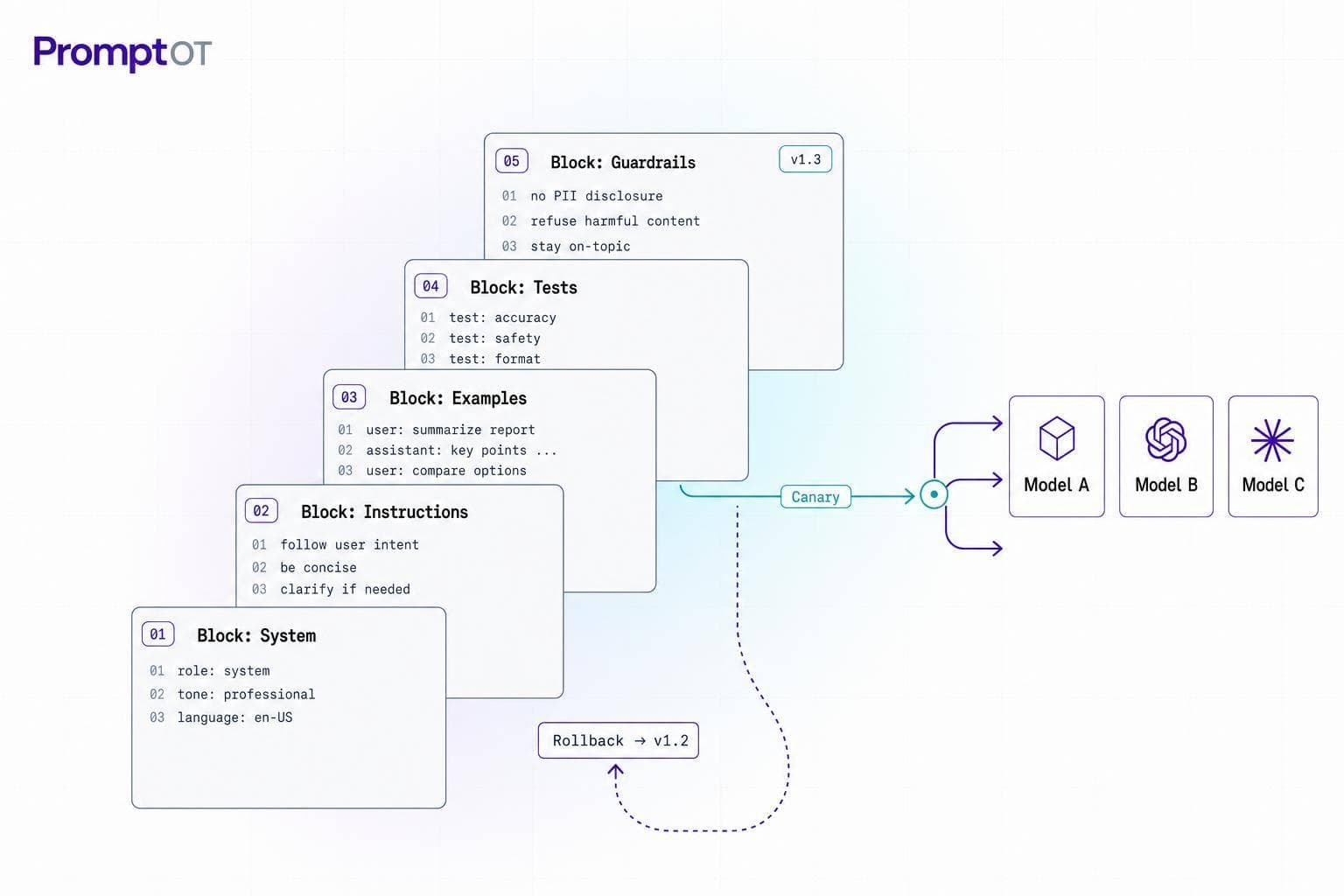
If one model change can force a prompt rewrite, your setup is fragile.
I’d boil this guide down to four moves: build prompts in fixed blocks, version every change, test across models before release, and keep rollback separate from app code. That gives production teams a way to swap providers, compare cost and latency, and keep output checks in place without rewriting the whole stack.
Here’s the short version:
- I keep prompt text separate from request settings like model name,
temperature, andtop-p. - I split prompts into repeatable blocks: role, context, instructions, guardrails, and output format.
- I use neutral syntax like Markdown headings and
{{placeholders}}, not provider-only formatting. - I treat each prompt update like a release, with drafts, published versions, approval, and audit logs.
- I run the same test suite on every production model and track pass rate, P50/P95/P99 latency, token use, error rate, and estimated cost in USD.
- I deploy with provider mapping, canary rollout, monitoring, and near-instant rollback.
A few numbers stand out. The guide suggests starting with 30 to 80 anonymized test cases. It also calls for tracking four core validation checks for user-facing flows: schema, groundedness, refusal behavior, and tone. And for latency, I’d watch P50, P95, and P99 on every model route.
What matters most is this: the prompt should stay fixed while the provider layer changes around it. That one rule cuts down rewrites, lowers release risk, and makes side-by-side model testing much easier.
If I were setting this up today, on September 2, 2026, I’d treat prompts like code: structured, versioned, tested, reviewed, and easy to roll back.
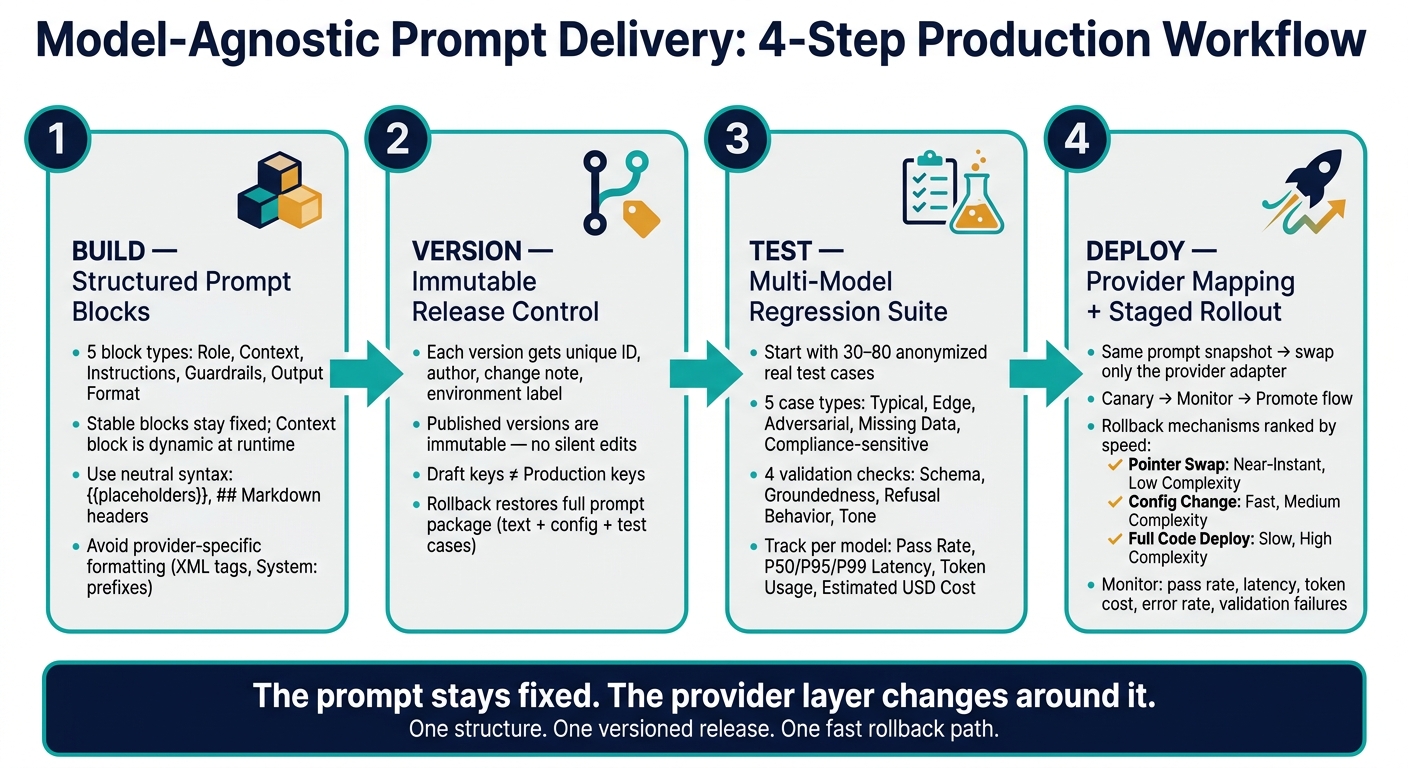
Model-Agnostic Prompt Delivery: 4-Step Production Workflow
Build Prompts as Structured Blocks, Not Long Strings
A long, unbroken prompt string is a pain to review, tougher to test, and awkward to reuse across providers. A better way is to split the prompt into structured blocks, with each block handling one clear job.
The Core Prompt Block Pattern
The core prompt pattern uses typed blocks for role, context, instructions, guardrails, output format, and custom sections:
| Block Type | What Goes In It | Stable or Dynamic? |
|---|---|---|
| Role | Persona, expertise, tone | Stable |
| Context | Background info, retrieved docs, policies | Dynamic |
| Instructions | Task directives, step-by-step logic | Stable |
| Guardrails | "Never do" lists, escalation triggers | Stable |
| Output Format | JSON schema, Markdown structure | Stable |
| Custom | Additional project-specific requirements | Stable or Dynamic |
The key move here is simple: keep role, instructions, guardrails, and output format stable. Then fill the dynamic block - Context - at runtime with customer data, retrieved documents, or user input. That split lowers prompt-injection risk and makes the prompt easier to maintain.
It also makes prompt assembly more predictable across providers. Instead of rebuilding the whole thing every time, you're snapping together the same parts in the same order.
Cross-Provider Syntax That Stays Portable
Provider-specific formatting is one of the biggest reasons prompts become brittle. System: prefixes, XML tags, or provider-only reasoning directives can create hidden dependencies. Everything may look fine until you switch providers and something quietly breaks.
Use neutral syntax throughout:
| Syntax Element | Portability Risk | Recommended Practice |
|---|---|---|
{{variable}} |
Low | Use double curly braces as a universal placeholder standard |
## Header |
Low | Use Markdown headers to separate blocks across all providers |
<xml_tags> |
Medium | High risk outside specific providers |
System: prefix |
High | Map this in the delivery layer to the provider's system role |
For output requirements, always include an explicit Output Format block that states the required JSON structure. If a response looks right but fails JSON parsing, that's a production failure. So don't check it by eye alone - validate the structure programmatically.
Once the syntax stays neutral, prompt changes become much easier to review and version.
Variables and Runtime Assembly
Use one naming pattern for placeholders like {{customer_name}} or {{policy_summary}}. And validate those placeholders before the prompt runs, not after.
At runtime, include only the blocks that are enabled, keep the order fixed, and compile them into one prompt string with Markdown headers. That compiled prompt can then go to whichever provider you're using.
PromptOT composes typed blocks, resolves {{placeholders}} at API-call time, and compiles the prompt for any provider.
With the structure set, the next step is to lock it into version control before release.
sbb-itb-b6d32c9
Add Version Control, Guardrails, and Governance from Day 1
Now that prompts are built from blocks, the next move is to lock those blocks into versioned releases. A prompt change is a production change. It can shift customer-facing output, affect data handling, and create compliance risk. Once the prompt package is versioned, release control comes next: guardrails, approval, and rollback.
Version Prompts Like Application Code
Every prompt version needs a unique ID, an author, a change note, and an environment label. Once a version is published, it should be immutable - no quiet edits, no overwriting. If you need to update it, create a new version. That gives you a clear record of what ran in production and when.
The draft/published split is the line you can't blur. A saved draft should never change production on its own. Production keys should always fetch the published version, while development keys fetch the latest draft. That split keeps tests and experiments from slipping into user-facing flows by mistake.
PromptOT tracks draft and published versions and restores a prior published state instantly.
A rollback has to restore the full prompt package, not just the text. That includes the role, instructions, guardrails, output format, model configuration, and linked test cases. If those parts don't come back too, it isn't a real rollback.
Guardrails That Reduce Unsafe or Unreliable Outputs
Put guardrails in a dedicated block, then test them before every release. Test the guardrails themselves - not your hopes about how the model will behave.
Use each guardrail for one clear threat:
| Guardrail Pattern | Threat Mitigated |
|---|---|
| Policy Blocks | Model inventing non-existent company policies or refund rules |
| Refusal Conditions | Attempts to collect sensitive data like passwords or credit card numbers |
| Prompt-Injection Defenses | "Ignore previous instructions" attacks or hidden system prompt exposure |
| Source-Grounding | Hallucinations in RAG apps from blending retrieved content with invented details |
| Escalation Logic | High-risk keywords (e.g., "billing", "security") that need human review before response |
For retrieval-augmented apps, source-grounding instructions are not optional. Without them, the model can mix retrieved content with made-up details. That's the kind of error that looks fine at first glance and then causes trouble in production.
Governance for Teams, Not Solo Prompt Editing
Prompt edits need review, approval, and auditability. The setup is pretty simple: developers write and test in draft; domain experts or PMs review for accuracy and compliance; a designated approver publishes to production. Two-person review should be required before a production release, especially for prompts tied to customer-facing or regulated content.
| Governance Control | Production Risk Mitigated |
|---|---|
| Approval Workflows | Unreviewed prompt changes affecting customer experience or legal compliance |
| Audit Logs | No traceability for "who changed what and why" during post-incident reviews |
| Environment Separation | Experimental drafts in development accidentally breaking production systems |
| Role-Based Access (RBAC) | Unauthorized team members publishing live changes |
Audit logs make incident review much faster because they show what changed, who changed it, and why.
With governance in place, test the same prompt across models before each release.
Test Across Models Before Every Release
Validation is the release gate before promotion to production.
How to Design Useful Prompt Test Cases
Start with a test suite built around five case types: typical requests, edge cases, adversarial inputs, missing data, and compliance-sensitive examples. This same suite helps you spot model-specific failures before users run into them. A good starting point is 30 to 80 anonymized real examples, then grow the suite as new failure modes show up.
Each test case should spell out three things:
- the input payload
- the expected output schema
- clear pass/fail conditions
For user-facing apps, test four checks every time: output schema, groundedness, required refusals, and tone consistency. Automated validators can cover schema and refusal checks in CI. Human review should handle the gray areas, like tone, subtle safety issues, and compliance-sensitive outputs, through scheduled sampling.
| Test Case Type | Primary Evaluation Signals | Automated or Human? |
|---|---|---|
| Typical requests | Accuracy, schema, tone | Automated + periodic human sampling |
| Edge cases | Fallback behavior, malformed input handling | Automated |
| Adversarial inputs | Refusal rate, guardrail triggering, leakage checks | Automated + human audit for high-risk |
| Missing data | Graceful failure, no hallucination | Automated |
| Compliance-sensitive | Safe refusal, disclaimers, policy adherence | Human review required |
These cases become the baseline for every model you route to production.
Run Multi-Model Regression Tests
Once the test suite is ready, run it against every model your production routing can hit, not just your main provider. Use the same suite version for each candidate model under identical settings. Then collect four signals for every run: pass rate, latency (P50, P95, P99 in seconds), token usage, and estimated USD cost.
"Evaluate every version against your test suite, not guesses." - PromptOT
The point isn't to find a perfect model. It's to see where each model drifts. One model may refuse too often on edge cases. Another may run long and burn through your token budget. Those differences help shape provider routing rules and guardrail tuning, without forcing you to rewrite the base prompt structure.
The results drive provider routing, guardrail tuning, and rollout decisions.
Use offline regression as the release gate. Once a version passes, move it to provider mapping and staged rollout.
Deploy with Provider Mapping, Staged Rollout, and Fast Rollback
Once regression passes, deploy the same prompt snapshot using provider mapping, staged rollout, and rollback controls.
Map One Prompt Structure to Many Providers
After regression passes, keep the same prompt version and change ONLY the provider adapter. Leave the block structure untouched, and translate it into each provider’s required message format at runtime. Resolve {{placeholder}} values at runtime too, so the template stays portable.
For routing and release decisions, track these metrics for each provider on its own:
- latency
- error rate
- token cost
That separation matters. If one provider gets slower or more expensive, you want to spot it right away instead of hiding it inside blended numbers.
Release Workflow: Canary, Monitor, Promote
A safe release flow should move through staging, a limited production canary, monitoring, and then full promotion only if the metrics stay healthy.
Development keys return drafts. Production keys return published versions. When a prompt is published or rolled back, HMAC-SHA256 signed webhook payloads can notify your CI/CD pipeline or monitoring tools automatically. Use the same saved test cases from regression to judge canary health.
During canary, track pass rate, latency, token cost, error rate, and validation failures. If any of those signals drift, roll back at once without redeploying application code.
Conclusion: An Operating Model for Reliable Prompt Delivery
Production prompt delivery depends on one fixed structure, one versioned release, and one fast rollback path. Build prompts from typed blocks, version every change as an immutable snapshot, test across multiple models before promotion, and map one prompt structure to many providers at runtime.
Rollback restores the previous published prompt version, not application code. That’s the line that keeps prompt releases safe to run.
| Rollback Mechanism | Rollback Speed | Operational Complexity | Description |
|---|---|---|---|
| Pointer Swap | Near-Instant | Low | Switch the published version ID. |
| Config Change | Fast | Medium | Change config and restart. |
| Full Code Deploy | Slow | High | Redeploy hardcoded prompt text. |
FAQs
How do I start with model-agnostic prompts?
Start by creating a PromptOT project and building your prompt with typed blocks like Role, Context, Instructions, Guardrails, and Output Format. If you need the prompt to change based on the user or request, add placeholders like {{user_name}}.
After that, publish a version and swap hard-coded prompts in your app for a single PromptOT API call. Use environment-scoped API keys so development can pull drafts, while production uses fixed published versions.
What should I test before switching models?
Before you switch models, test the prompt on a golden dataset of 50 to 200 curated cases. That set should cover core functionality, edge cases, and adversarial inputs. Then compare pass rates, latency, and cost against your production baseline.
You should also run red-team testing to make sure guardrails still hold up against injection attempts and tool misuse. After that, use shadow testing to watch how the model performs in live conditions before you roll it out fully.
What is the fastest way to roll back a prompt?
Treat prompts as fixed versions, then point your production setup back to the last known-good version ID.
Because prompts live in a central registry and stay separate from application code, a rollback is just a config change instead of a full code redeploy. With environment-level pointers or aliases, you can switch back to a stable, pre-checked version in under 60 seconds.