One shared prompt can fail fast when the API contract changes. I’d treat prompt compatibility like a release check: validate request shape, reserve output tokens first, keep tool schemas small, buffer streamed responses before parsing, and block rollout on schema or feature mismatches.
Here’s the short version:
- Request format comes first. A prompt can be fine, but the payload can still fail from bad roles, missing fields, unresolved placeholders, or JSON mistakes.
- Token math decides what fits. The safe budget is: context window minus instructions, user input, history, RAG chunks, tool args, output reserve, and headroom. I’d block requests above 80% to 90% of the deployable limit.
- Large context windows don’t remove prompt discipline. Even with 1,000,000+ tokens, extra text still adds cost, delay, and noise.
- Streaming needs care. I’d buffer the full stream and parse only after the final event. Partial JSON and half-finished tool args are common failure points.
- Tool calling and structured output vary by provider. Support, schema limits, and runtime behavior are not the same across APIs.
- 429 errors are retryable. Validation errors and unsupported-feature errors are not. Those should stop the release.
- Version pinning matters. I’d pin API and model versions, run contract tests, check token headroom, validate schemas, and use shadow then canary before full rollout.
A few hard numbers in the article show why one setup rarely works everywhere:
| Item | Example from the article |
|---|---|
| Largest context window listed | 1,050,000 tokens |
| Gemini input window listed | 1,000,000 tokens |
| Smallest max output listed | 4,000 tokens |
| Suggested raw chat history | 4 to 10 turns |
| Suggested summary size | 1% to 5% of the window |
| Pre-call cutoff | 80% to 90% of limit |
| Token headroom before deploy | 20% to 40% |
If I had to sum it up in one line, it would be this: a shared prompt is not just text; it’s a versioned execution spec that has to pass every model and environment before it ships.
LLM API Limits Compared: Context Windows, Output Caps & Tool Support
Rate Limits in LLM APIs Explained | HTTP 429, RPM, TPM & Exponential Backoff
1. Request Format Rules That Determine Basic Compatibility
Request format is the first compatibility check. If the payload is invalid, the request fails before the model even runs.
Chat messages, plain-text inputs, and role mapping
Many LLM APIs expect a structured array of chat messages with role and content fields. But the way roles work can change from one provider to another. Some newer models use a developer role instead of, or in addition to, system. Others skip multi-message structures and expect one plain-text input.
That’s why it helps to keep one internal prompt structure and render it for each provider as needed.
A simple way to do that is to store role, instructions, guardrails, and output format in typed blocks, then compile those blocks into the target API format at deployment time. If you need to collapse several blocks into one message, use clear Markdown headers like ## Role and ## Instructions so the model can still tell what each part is doing.
That same normalization step also helps you avoid provider-specific field errors.
Provider-specific fields and serialization errors
Treat the model name, temperature, and max tokens as deployment settings, not as part of the prompt text. Unsupported fields, or missing required ones, can trigger validation errors.
JSON mistakes are another common problem. One trailing comma can quietly break tool loading or kill the request outright.
How to normalize a shared prompt before the API call
Before sending the request, resolve all runtime variables such as {{user_name}} and {{tone}}, check that required fields exist for the target provider, and compile your internal prompt blocks into the message format that provider expects.
Two checks stop a lot of the usual failures:
- Confirm that all
{{placeholders}}are resolved. - Verify that the API key has the scope required for the request. A
403 INSUFFICIENT_SCOPEerror means the key is valid, but it doesn’t have permission for that action.
Once the request format is valid, token budgets become the next limit. Next: how token budgets and context windows shape prompt design.
2. Token Budgets and Context Windows
How to calculate usable tokens instead of advertised maximums
A provider’s published context window is not the same thing as your usable request budget. Everything has to fit inside one shared envelope: input and output together. So the safe way to plan a request is simple: reserve output space first, then fit everything else around it.
The formula looks like this:
Usable request budget = context window − system instructions − user input − chat history − retrieval chunks − tool args − output reserve − headroom
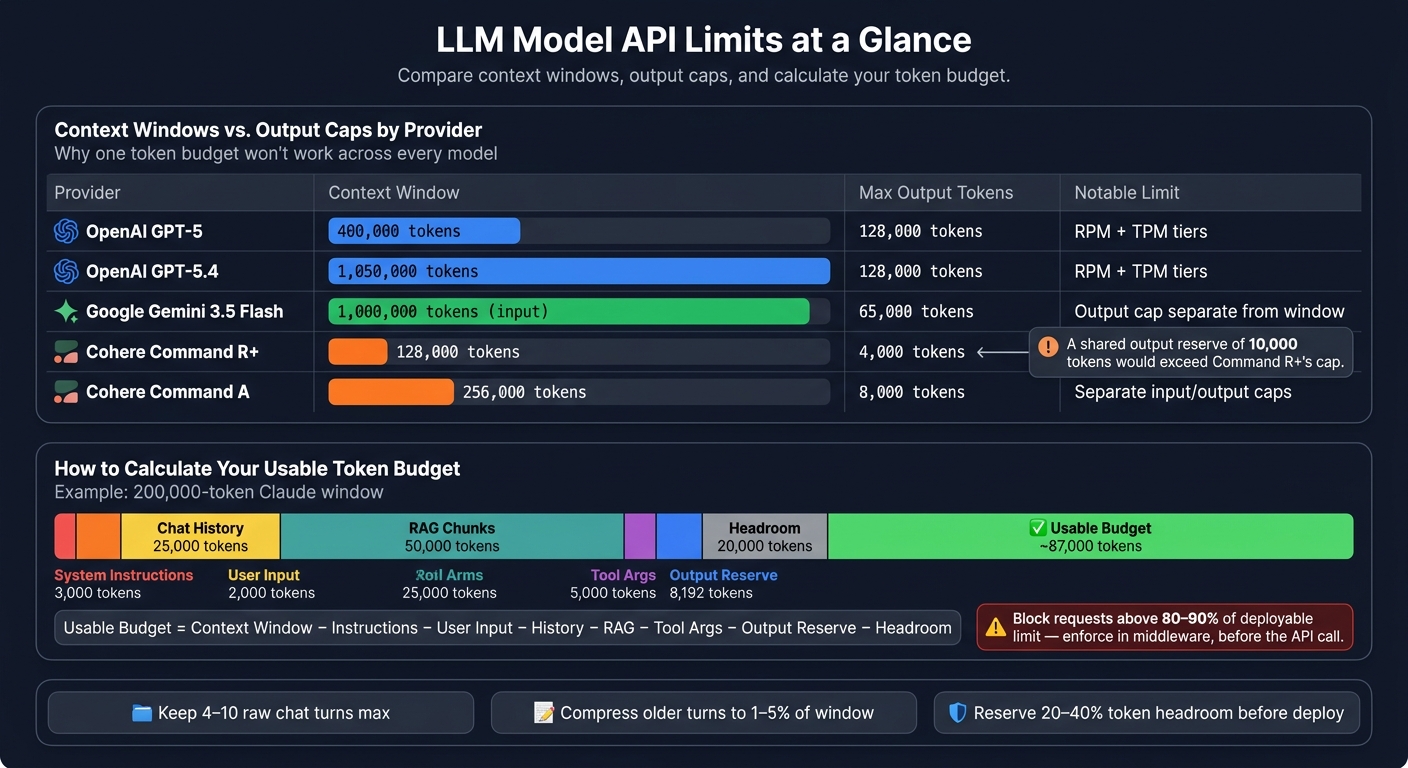
Here’s what that means in practice. On a 200,000-token Claude window, subtract 3,000 for system instructions, 2,000 for the user request, 25,000 for history, 50,000 for RAG chunks, 5,000 for tool args, 8,192 for output reserve, and 20,000 for headroom. That leaves about 87,000 tokens.
One more guardrail matters a lot: reject or auto-prune requests once they go above 80% to 90% of the deployable limit. Do that in middleware before the API call, not after it fails.
How long context changes prompt design
Big windows don’t remove limits. They just push them farther out. GPT-5.4 at 1,050,000 tokens and Gemini 3.5 Flash at 1,000,000 input tokens can make it tempting to stop compressing prompts. That’s usually a mistake.
Think of a large window as capacity, not permission to dump in extra text. Irrelevant tokens still cost money, slow the request, and add noise. There’s also the lost-in-the-middle effect: long-context research shows that evidence buried in the middle of a large prompt can get less weight during reasoning. A better move is to place the most important material in one consecutive block near the start of the prompt.
Long context still needs tight history management. A simple cross-model rule works well:
- Keep only the last 4 to 10 turns as raw text
- Compress older turns into a summary that uses about 1% to 5% of the window
That keeps one prompt design more portable across providers. And when the evidence still won’t fit, split the job into stages: ingest and summarize, then analyze, then generate. It’s slower, yes. But it’s also easier to debug and cheaper at scale.
Comparison table: context windows, output caps, and rate-limit shape
The table below shows why one token budget won’t work across every model. A prompt built around GPT-5.4’s 1,050,000-token window may not fit on smaller models like Cohere Command R+, and a shared output reserve of 10,000 tokens would already exceed Command R+’s 4,000-token cap.
| Model | Context window | Max output tokens | Limit profile |
|---|---|---|---|
| OpenAI GPT-5 | 400,000 | 128,000 | RPM + TPM tiers documented |
| OpenAI GPT-5.4 | 1,050,000 | 128,000 | RPM + TPM tiers documented |
| Google Gemini 3.5 Flash | 1,000,000 (input) | 65,000 | Output cap separate from window |
| Cohere Command R+ | 128,000 | 4,000 | Separate input/output caps |
| Cohere Command A | 256,000 | 8,000 | Separate input/output caps |
For shared prompts, set the budget using the smallest practical input and output envelope across the models you plan to support. After that, the next pressure points are streaming, tool calls, and structured output.
sbb-itb-b6d32c9
3. Streaming, Tool Calls, and Structured Outputs
Streaming rules and partial-response failure modes
Streaming and tool calls add one more compatibility layer. The response can arrive in chunks, and the request schema can change from one provider to another. Streaming changes when you receive output, not how many tokens you get. Providers also stream deltas in different event formats, so clients need different logic to assemble the final response.
The safe rule is simple: buffer first, parse later. Parse only after the terminal event arrives. Never act on partial JSON or half-finished tool arguments. And don't run a tool call until the full argument object is complete. If the stream aborts or times out, treat it as a failed stream unless you can recover a valid object. At that point, retry or fall back to non-streaming. That buffering rule matters even more when streamed content includes tool arguments.
Schema-constrained streaming works the same way. Collect the full payload, then validate it after the stream ends.
Tool calling support and function argument limits
Tool calling is provider-specific. Each API has its own request shape and its own argument dialect. In practice, these formats are often subsets of JSON Schema or OpenAPI, but support varies by provider, and so does runtime behavior when the model emits arguments. That's the annoying part: many failures don't show up during request validation. They show up later, at runtime.
Keep tool schemas small and flat. Large schemas increase validation risk, make tool selection worse once you get past about 32 tools, and can even stop calls from firing at all. The table below shows how those limits differ by provider.
Comparison table: structured output and tool support by provider
JSON mode guarantees valid JSON. Structured outputs go a step further and enforce schema validation. That's why structured output is safer than JSON mode: it checks the shape, not just the syntax. JSON mode can still fail in production, while structured outputs enforce a full JSON Schema at inference time, with failure rates closer to 0.2%. Even then, most providers still need clear prompt instructions telling the model to return JSON. The API parameter alone usually isn't enough.
| Provider | Streaming support | Structured output / JSON handling | Tool calling | Notable limits |
|---|---|---|---|---|
| OpenAI | ✅ Typed SSE events | ✅ JSON mode and schema-constrained structured outputs | ✅ tools + tool_choice |
Up to 5,000 object properties, 10 nesting levels, and 120,000 schema characters |
| Anthropic Claude | ✅ Fine-grained partial_json deltas for tool input |
⚠️ Prompt-driven JSON workflows still need client-side validation | ✅ tools with tool_use content type |
Different tool-choice modes consume different amounts of system-prompt tokens, so available context varies |
| Google Gemini | ✅ Repeated chunks with partial candidates[] payloads |
✅ Schema-constrained responses with a JSON Schema subset | ✅ tools.functionDeclarations |
Up to 128 function declarations per request |
Typed outputs and narrow tool schemas help reduce cross-model breakage. Use tool calling for actions, not for data extraction.
4. Rate Limits, Errors, Versioning, and Deployment Checks
How to handle throttling, validation errors, and unsupported-feature errors
Once format, token, and feature checks pass, the next gate is runtime failure.
Treat 429s as retryable. Treat validation and schema errors as terminal.
Different providers phrase 429s in different ways, but they all point to the same thing: the request hit a quota, token, or spend cap. When Retry-After appears in the response headers, treat it as a minimum wait, not a casual hint, and add a small random delay on top so clients don't all retry at once. If Retry-After is missing, use exponential backoff with jitter and cap the total number of retries.
Shared prompts only stay compatible if you handle runtime failures and rollout controls as one system.
For terminal failures, keep the rule simple: fail fast, log everything, and don't retry. A VALIDATION_ERROR means the request parameters are wrong. An unsupported-feature error means the prompt is using tools, streaming flags, or structured outputs that the model doesn't support. Both should stop a release, not kick off another retry.
Every failed call should log:
- prompt version
- model name and version
- environment
- feature flags
- input and output token counts
- HTTP status
- error subtype
- whether
Retry-Afterwas returned
Those fields make it much easier to tell the difference between a short-lived throttling spike and a deeper compatibility problem.
Once the retry policy is set, the next step is release gating.
Version pinning and pre-deploy compatibility checks
Before you move any shared prompt into production, run this checklist against every target model:
| Check | What to verify |
|---|---|
| API and model version | Explicitly pinned - never set to "latest"; required features confirmed on that version |
| Request shape | The prompt compiles into the correct format for each provider; contract tests pass against staging |
| Token budget | Worst-case tokens stay below per-request and per-minute caps with 20%–40% headroom |
| Schema compatibility | Structured output and tool responses validate against the expected JSON schema on all target models |
| Streaming behavior | Streaming flags are supported; clients handle partial responses, timeouts, and stream interruptions correctly |
| Shadow/canary run | The new prompt/model combination is tested against real traffic before full rollout; automatic rollback is armed if error rates or quality metrics exceed baseline |
The difference between shadow and canary matters.
A shadow deployment compares outputs from the current and candidate prompt on real traffic, but users never see the new version. A canary sends a small share of live traffic to the new version. Move to canary only if shadow results stay in line with baseline. Promote fully only if canary metrics hold up.
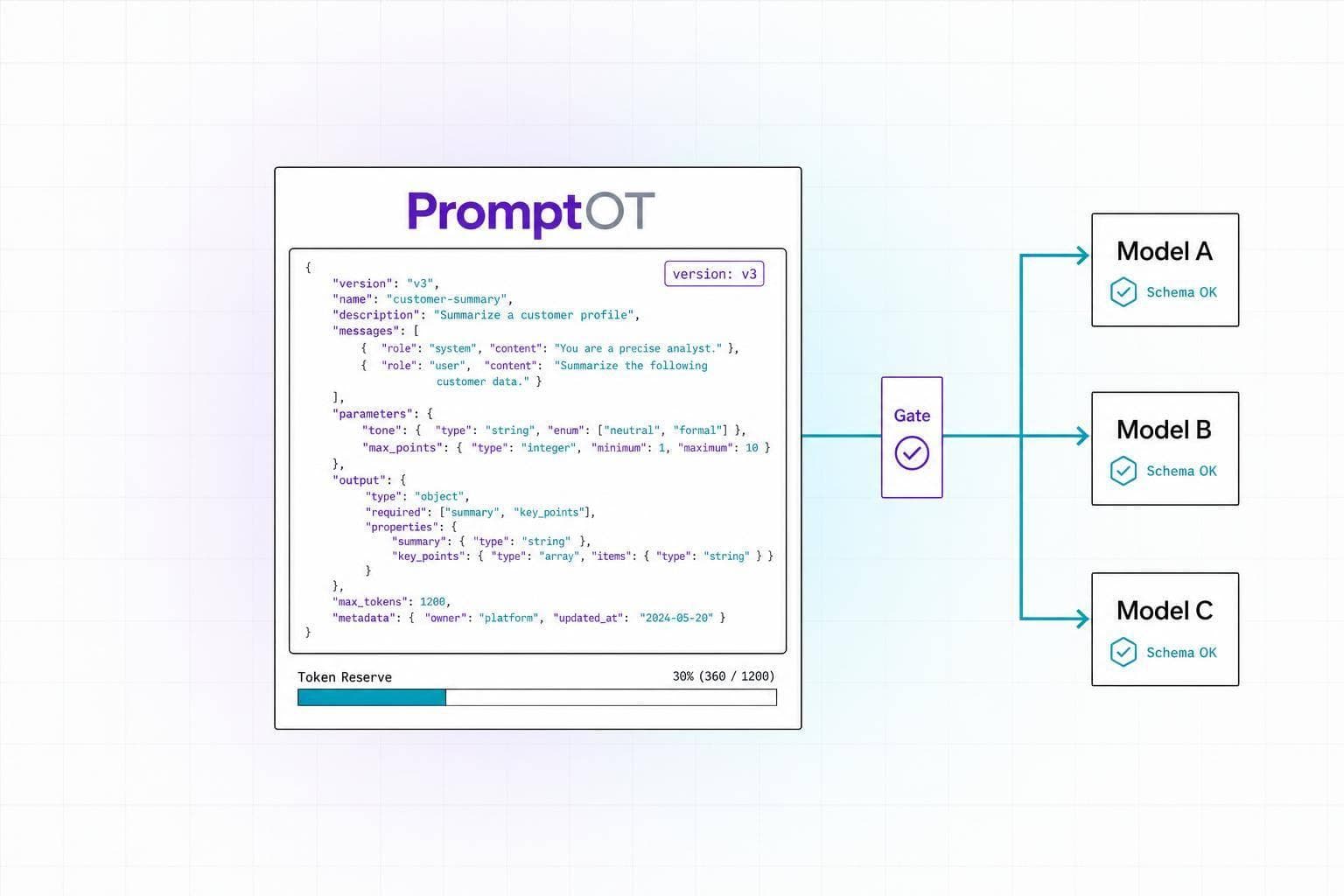
Using PromptOT to manage prompt versions across environments
Version control ties the whole process together.
PromptOT keeps prompt content separate from model settings. Draft and published states, along with environment-scoped API keys, control what each environment can deploy. pk_dev_* keys return the latest draft. pk_live_* keys return only the published version.
If a published prompt breaks, rollback takes a single action. For teams running shared prompts across more than one provider, that mix of version control, environment separation, and rollback helps keep releases under control. Use rollback to recover a broken release fast.
Conclusion: A Practical Compatibility Standard for Shared Prompts
A shared prompt breaks when the place it runs doesn't line up with the target model's API contract. The request format matters. So do token limits, streaming behavior, tool schemas, and deployment settings. A prompt might work on one model and fail on another because of a role mismatch, unsupported structured output, or not enough token room.
In plain English: treat every shared prompt like a versioned execution spec, not just a string pasted into code.
If your team ships across more than one environment, you need prompt execution specs. Ad-hoc prompt strings aren't enough.
The checks in this guide help keep shared prompts stable as models and APIs shift. PromptOT supports that workflow with typed block composition, draft/published version states, environment-scoped API keys, and instant rollback.
That standard should live in the deployment gate, not in the prompt draft. Make it a release rule: no shared prompt ships until it passes every declared model and environment.
FAQs
How do I make one prompt work across multiple models?
Use a model-agnostic approach. Keep the core prompt the same, and split it from model-specific settings.
Tools like PromptOT can help you organize prompts into typed blocks. Then you handle provider formatting, API settings, and routing at the deployment or gateway layer.
Write prompts in plain, clear language. Skip provider-specific features when you can, and test prompts across the models you plan to use so you can spot differences early.
What’s the safest way to calculate token headroom?
Track token counts at the p95 and p99 for each variable so you can spot spikes before they turn into failures.
This matters more than it might seem at first glance. Dynamic inputs like RAG context or tool outputs can swell prompts out of nowhere. One normal request is fine, then the next one blows past your budget because a runtime field came in much larger than expected.
To keep that under control, enforce strict character or token caps on every runtime variable before interpolation.
It also helps to put guardrails around retrieved context itself. Apply max-length rules and summarize retrieved content when needed, so the prompt stays within bounds without dragging in more text than the model can handle.
On top of that, monitor token usage at the gateway layer. That gives you one place to watch usage against provider limits and to block or throttle requests that go over.
When should a failed API call block deployment?
Block deployment when quality metrics drop below the set threshold. In most cases, that means 90% accuracy on a golden dataset with 50 to 200 test cases.
Promotion should also stop if staging shows regressions, unresolved placeholders, or schema errors. If required variables are missing, the system should fail at runtime. And if live metrics drop in a meaningful way, roll back at once to a known-good version.